
Reference Data, One to One
Esta página aún no está disponible en tu idioma.
Module 2 in the chapter From the Lake to the Model, chapter 8 of the Data 360 Architect course. Each module stands on its own. Previous: What the Model Is · Next: People Data, Into the Standard Model
The question this module answers: How does reference data get into the model, and when is a custom data model object the right home?
Not everything you bring into Data 360 is about a person. Airports, runways, a product catalog, a list of stores: this is reference data. It describes the things your people and their activity touch. It still has to reach the model before anything can use it, but it takes a simpler path.
Airports and runways, all the way through
Section titled “Airports and runways, all the way through”In my org, I brought in two files from an open-source airport data set: the airports and the runways. They came in through Amazon S3, as other data, because they’re not about a person’s profile and they’re not engagement, which is activity. When the first loads finished in my org, back in 2023, there were about 76,000 airports with 45,000 runways in the lake. The data set has grown since: the copy for this course, SkyData’s OurAirports v1.0 (opens in a new tab) of 2026-11-09, has 86,350 airports and 48,412 runways, and those are the numbers you’ll see if you load it.
Then the mapping. If you have a brand new object, there’s a really easy way to do it. From the lake object, start the data mapping and, instead of picking an existing data model object, create a new custom object. Data 360 offers every field from the lake object and makes assumptions on the data types. Choose all the fields, give it a quick double check, make sure the primary key is text, and save.
What you get is one to one: every field in the lake object maps to the same field in the new data model object. These are exact representations. Since we’re bringing them in as reference data, we didn’t need to map them to the standard data model objects; we created target objects for them. Do the same for the runways, and both are in the model, ready to use. You can check them in Data Explorer: the lake object and the model object show the same rows.
Two paths: through an enriched layer, or straight from the lake
Section titled “Two paths: through an enriched layer, or straight from the lake”In my 2023 org, both files went straight from their lake objects to the model. That still works, and it’s the simplest path. But chapter 7 added a choice: an enriched lake object between the raw data and the model, written by a transform. So in this course the two reference objects take the two paths, side by side, to show that the layer is a pattern, not a rule.
- Airports go through the enriched layer. The Airport model object is created from Airport Enriched (chapter 7, module 3): every airport already carries its region, its country and its category, joined and derived once. And it’s a Profile object, so airports can be segmented (chapter 6). That’s where the extra layer earns its cost.
- Runways go straight from the lake. The Runway model object is created from the runways’ own lake object, one to one, as other data. Nothing needs joining or deriving, so a layer would only add a transform to run and to pay for.
The relationship between them still works, because both sides use OurAirports’ permanent ids: a runway’s airport_ref is the airport’s id, which is Airport Enriched’s key too.
So ask, source by source: does this data need joining, deriving or cleaning before the model reads it, and will that work be reused? Yes: an enriched layer. No: map it straight. Both are right designs.
Name it for what it is
Section titled “Name it for what it is”When I created the airports stream, I put “Amazon S3” in the object’s name, to show where it came from. That’s useful on the lake object, which is the source’s own representation. But the model is the abstracted layer: the airport object should be called Airport, wherever the airports come from. If a second source of airports arrives next year, it maps to the same object.
So name the model object for what it is, not for its source, and do it when you create it. Chapter 3’s rule holds here too: you get one chance at a clean name. Salesforce adds that an object’s API name “must be unique across standard and custom DMOs.”
Types: decided at the lake, checked at the model
Section titled “Types: decided at the lake, checked at the model”A field can only map to a field of a compatible type. Salesforce’s table is short: a date maps to a date, a number to a number or text, text to text, email, phone or URL. And the rule from chapter 3 again: “After a DLO or DMO is created, you can’t change the data type of any fields.”
The fields to look at twice are the keys. When I brought in the runways, the field pointing to the airport came in as a number. It’s actually the airport’s key in a numeric form, so I changed it to text, for proper linkages when I create relationships. Keys and foreign keys come in as text, even when they look like numbers.
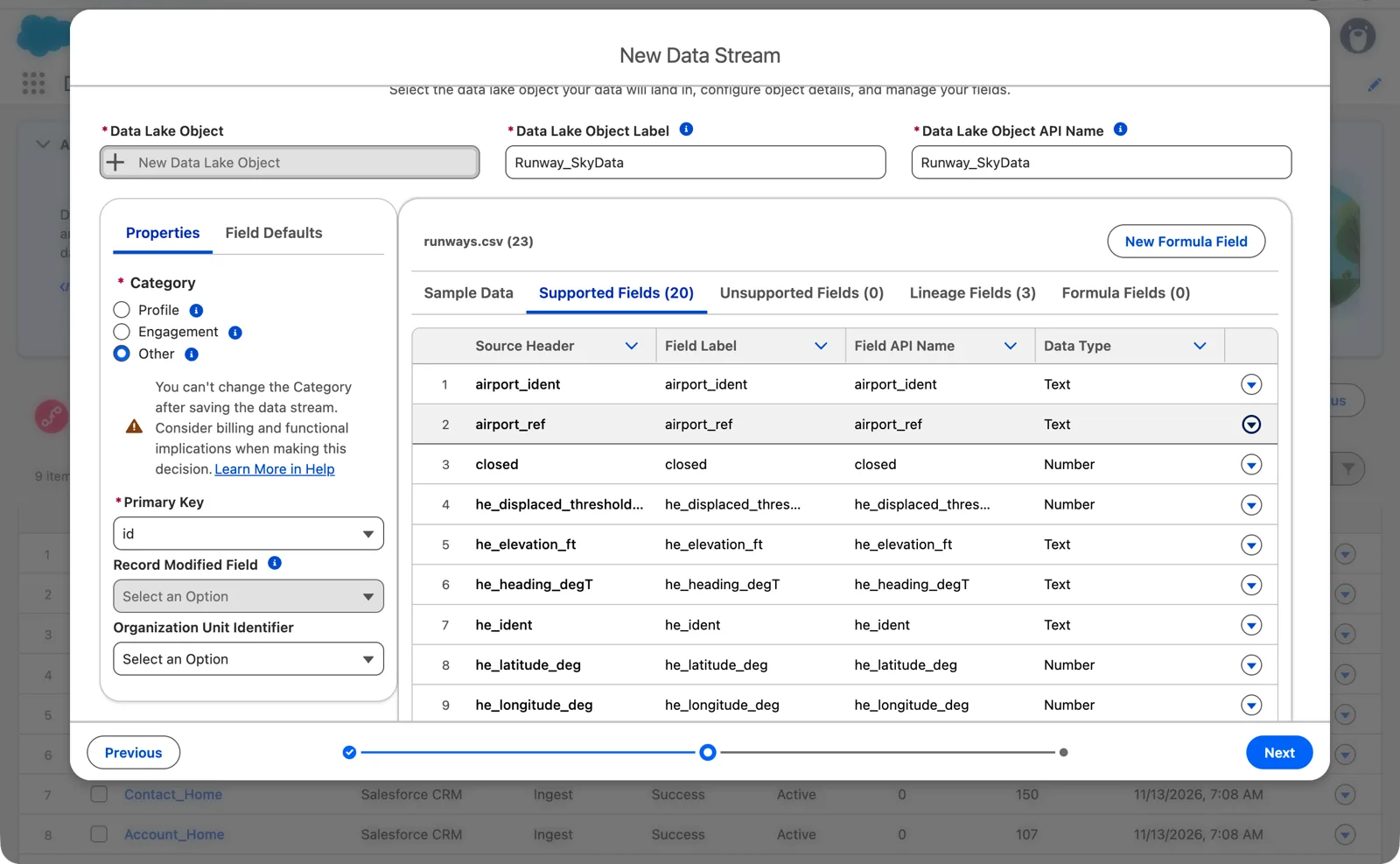
The runways again, in my practice org: airport_ref was detected as a number, and I set it to Text before saving (Salesforce Data 360 in a Developer Edition org, screenshot, November 2026). Full size
Value suggestions
Section titled “Value suggestions”When you create the object, you can turn on value suggestions for some fields. I turned them on for a couple, like the airport type and the municipality. Value suggestions give people building a segment a list of the values in the data to pick from, instead of typing them. Salesforce’s rules:
- Only for Text fields, and “up to 500 attributes for your entire org.”
- “It can take up to 24 hours for suggested values to appear.”
- For an object in the other category, suggestions work only when it’s reached from the segment through a one-to-one or many-to-one relationship.
Turn them on for the fields people will filter on, not for every field.
Relationships: how reference data connects
Section titled “Relationships: how reference data connects”A runway belongs to an airport. In the model, that’s a relationship between the two data model objects, from the runway’s airport key to the airport’s key. Salesforce’s rules for relationships:
- Cardinality is a decision you make once. Many runways to one airport is many-to-one. “You can’t change the cardinality after the relationship is created.”
- Standard relationships come with the standard model. One is “inactive until the related object fields are mapped,” and active once both fields have a mapping.
- Custom relationships are yours to create, on the object’s Relationships tab, and each object has a limit on how many can be active.
- A relationship in use can’t be switched off. “You can’t deactivate relationships that are being used in calculated insights, segmentation, or activation.”
Relationships are how reference data becomes useful. A flight points to its arrival airport; the airport has its runways and its region. Segments and insights follow those paths (chapters 10 and 11).
When a custom object is the right home
Section titled “When a custom object is the right home”One to one into a custom object is right when:
- the data is reference data, not people or the activities you’ll unify and segment on;
- there’s no standard object that means the same thing;
- you want it in the model in the same shape it arrived.
It’s the wrong choice for people. A pilot isn’t reference data. If you put pilots in a custom object, identity resolution can’t unify them, because it works on the standard Individual and its contact points. And if a standard object already means what your data means, such as a product, use it. For people, that’s module 3.
Watch it on video
Section titled “Watch it on video”In 2023 I filmed the airports and runways going all the way through, stream to lake to a new custom data model object, one to one. The note under the video says what’s still right and what’s changed since.
What an architect decides here
Section titled “What an architect decides here”- Which sources are reference data, and which go into the standard model.
- For each one, whether the model reads an enriched layer or the raw lake object.
- The name of each custom object, for what it is, decided once.
- The relationships between the objects, and the cardinality of each.
- Which text fields get value suggestions.
Explore
Section titled “Explore”All checked 2026-11-14.
- Create a Custom Data Model Object (opens in a new tab), Salesforce Help.
- Data Types in Field Mappings (opens in a new tab), Salesforce Help.
- Data Model Object Relationships (opens in a new tab), Salesforce Help.
- SkyData: OurAirports (opens in a new tab), the library page for the airport data.