
External Org-Wide Defaults
هذا المحتوى غير متوفر بلغتك بعد.
Module 4 of 8 in the chapter External Users: Sites, Communities, Licenses and Roles, chapter 14 of Securing Salesforce: Sharing and Visibility. Each module stands on its own.
The question this module answers: Every object has a separate default for outside users. What does that one setting mean when your outside users work for hundreds of different companies, and how should you set it?
When I review the sharing settings with a class, I say it plainly: check all your external sharing, and keep it all Private. Chapter 6 showed that every object has two defaults, one for your own people and one for people from outside, and that the outside one can never be more open than the inside one. This module is about the outside one, and why it’s almost always Private.
One setting for every outside company
Section titled “One setting for every outside company”Here’s the thing to see first. Your own employees all work for one company. Your outside users don’t. One is a customer, one is a partner, one is a customer of that partner, and some of them compete with each other.
The external default doesn’t know any of that. It’s one setting for all of them at once. Set accounts to Public Read Only for external users, and every partner user can read every account in your org: their own customers, other partners’ customers, and the accounts of their competitors.
So Salesforce’s advice is the same as mine: “we recommend that you set your external organization-wide defaults to Private unless otherwise required by your business needs” (Set Your External Organization-Wide Sharing Defaults (opens in a new tab), Salesforce Help, checked 2026-11-26). Then you open records back up for each company on purpose, which is the rest of this chapter.
Who counts as outside, and which objects have the setting
Section titled “Who counts as outside, and which objects have the setting”The external default applies to “external authenticated users”: people who log in from outside. Salesforce’s list includes Experience Cloud site users, Customer Community users, high-volume site users, partner users, authenticated website users, Customer Portal and Service Cloud Portal users, and Chatter external users, who reach only the User object (External Organization-Wide Defaults Overview (opens in a new tab), Salesforce Help, checked 2026-11-26).
Guests aren’t on the list. “Guest users aren’t considered external users.” Their default is always Private and can’t be changed (same page); module 2 covers the guest.
You can set an external default on accounts, assets, cases, campaigns, contacts, individuals, leads, opportunities, orders, users and custom objects, and “your org might have other objects” (same page). For an object without one, Salesforce’s workaround is to set the object to Private and “create a sharing rule to share records with all internal users.” Your people get their access back through the rule, and outside users stay at Private.
Is it on, and what is it set to?
Section titled “Is it on, and what is it set to?”You don’t turn external defaults on any more. They’re “automatically enabled in all orgs created in Spring ‘20 or after and in all orgs where Salesforce Experiences or portals are enabled,” and once on, “the External Sharing Model can’t be disabled” (Set Your External Organization-Wide Sharing Defaults).
What they’re set to depends on how old the org is (same page):
- Orgs created after Spring ‘20: “the default external access level is set to Private for all objects.”
- Orgs created before Spring ‘20: the external default was copied from the internal one. If contacts were Private, both are Private. If accounts were Public Read/Write, the external default started at Public Read/Write too.
That second line is the one to check. If you work in an older org, especially one that added a site or portal years after it was built, open the Sharing Settings page and read the Default External Access column object by object. Anything open there is open to every outside company, and nobody may have looked at it since the day it was copied. The exceptions are the User object and newly created custom objects, which start at Private.
Here’s the page you check. Read the two columns side by side:
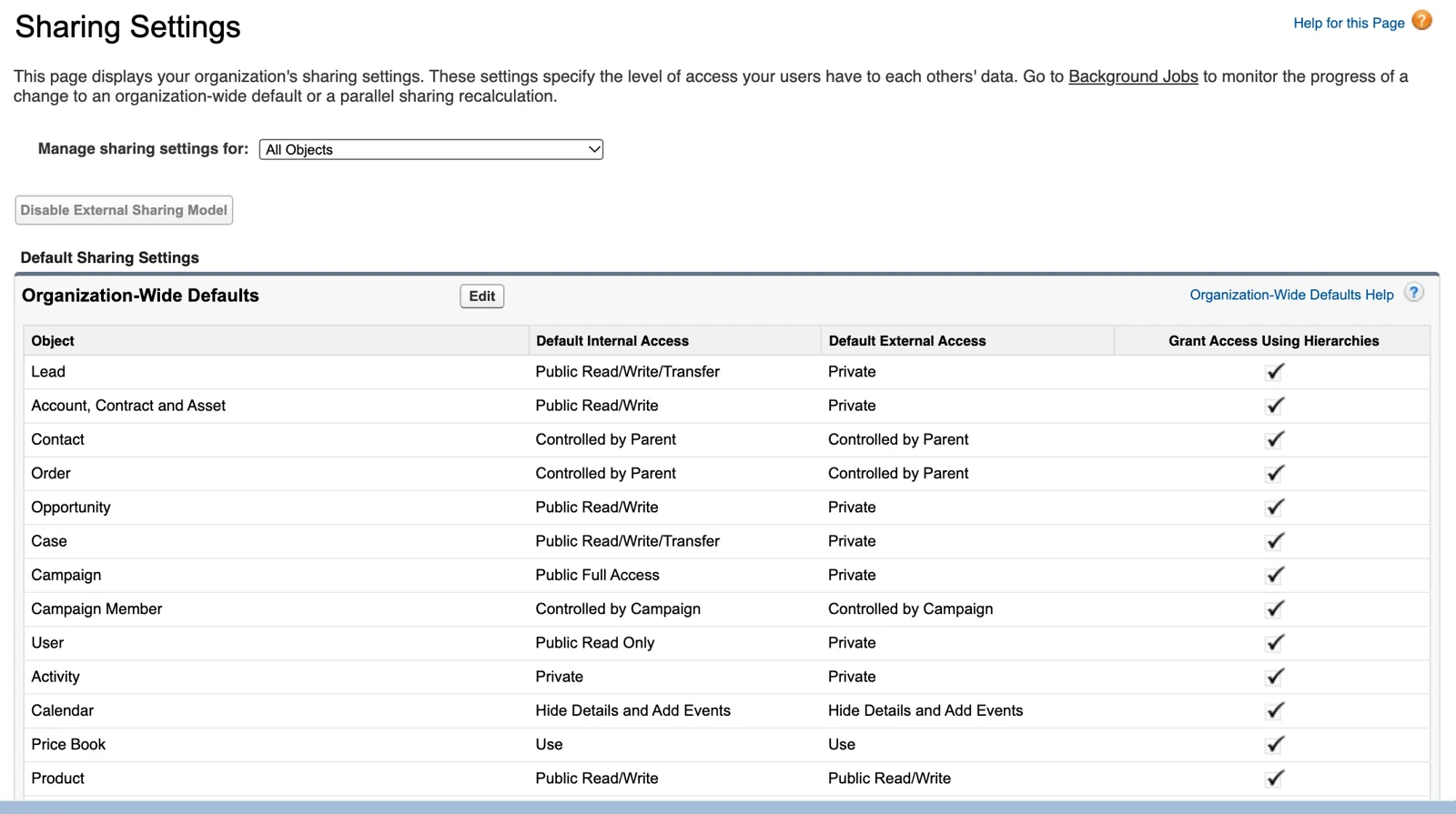
Open to your own people and Private to every outside company, on the same row (Salesforce, Setup in a Partner Developer Edition org, screenshot, November 2026). Full size
The report rule that surprises people
Section titled “The report rule that surprises people”This one catches teams who buy Customer Community Plus for the reports. Salesforce: outside users see an object in a report only when its external default is Private: “If an object’s external organization-wide default can’t be set to Private, then an external user can’t view the object in a report” (same page).
So an external default left at Public Read Only doesn’t only show too much. It also takes the object out of your outside users’ reports. Private is the setting that makes reports work.
And when the object is the detail side of a master-detail relationship: “The default internal and external access must match if either one is set to Controlled by Parent.” Chapter 6 module 6 covers Controlled by Parent.
Opening it back up, user by user
Section titled “Opening it back up, user by user”With the external default at Private, outside users start with their own records, and you open the rest with tools chosen for the kind of outside user (module 1 has the three kinds):
- Guests: guest user sharing rules, Read Only (chapter 7 module 3).
- High-volume users, with no role: sharing sets, and share groups for their own records (chapter 15), plus the site user implicit sharing in chapter 10 module 5.
- Users with roles, on Customer Community Plus and Partner Community: their external roles under the account’s owner (module 5), super users (module 6), external account hierarchies (module 7), and sharing rules and groups.
When a sharing rule or group targets outside users, Salesforce gives you outside member types (Group Member Types (opens in a new tab), Salesforce Help, checked 2026-11-26):
- Customer Portal Users and Partner Users: all of them, across every company.
- Portal Roles and Portal Roles and Subordinates: the roles at one account, whose names include the account’s name. These leave out high-volume users.
Read the first two carefully. “All of your partner users” in a sharing rule is the same mistake as a Public Read Only external default, written as a rule: every partner company gets the records. Most designs want the per-account roles instead. And watch Roles, Internal and Portal Subordinates, which takes in site users below a role; chapter 7 module 1 covers the older orgs where groups were converted to it.
Changing it on a live site
Section titled “Changing it on a live site”Changing a default is a recalculation, and on a live site it changes what people can see while they’re using it. Salesforce: “You can monitor the progress of your organization-wide default updates on the Background Jobs page or view recent sharing operations on the View Setup Audit Trail page” (Set Your External Organization-Wide Sharing Defaults).
Tightening an external default to Private takes away every bit of access that came only from the default. Before you do it, list what your outside users need, build the sharing that gives it to them, and test as each kind of outside user, as chapter 13 teaches. Then lower the default. It’s easier to open up later than to lock down later, and when you do lock down, have the doors ready first.
Test knowledge. Know that the external default applies to every external authenticated user across every account, that guests aren’t external users, and that Salesforce recommends Private. Know that orgs created since Spring ‘20 start every external default at Private, that the setting can’t be disabled once on, and that an object’s external default must be Private for external users to see it in reports. A likely area, not a known question.
What an architect decides here
Section titled “What an architect decides here”- For each object with an external default, Private unless a requirement says otherwise, and which requirement.
- For each object without one, whether to use Private plus a sharing rule to all internal users.
- In an older org, an audit of the Default External Access column, object by object.
- Which objects outside users need in reports, knowing those must be Private externally.
- For each kind of outside user, which tools open records back up, and never “all partner users” where one account’s roles will do.
- When an external default is tightened on a live site, the sharing built and tested first.
Beyond the exam: what AI changes. An agent that serves logged-in customers or partners runs as that site user, so it gets the external default. If an object is open externally, the agent can find and summarize every outside company’s records for whoever asks, and it’s quicker at it than any page. Before an agent goes on a site, read the Default External Access column the way the agent will: every object it can query, for every outside user at once. Chapter 20 covers agents.
Explore
Section titled “Explore”- External Organization-Wide Defaults Overview (opens in a new tab), Salesforce Help (checked 2026-11-26)
- Set Your External Organization-Wide Sharing Defaults (opens in a new tab), Salesforce Help (checked 2026-11-26)
- Group Member Types (opens in a new tab), Salesforce Help (checked 2026-11-26)