
Experience Cloud Licenses
Tento obsah zatím není dostupný ve vašem jazyce.
When somebody says “we’re building a customer portal,” my next question isn’t which template. It’s: who are the customers, how many, how often do they come, what data do they need, and what are they allowed to do with it? The license answers half of those for you. Licenses are part of the data model. Pick the wrong one and a design that looked fine on the whiteboard can’t be built.
Salesforce publishes the facts in one big grid (Experience Cloud User Licenses (opens in a new tab), Salesforce Help, checked 2026-11-01). It’s complete, and it’s alphabetical: the rows that change your design sit between rows that are the same for everyone. This page is the same facts, cut three ways:
- The stadium: the five licenses as seats, and what each seat adds over the one behind it.
- The architect’s questions: only the rows where the licenses differ, grouped by the decision they drive.
- The full grid, at the bottom, for when you need to look one thing up.
This page is about people outside the company: customers and partners logging in to an Experience Cloud site. Licenses for your own people (Sales, Service, Platform and the rest) have their own page, Internal User Licenses.
The Stadium
Section titled “The Stadium”I think of licenses as seats in a stadium. Everybody’s watching the same game. If I buy the expensive seats in the middle, I can see both teams up close. If I’m up in the corner in the bleachers, the seats aren’t cushioned and I’m watching through binoculars.
The game is your company’s data. The closer the seat is to the field, the more of that data the user can reach, and the more of the platform’s sharing they take part in. Here are the five seats, from the back row forward. Each one lists only what it adds.
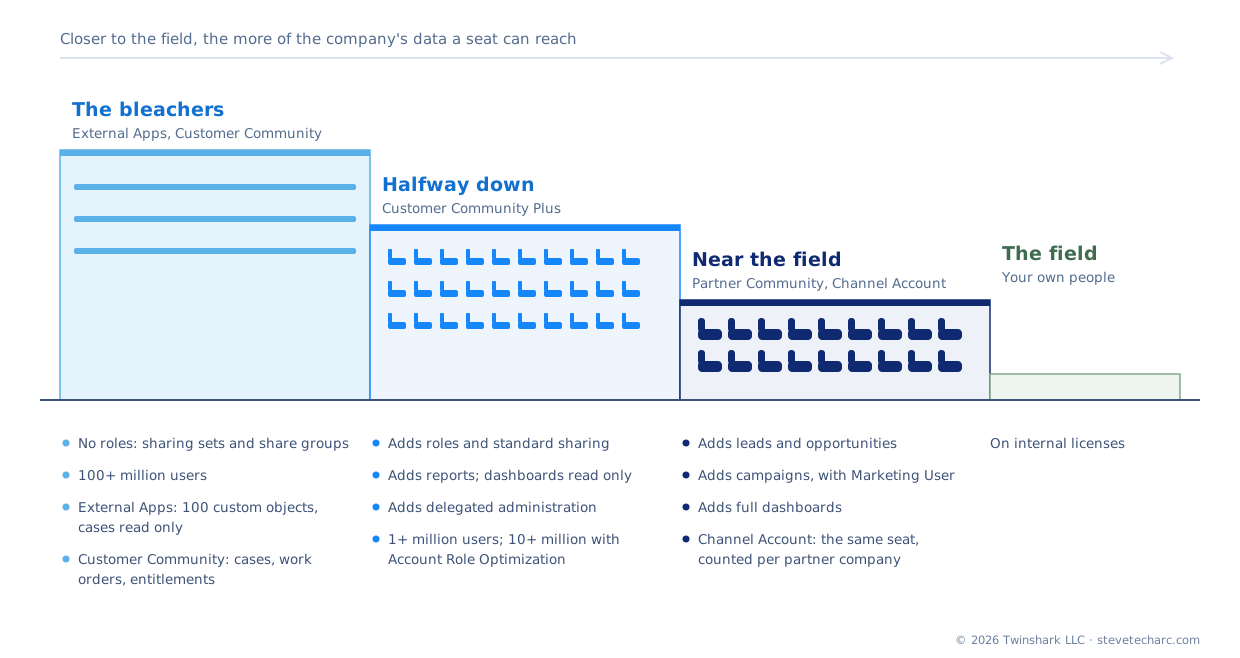
The same three seats, side by side:
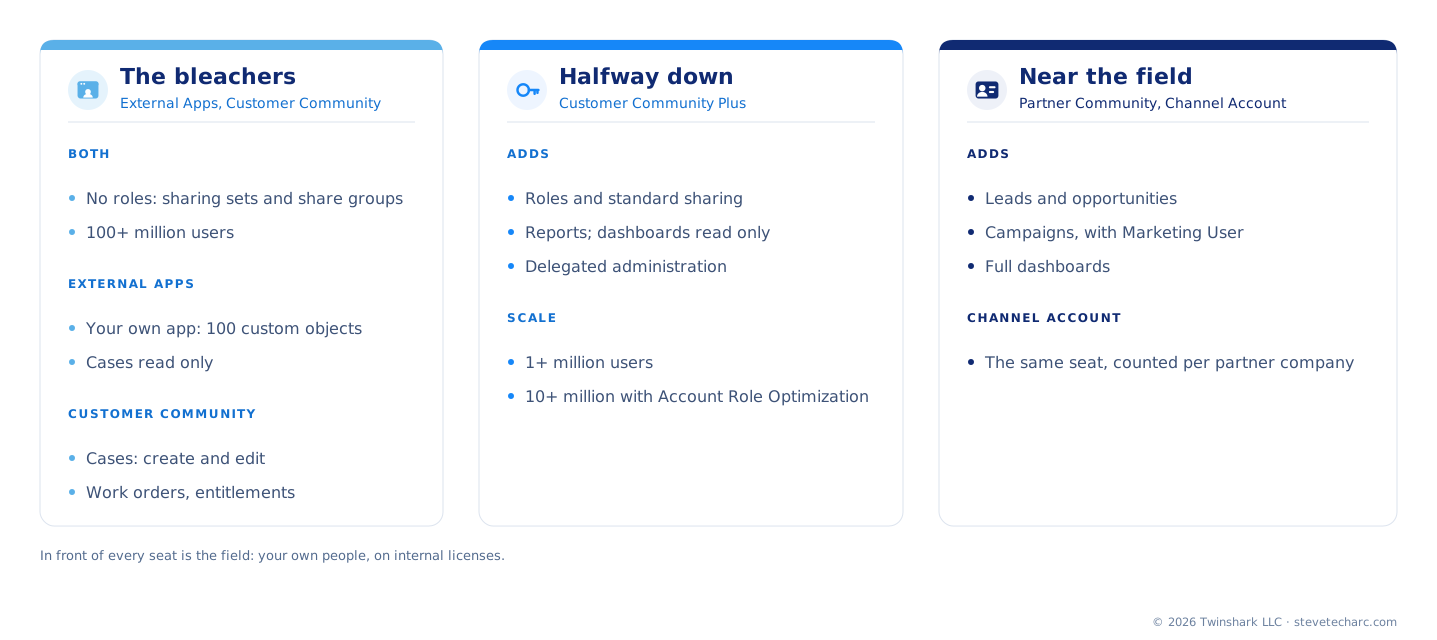
External Apps: the bleachers, for your own app. Salesforce built it for “custom digital experiences to engage any external stakeholder,” with “limited access to CRM objects.” It’s the seat for your own app more than for CRM:
- 100 custom objects per license. Every other seat here has 10.
- Cases are read only. No work orders, entitlements or service appointments.
- No roles. These are high-volume users: their records are shared through sharing sets and share groups, not the role hierarchy.
- Built for the biggest crowds: 100+ million users per org.
Customer Community: the bleachers, for service. For “large numbers of external users who need access to case objects or knowledge”: a customer checking on their support case. Over External Apps it adds:
- Cases they can create and edit, plus work orders, work order line items, entitlements, return orders and service appointments.
- Still no roles, no reports, 10 custom objects, and 0 API calls a day.
- Still a high-volume user, still 100+ million users per org.
Customer Community Plus: halfway down. For external users “who need access to reports and dashboards and need standard sharing”: a customer who manages other people’s access, or needs to see their numbers. It adds:
- Roles and standard sharing. The role hierarchy and sharing rules now reach these users. This is the biggest step in the stadium.
- Reports, create and manage. Dashboards are read only, and there are no report subscriptions.
- Delegated administration, sending email, and territories.
- The crowd gets smaller: 1+ million users per org, 10+ million with Account Role Optimization.
Partner Community: near the field. For “business-to-business experiences that need access to sales data.” Partners register deals and run campaigns with you. It adds:
- Leads and opportunities, and campaigns with the Marketing User feature license. It’s the external seat that reaches the sales objects.
- Full dashboards, lead and opportunity scoring, and market development funds.
- One catch: it “can’t be used with person accounts.”
Channel Account: the same seat, counted differently. The Partner Community seat, for sites “that calculate their usage based on the number of partners instead of the number of individual users.” You count partner companies, not people. One difference to know: Channel Account users “can’t see emails in the case feed.”
The field: your own people. In front of every external seat are your internal users, on the full Salesforce license and its relatives. That’s the next page, Internal User Licenses.
Test knowledge. Which seat first gets roles and standard sharing, and which first gets leads and opportunities? Customer Community Plus, and Partner Community. If you remember those two steps, you can rebuild most of the grid.
The Questions an Architect Asks
Section titled “The Questions an Architect Asks”Only the rows where the licenses differ, grouped by the decision. Everything here is from Salesforce Help, Experience Cloud User Licenses (opens in a new tab) and About High-Volume Community or Site Users (opens in a new tab), both checked 2026-11-01.
How to read the grids. Full everything the row offers Part some of it Read only No Not stated Salesforce’s table says nothing either way. The words always say exactly what’s included; the colour and the symbol only help you see the pattern.
Who Is It For, and How Many?
Section titled “Who Is It For, and How Many?”| External Apps | Customer Community | Customer Community Plus | Partner Community | Channel Account | |
|---|---|---|---|---|---|
| Built for | Any external stakeholder, on your own app | Large numbers of customers needing cases or knowledge | Customers needing reports and standard sharing | Partners working sales data | Partners, counted per partner company |
| Users per org | 100+ million | 100+ million | 1+ million (10+ million with Account Role Optimization) | 1+ million (10+ million with Account Role Optimization) | 1+ million (10+ million with Account Role Optimization) |
| Person accounts | Yes | Yes | Yes | Can’t be used | Not stated |
How Does Sharing Reach Them?
Section titled “How Does Sharing Reach Them?”This is the row that decides the most. A high-volume user has no role. Salesforce’s words: they “don’t have roles, which eliminates performance issues associated with role hierarchy calculations.” That’s why those seats scale to 100+ million. It’s also why their access has to come another way.
| External Apps | Customer Community | Customer Community Plus | Partner Community | Channel Account | |
|---|---|---|---|---|---|
| Roles and standard sharing | No | No | Yes | Yes | Yes |
| High-volume user: no role; access through sharing sets and share groups | Yes | Yes | No | No | No |
| Sharing sets | Yes | Yes | Yes | Yes | Yes |
| Delegated administration | No | No | Yes | Yes | Yes |
High-volume users also can’t be in personal or public groups, owner-based sharing rules, or account, opportunity or case teams, and nobody can manually share their records. They can’t own accounts.
Which Data Can They Reach?
Section titled “Which Data Can They Reach?”| External Apps | Customer Community | Customer Community Plus | Partner Community | Channel Account | |
|---|---|---|---|---|---|
| Leads, opportunities | No | No | No | Read, create, edit | Read, create, edit |
| Campaigns (with Marketing User) | No | No | No | Read, create, edit | Read, create, edit |
| Cases | Read | Read, create, edit | Read, create, edit | Read, create, edit | Read, create, edit |
| Work orders, entitlements, service appointments | No | Read, create, edit | Read, create, edit | Read, create, edit | Read, create, edit |
| Events and calendar | No | Read | Read, create, edit, delete | Read, create, edit, delete | Read, create, edit, delete |
| Tasks | Read only | Read, create, edit, delete | Read, create, edit, delete | Read, create, edit, delete | Read, create, edit, delete |
| Accounts | Read, edit | Read, edit | Read, create, edit | Read, create, edit | Read, create, edit |
One case detail to know: “Customer Community Plus users can’t change the account or contact on a case they own.” The owner has to be an internal or Partner Community user to make that change.
Reports and Dashboards
Section titled “Reports and Dashboards”| External Apps | Customer Community | Customer Community Plus | Partner Community | Channel Account | |
|---|---|---|---|---|---|
| Reports | No | No | Create and manage | Create and manage | Create and manage |
| Dashboards | No | No | Read only | Yes | Yes |
| Report subscriptions | No | No | Not included | Not stated | Not stated |
And a trap that catches people: “Sharing sets aren’t supported by reports and dashboards.” A user who sees records through a sharing set won’t see them in a report the same way. Salesforce’s suggestion is permission sets alongside the sharing sets.
Limits That Bite
Section titled “Limits That Bite”| External Apps | Customer Community | Customer Community Plus | Partner Community | Channel Account | |
|---|---|---|---|---|---|
| Custom objects per license | 100 | 10 | 10 | 10 (100 through the External Apps SKU) | 10 |
| API calls a day, per member user | 200 | 0 | 200 | 200 (1,000 through the External Apps SKU) | 200 |
| Extra data storage, per member user | 10 MB | None listed | 2 MB | 5 MB (45 MB through the External Apps SKU) | 5 MB |
The custom-object count leaves out objects in managed packages, “as long as they’re made publicly available on AppExchange.”
The Same on Every Seat
Section titled “The Same on Every Seat”Some rows don’t decide anything, because every seat has them: contacts, assets, orders and quotes (read, create, edit, and delete for orders and quotes), external objects through Salesforce Connect, list views, Knowledge, Chatter, ideas, account contact relationships, recognition badges, and the Salesforce mobile app. Documents, price books and products are read only on every seat.
Member or Login?
Section titled “Member or Login?”Every seat comes in two shapes. Member-based: you pay per user, which suits 500 partners who log in every day. Login-based: you buy a number of logins per month, which suits five million customers who log in a few times a year. Logging in more than once on the same day still counts as one login.
The two shapes aren’t always the same seat. Look at the API calls: a Customer Community Plus member user brings 200 calls a day to the org, a login user brings 10. When the numbers matter, check the login column too.
The Full Grid
Section titled “The Full Grid”Every row, for lookup (Salesforce Help, Experience Cloud User Licenses, checked 2026-11-01)
| Row | External Apps | Customer Community | Customer Community Plus | Partner Community | Channel Account |
|---|---|---|---|---|---|
| Account contact relationships | Yes | Yes | Yes | Yes | Yes |
| Accounts | Read, edit | Read, edit | Read, create, edit | Read, create, edit | Read, create, edit |
| Assets | Read, create, edit | Read, create, edit | Read, create, edit | Read, create, edit | Read, create, edit |
| Campaigns | No | No | No | Read, create, edit (with Marketing User) | Read, create, edit (with Marketing User) |
| Cases | Read | Read, create, edit | Read, create, edit | Read, create, edit | Read, create, edit |
| Contacts | Read, create, edit | Read, create, edit | Read, create, edit | Read, create, edit | Read, create, edit |
| Contracts | Read, create, edit | Read, create, edit, delete | Read, create, edit, delete | Read, create, edit, delete | Read, create, edit, delete |
| Dashboards | No | No | Read only | Yes | Yes |
| Documents | Read only | Read only | Read only | Read only | Read only |
| Entitlements | No | Read, create, edit | Read, create, edit | Read, create, edit | Read, create, edit |
| External objects (Salesforce Connect) | Read, create, edit | Read, create, edit | Read, create, edit | Read, create, edit | Read, create, edit |
| Events and calendar | No | Read | Read, create, edit, delete | Read, create, edit, delete | Read, create, edit, delete |
| Ideas | Read, create, edit | Read, create | Read, create | Read, create | Read, create |
| Leads | No | No | No | Read, create, edit | Read, create, edit |
| List views | Read, create, edit | Read, create, edit | Read, create, edit | Read, create, edit | Read, create, edit |
| Notes and attachments | No | Exceptions apply | Yes | Yes | Yes |
| Opportunities | No | No | No | Read, create, edit | Read, create, edit |
| Orders | Read, create, edit, delete | Read, create, edit, delete | Read, create, edit, delete | Read, create, edit, delete | Read, create, edit, delete |
| Price books | Read only | Read only | Read only | Read only | Read only |
| Products | Read only | Read only | Read only | Read only | Read only |
| Quotes | Read, create, edit, delete | Read, create, edit, delete | Read, create, edit, delete | Read, create, edit, delete | Read, create, edit, delete |
| Reports | No | No | Create and manage | Create and manage | Create and manage |
| Return orders | No | Read, create, edit | Read, create, edit | Read, create, edit | Read, create, edit |
| Salesforce CMS | No | Yes | Yes | Yes | Yes |
| Service appointments | No | Read, create, edit | Read, create, edit | Read, create, edit | Read, create, edit |
| Tasks | Read only | Read, create, edit, delete | Read, create, edit, delete | Read, create, edit, delete | Read, create, edit, delete |
| Work orders | No | Read, create, edit | Read, create, edit | Read, create, edit | Read, create, edit |
| Work order line items | No | Read, create, edit | Read, create, edit | Read, create, edit | Read, create, edit |
| Chatter | Yes | Yes | Yes | Yes | Yes |
| Custom objects | 100 per license | 10 per license | 10 per license | 10 (100 through the External Apps SKU) | 10 per license |
| Delegated administration | No | No | Yes | Yes | Yes |
| Einstein lead and opportunity scoring | No | No | No | Yes | Yes |
| Einstein sales emails | No | No | No | Yes | Yes |
| Enhanced list views for sales objects | No | No | No | Yes | Yes |
| Files | Yes (no content libraries) | Yes (no content libraries) | Create, read, edit, delete | Create, read, edit, delete | Create, read, edit, delete |
| Knowledge | Yes | Yes | Yes | Yes | Yes |
| Market development funds | No | No | No | Yes | Yes |
| Recognition badges | Yes | Yes | Yes | Yes | Yes |
| Roles and standard sharing | No | No | Yes | Yes | Yes |
| Salesforce mobile app | Yes | Yes | Yes | Yes | Yes |
| Send email | No | No | Yes | Yes | Yes |
| Sharing sets | Yes | Yes | Yes | Yes | Yes |
| Territory management | No | No | Yes | Yes | Yes |
| Workflow approvals | No | Yes (see below) | Yes | Yes | Yes |
Workflow approvals on Customer Community: users “can submit for approval and can be assigned as the approver, but they can’t be assigned tasks or email alerts via approval workflows.”
Where This Comes Up in the Courses
Section titled “Where This Comes Up in the Courses”- Data Architect, Choose the Right Object: where the stadium is first taught, with member and login licenses and the license that decides the object.
- Internal User Licenses: the twin of this page, for your own people.
- Data Architect, The Sharing Model, in the Data Security chapter: the seats again, this time for sharing.
Explore
Section titled “Explore”- Salesforce Help, Experience Cloud User Licenses (opens in a new tab): Salesforce’s own grid, every license and SKU, checked 2026-11-01.
- Salesforce Help, About High-Volume Community or Site Users (opens in a new tab): what having no role means, checked 2026-11-01.