
What Data 360 Adds to Every Lake Object
Dette indhold er ikke tilgængeligt i dit sprog endnu.
Module 5 in the chapter Streams and the Lake, chapter 6 of the Data 360 Architect course. Each module stands on its own. Previous: When Rows Don’t Make It
The question this module answers: What are the fields on a data lake object that you never sent, and what do they mean for your design?
Open a data lake object after its first load and look at its fields. Your fields are there, the ones from the stream. And beside them are fields you never sent: some starting with KQ_, some called Data Source and Data Source Object, some starting with cdp_sys_. In module 4 we met one thing Data 360 adds, the problem records object with PR in front of its name. These are the others, and they’re not noise. They do two jobs: they keep sources apart, and they trace a record back to where it came from.
Two sources, one key value
Section titled “Two sources, one key value”Start with the problem. Salesforce’s own example: contacts come in from a CRM org, and subscribers come in from a marketing system. Both are mapped to the Individual data model object, and the marketing system uses the CRM’s contact IDs as its own keys. So the same ID appears on two rows. Join that to the email clicks, and a person who clicked once is counted as having clicked twice, because each copy of the person joins to the same click. A segment for “at least two clicks” picks the wrong people.
And identity resolution doesn’t save you. Salesforce: “This issue occurs even when profile unification is deployed, because engagement data is always joined to the Individual DMO.”
The answer is to say where each key came from. A fully qualified key is “a source key (for example, the identifier-contact ID) and a key qualifier (for example, the source-CRM),” in Trailhead’s words. With one, “the table join uses both the foreign key field (Individual ID) and the key qualifier field (KQ_ID),” and the person is counted once.
The KQ_ fields
Section titled “The KQ_ fields”That’s what the first group of fields is for. “Data 360 adds key qualifier fields to DLO fields that contain either a primary key or a foreign key. The default value stored in a key qualifier field is null.”
Each one is named KQ_ and then the name of its key. In my own org, the certifications’ lake object from chapter 5 has its record ID, Id__c, as the key, and a KQ_Id beside it (the screenshot below). Which fields count as keys? The primary key, chosen when the stream is created (chapter 3, module 3). And a field becomes a foreign key when it’s mapped to a model field that’s part of a relationship (chapter 8).
The data model objects get them too, and there you don’t touch them: Data 360 adds a key qualifier field to each model object’s primary key and to each field in a relationship, and “You can’t edit these system fields.” The mapping between the lake’s qualifiers and the model’s is done for you; it isn’t on the mapping page.
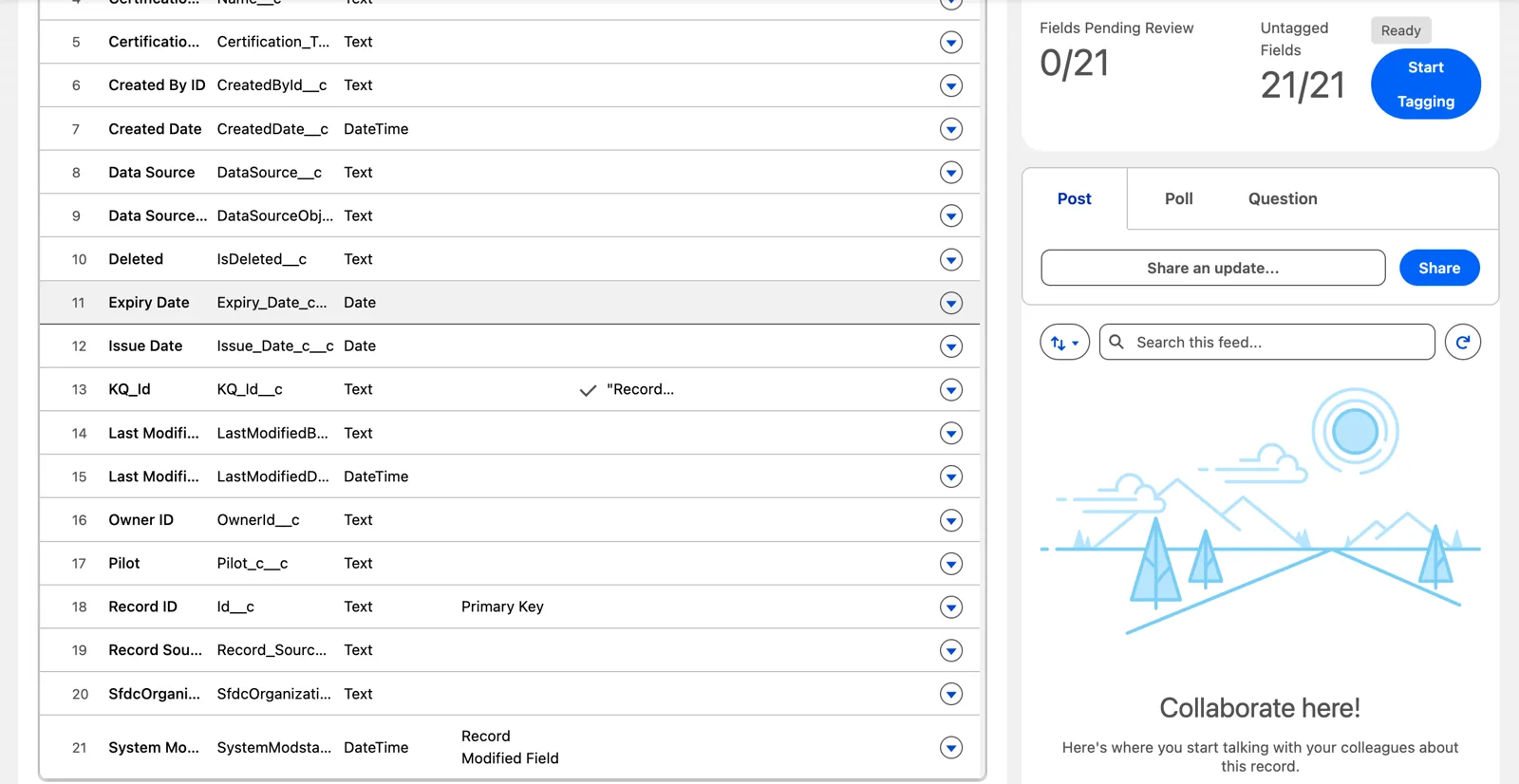
A key qualifier field, KQ_Id, beside the record ID it qualifies (Salesforce Data 360 in a Developer Edition org, screenshot, November 2026). Full size
Setting one up
Section titled “Setting one up”The KQ_ fields stay empty until you give them a value. After the stream is created, go to the Data Lake Objects tab and open the lake object. On the key field’s row, open the menu and choose Add Key Qualifier: pick one you already have, or create one with a label, an API name and a description.
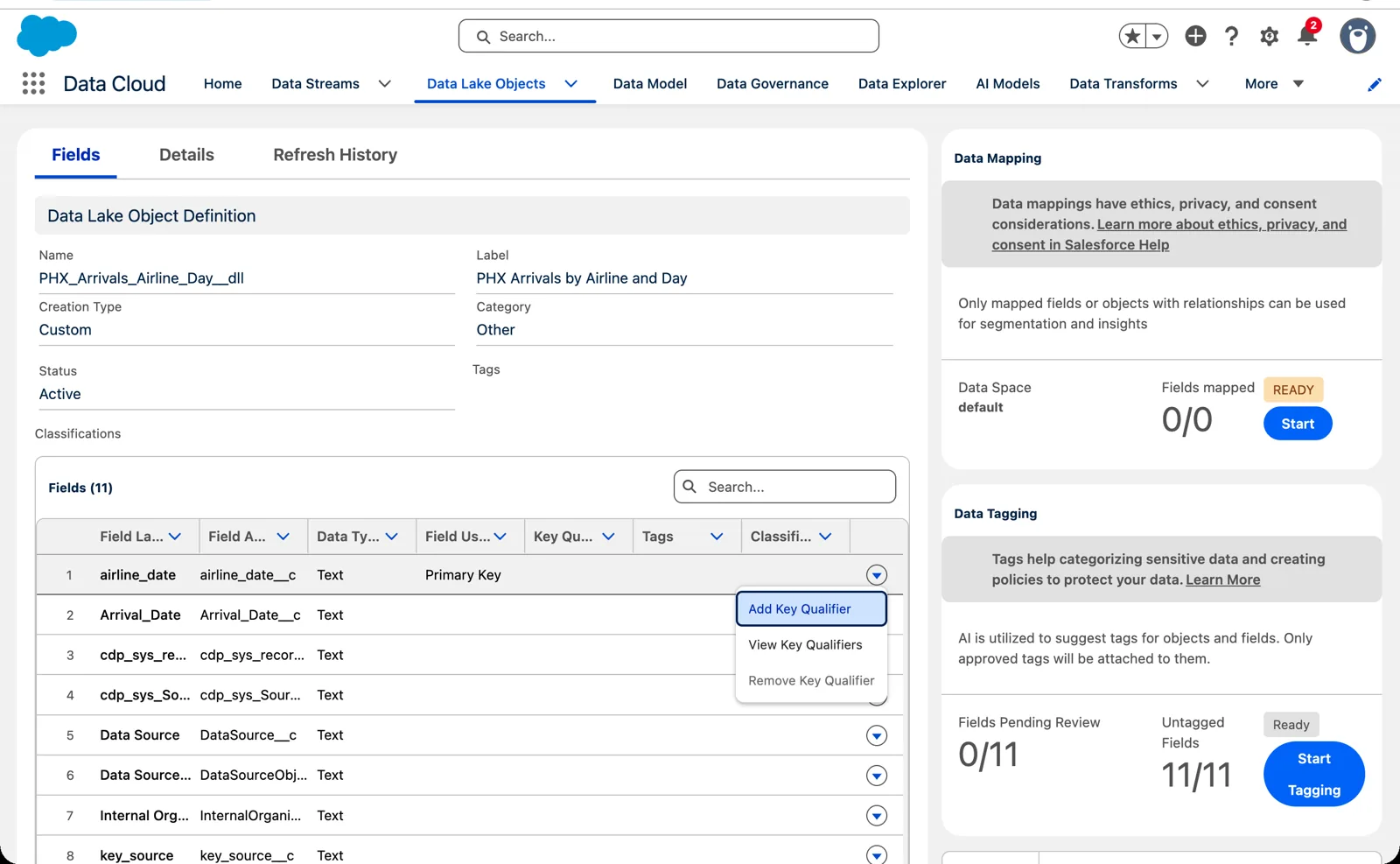
Add Key Qualifier, on the key field’s row (Salesforce Data 360 in a Developer Edition org, screenshot, November 2026). Full size
What ends up in the KQ_ field? The API name. In my own org I gave a key a qualifier with the label “PHX Arrivals” and the API name PHX_Arrivals, and after the next full load every row I looked at said PHX_Arrivals. That was on the lake object a batch transform writes (chapter 7, module 4), not a stream’s, but it’s the same kind of field. And it reaches the rows already loaded: when I added a qualifier to the regions’ key, every row already in the lake object showed it in Data Explorer, with no reload. So choose the API name with care: it’s the value every join will compare, and it’s case-sensitive. PHX_Arrivals and PHX_ARRIVALS are different values.
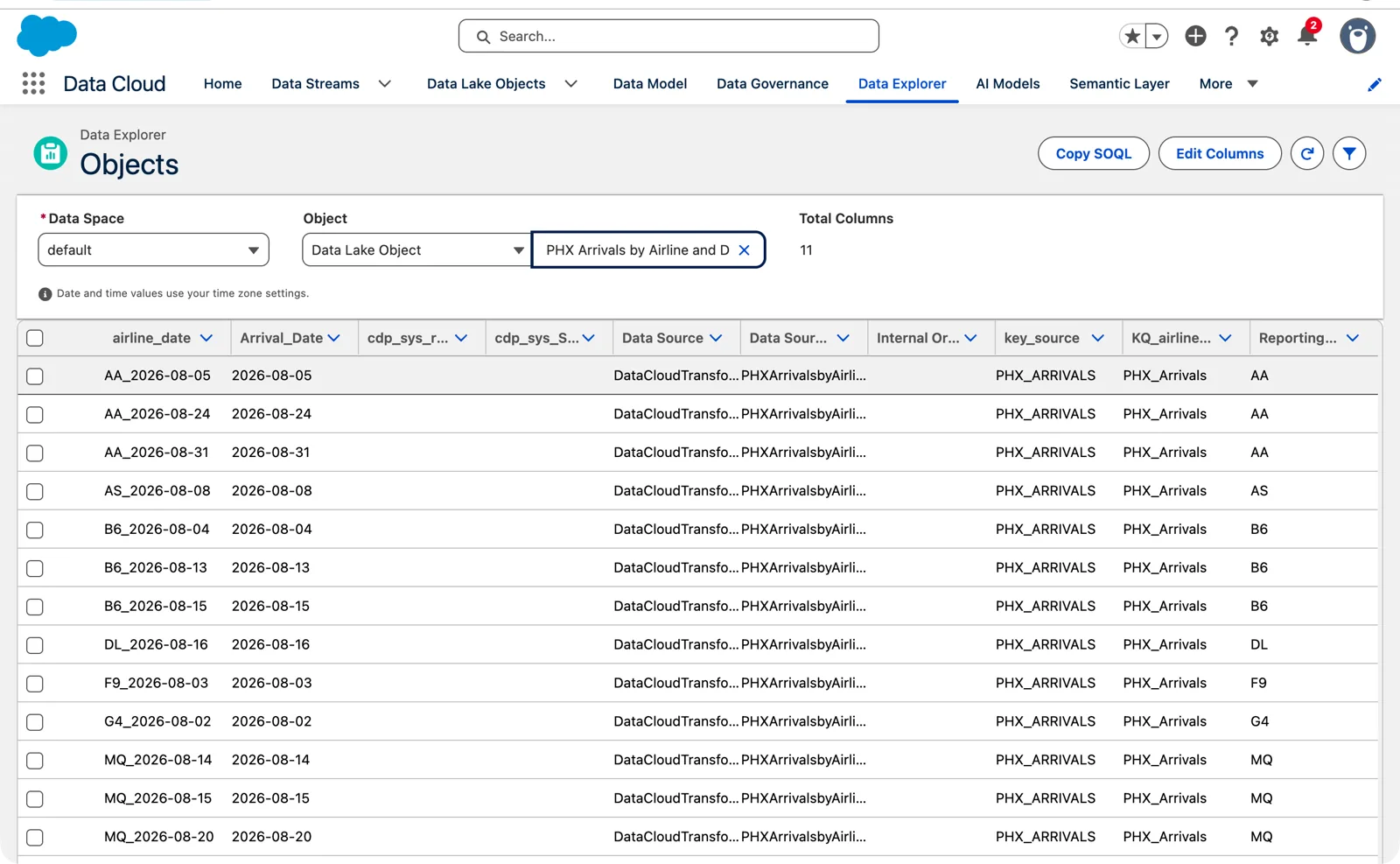
The key qualifier field holds the API name, PHX_Arrivals (Salesforce Data 360 in a Developer Edition org, screenshot, November 2026). Full size
Two things to plan around:
- A limit. “You can add up to 20 active key qualifiers. A key qualifier is active when it’s used for a DLO field.” Twenty is plenty for a few sources, and not for one per field. Name them for the source, not the field.
- Companion orgs. With more than one org (chapter 1, module 3), you add key qualifiers in the home org and wait for them to reach the companions: Salesforce says “wait at least 10 minutes.”
Every join changes
Section titled “Every join changes”Once qualifiers are in use, a join on the key alone isn’t enough. It can match pilot PLT-000238 from one source to a different PLT-000238 from another (chapter 3, module 3). A join has to use the key and its qualifier.
And it has to work when the qualifier is empty, because two empty values don’t match in SQL. Salesforce’s best practice: “Use COALESCE() on key qualifier fields in all table joins to handle null values and prevent data loss.” COALESCE swaps an empty value for a fixed one, so two empty qualifiers still join.
You’ll see this again wherever joins are written: calculated insights (chapter 10), segments (chapter 11) and the Query API (chapter 14). In my own testing, a segment written in SQL through the API wouldn’t run until its SQL selected the key’s KQ_ field as well as the key. So if you turn on key qualifiers in an org that already has insights and segments, plan to update them. Salesforce: “update your existing calculated insights to add key qualifier fields to table joins and dimensions.”
The lineage fields
Section titled “The lineage fields”The second group traces a record back. Data 360 “adds fields to a data object to capture data source details”:
| Field | What it records |
|---|---|
| Data Source | The source of the records, such as one Marketing Cloud Engagement account |
| Data Source Object | “the object where the record came from, such as the name of a cloud storage file” |
| Internal Organization | The business unit that owns the record; “not mapped automatically for CRM sources” |
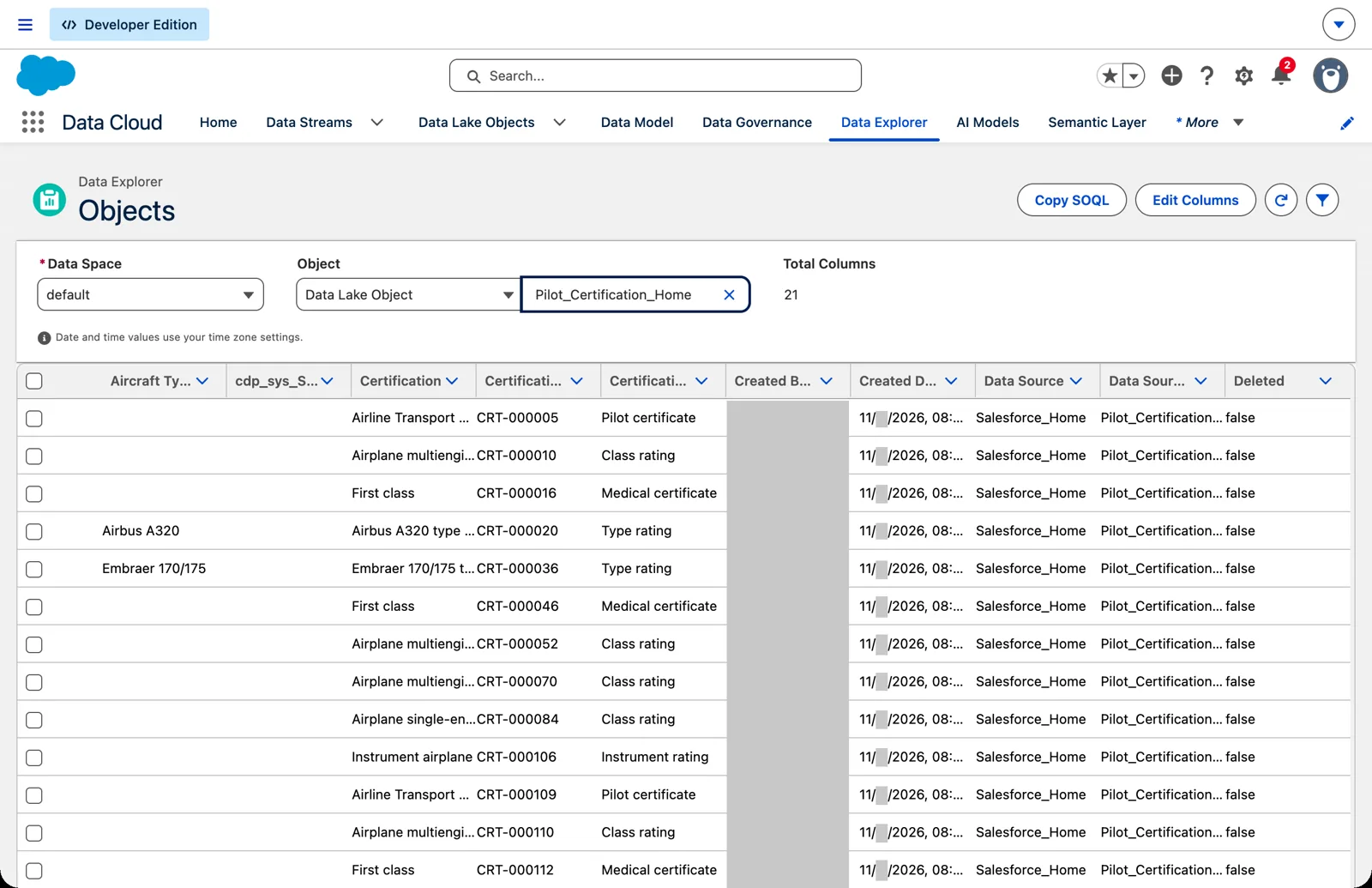
Lineage from a CRM source: the org connection and the object (Salesforce Data 360 in a Developer Edition org, screenshot, November 2026). Full size
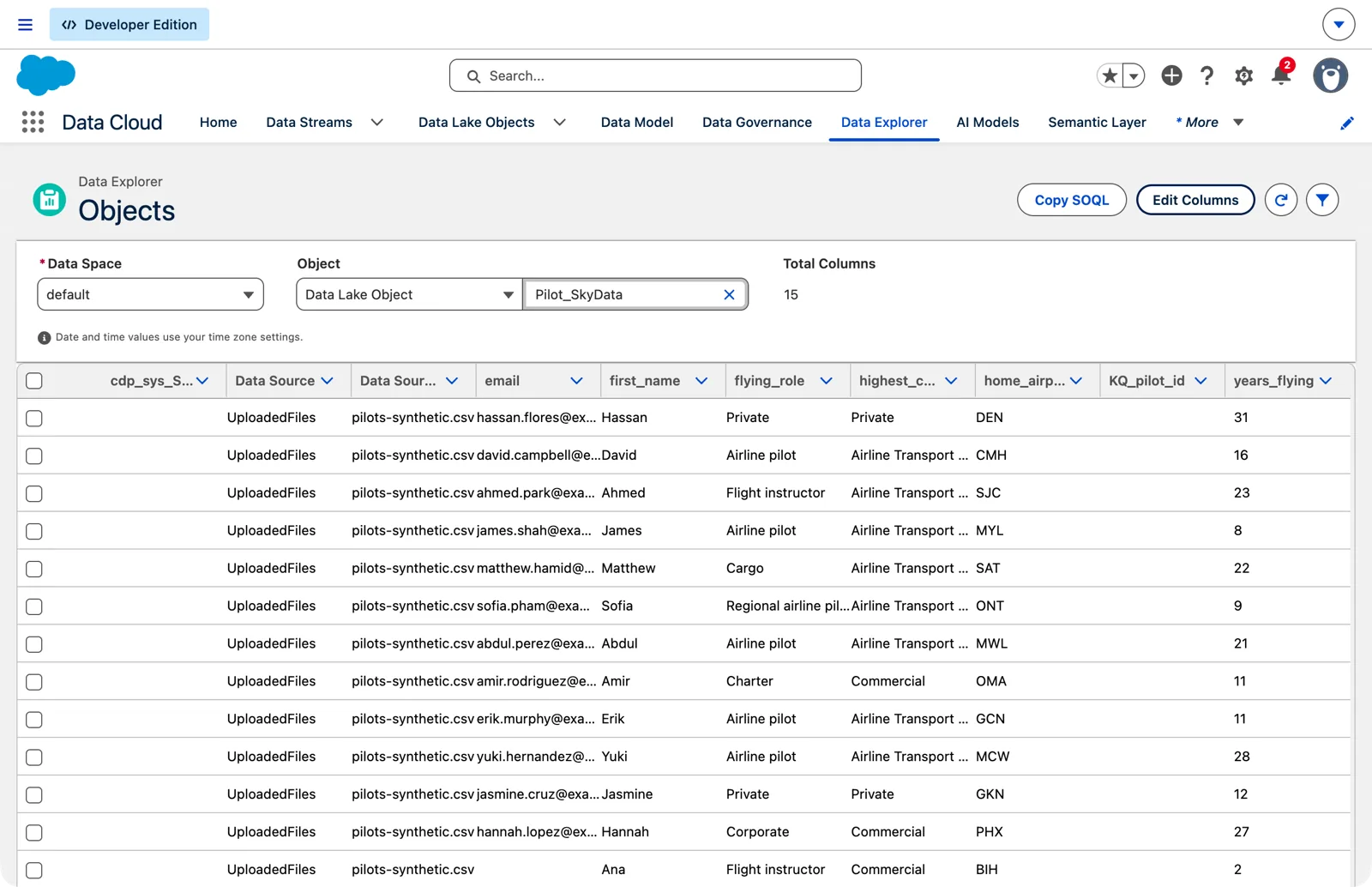
Lineage from a file: the upload and the file’s name (Salesforce Data 360 in a Developer Edition org, screenshot, November 2026). Full size
So when someone finds a strange value and asks where it came from, these fields are the first place to look. They say which source and which object or file. What they may not say is which day’s file, when one stream picks up a new file every day with a wildcard (chapter 4, module 3). I haven’t tested what Data Source Object holds then, each file’s name or the stream’s pattern, so I don’t count on it.
That’s why I still ask whoever makes the files to write the file name, a batch ID and an extract time into every row (chapter 3, module 4). Those I can count on.
The system fields
Section titled “The system fields”The third group starts with cdp_sys_, such as cdp_sys_SourceVersion__c, which is on every lake object in my org. Salesforce calls these system fields, and I haven’t found a page that says what each one holds. So I don’t build on them: no joins, no segments, no rules. If a field isn’t documented, it can change without notice.
What they don’t do
Section titled “What they don’t do”None of these replace a good key. A key qualifier keeps two sources apart; it doesn’t make a weak key unique inside one source. And a lineage field says where a record came from; it doesn’t decide which of two versions is newest. Those are still the key you chose and the record modified field (chapter 3, module 3). The added fields sit beside your design. They don’t fix it.
What an architect decides here
Section titled “What an architect decides here”- Which sources need key qualifiers: any two that can share key values in one model object.
- The qualifier names, one per source, within the limit of 20.
- That every join, in insights, segments and queries, uses the key and its qualifier, null-safe; and who updates the old ones when qualifiers are turned on.
- What the team relies on to trace a record: the lineage fields, and the columns the producer writes. Not undocumented system fields.
Explore
Section titled “Explore”All checked 2026-11-14.
- Fully Qualified Keys (opens in a new tab), Salesforce Help: the overview.
- Data Interpretation with Fully Qualified Keys (opens in a new tab), Salesforce Help: the double count.
- Fully Qualified Keys in Data Objects (opens in a new tab), Salesforce Help: where the
KQ_fields come from. - Configure a Key Qualifier Field (opens in a new tab), Salesforce Help.
- Best Practices for Fully Qualified Keys (opens in a new tab), Salesforce Help: null-safe joins.
- Data Lineage Fields (opens in a new tab), Salesforce Help.
- Learn About Fully Qualified Keys (opens in a new tab), Trailhead.