
What Makes It Unique
Tämä sisältö ei ole vielä saatavilla valitsemallasi kielellä.
Module 3 in the chapter Understanding Your Data Structures, chapter 3 of the Data 360 Architect course. Each module stands on its own. Previous: Flat, Normalized or Unstructured · Next: The Dictionary Before You Map
The question this module answers: What makes each record unique, and why must you know before it comes into Data 360?
If you don’t understand what makes your data unique, nothing downstream will work correctly. That’s the most important sentence in this chapter. Every source you bring in needs an answer to one question: what makes one row different from every other row, now and forever?
The key decides everything that follows
Section titled “The key decides everything that follows”Every data stream in Data 360 needs a primary key. Salesforce Help puts the stakes plainly: “The primary key is the basis for deciding whether to add a new record or update an existing record.”
Think about what that means. Every time the stream runs, each incoming row is checked against the key. Same key: it’s an update, and the new values replace the old. New key: it’s a new record. Get the key wrong, and every load after that does the wrong thing, quietly.
And remember from chapter 1: deletes work through the key too. When you send a delete, you send the primary keys of the records to remove. A key you can’t trust is a record you can’t remove.
Two ways to get it wrong
Section titled “Two ways to get it wrong”Too narrow: records overwrite each other. Take the runways file from module 2. Each runway points to its airport by the airport’s code, airport_ident, and it’s the first code you see in the file. Someone sets up the stream and picks it as the primary key. Now Toronto Pearson’s five runways arrive one after another, each finds the same key, CYYZ, and each overwrites the one before it. Toronto ends up with one runway. Across the whole file, 48,412 runways become 41,277: one per airport that has any. No error. Just 7,075 runways gone, and the ones that are left are whichever happened to load last.
Changing: one thing becomes two. Take the pilots file. Email looks unique, so someone picks it as the key. Then a pilot changes email. It happens: in SkyData’s core contacts file, 20 of the contacts still carry a pilot’s older email. The next load sees a key it has never seen, and adds a new pilot. Now there are two Imani Halls (imani.hall@ and imani.hall.old@), and her years of flying are on both. Poor key strategy leads to duplicate or fragmented profiles.
Notice something about that second example. Email is exactly what we matched on in chapter 1, when identity resolution decided that the pilot in the file and the pilot in core were the same person. That’s the right job for an email: a match key, a clue that two records are the same person. It’s the wrong job for a primary key, which has to identify one record for as long as it exists.
Two keys for one airport
Section titled “Two keys for one airport”Here’s a real decision from the same files. Every runway points to its airport twice: by airport_ref, a number such as 1990, and by airport_ident, a code such as CYYZ. Both match an airport in this file. Which one do you join on?
airport_ref: 1990 | airport_ident: CYYZ | |
|---|---|---|
| Unique in the file? | Yes | Yes |
| Means something? | No. It’s just the airport’s row ID. | Yes. It’s the airport’s ICAO code, and its first letter says the region of the world: C for Canada. |
| Could it change? | No reason to | A code with meaning changes when the meaning does |
| What it’s good for | Joining | People: it’s the code they recognize and search for |
Toronto Pearson in OurAirports. Both columns are filled on every one of the 48,412 runways (SkyData’s OurAirports v1.0).
So I join on airport_ref, brought in as text, and keep airport_ident as a field people can read and search. When I first brought the runways into my org, the airport reference came in as a number, and I changed it to text for proper linkages (chapter 8). That’s the rule in this module, applied to one column.
What makes a good key
Section titled “What makes a good key”In the Data Architect course I give a rule for keys that holds in Data 360 too: unique, unchanging, meaningless, never personal data.
- Unique: one value, one record. The runway needs its own identifier, not its airport’s.
- Unchanging: a key that can change will, eventually. Emails, names and phone numbers all change.
- Meaningless, unless the meaning can never change: a key that carries meaning, like a region code built into it, has to change when the meaning does. A compound key can carry meaning if that meaning can never change: one airline on one day, or one flight that has already flown (chapter 7).
- Never personal data: an email or a phone number as a key spreads personal data into every table that points to it.
That’s why the pilots file carries a pilot ID, pilot_id, that the source system assigns and never reuses. The runways file already does: each runway has its own id, such as 234792.
When no single field is unique
Section titled “When no single field is unique”The flights from module 2 have no ID of their own. BTS gives each row a date, an airline, a flight number and two airports, but nothing that says “this flight” by itself. One flight number flies every day. And on the same day, the same number can fly more than once.
Salesforce’s way out: “create a composite key by combining two or more source fields using a formula field.” Salesforce’s own example joins an order number and a product ID with an underscore. For the flights, the key is four values joined together:
| Part | Example | Why it’s there |
|---|---|---|
FlightDate | 2026-08-14 | Which day’s flight: the same number flies every day |
Reporting_Airline | AA | Whose flight number it is |
Flight_Number_Reporting_Airline | 336 | Which flight |
Origin | DFW | Which leg: one number can fly several legs in a day |
The key: 2026-08-14_AA_336_DFW, a real flight in BTS’s August 2026 data on SkyData.
Why the origin? Try the key without it. On 2026-08-01, Delta flight 2208 flew from Minneapolis–Saint Paul (MSP) to PHX in the morning, then from PHX back to MSP later that morning, under the same number. Date, airline and number are the same for both legs. In August’s PHX flights, that happens 3,829 times. Add the origin, and every one of the 29,524 rows has a key of its own.
And notice what’s not in the key: the actual times. In a live feed, DepTime is blank until the plane leaves and changes while a flight is delayed. Put it in the key and every update becomes a new flight: the “changing” mistake above. The schedule doesn’t move, so every update to a flight lands on the same row. From a file, you build this key with a formula field on the stream (chapter 6).
Keys across sources
Section titled “Keys across sources”One more question, and it’s the one teams miss: how do your keys behave across systems?
The pilots file has pilot PLT-000238. Another source, a training system, also uses PLT-000238, for a different person. If both land in the same place, they collide. My own habit, when several sources feed one data lake object, is to build the key with the source in front of it: not a compound key, compound values in a single key. “PILOTS-PLT-000238” and “TRAINING-PLT-000238” can never collide.
Salesforce’s own answer is the key qualifier. A fully qualified key is “a source key (for example, the identifier-contact ID) and a key qualifier (for example, the source-CRM),” in Trailhead’s words. The qualifier names the source, and joins use both parts. Data 360 adds a field for it next to every key on a lake object, named KQ_ and then the key’s name: in my own org, the certifications’ record ID, Id__c, has a KQ_Id beside it. Chapter 6, module 5 shows these fields, and chapter 7 sets one up.
And bring keys in as text, even when they look like numbers (module 2). A key is a label, not an amount.
The same record, more than once
Section titled “The same record, more than once”Here’s the question I get when a team has more than one feed: “We get the same data from two places, and sometimes the same file twice, with slight differences. What happens?” It’s really four different situations, and each one has its own answer.
| Situation | Example | What handles it |
|---|---|---|
| The same key means different things in two sources | Pilot 1001 and training person 1001 | The source in the key, or a key qualifier (above) |
| The same record arrives again | Yesterday’s file sent again; two daily files that overlap by an hour | The primary key. Same key, so the second copy updates the first. Salesforce: “reprocessing the same file does not result in duplicate records” |
| A newer version must replace the older one | A corrected flight time | The key, plus a column that says when the record changed (module 4) |
| Every version must be kept | Each revision of a cargo manifest | The version goes into the key: partner key plus revision number (chapter 8) |
Notice that the first three only work if the key is right. And notice the last one: putting a version, a date or a file name into the key changes the second situation into the fourth. The same record sent again in a new file becomes a second row. That’s correct when you want every version, and wrong when you don’t. So decide which situation you’re in before you decide the key.
My rule for key qualifiers: give every source its own key qualifier, and set it on every key and every field you’ll join on, from the start. Adding qualifiers later means changing every join, insight and segment already built on them. Salesforce asks for it in transforms anyway: “All data lake object (DLO) fields used in the data transform table join must have an associated key qualifier.” And name each qualifier for the source, not the field: an org can have up to 20 active ones, which is plenty for one per source and not for one per field. Chapter 6, module 5 sets them up, and chapter 7 builds with them.
And when two rows with the same key arrive out of order? If the stream has a record modified field, the newer value wins, not the last row loaded. Salesforce’s example: a row whose modified date is older than what’s already there “isn’t the most current record,” and its values aren’t written over the newer ones. That works in upsert mode, and the field has to be a date and time. So if a source can send old rows late, give the stream a record modified field (chapter 6).
Before you bring it in
Section titled “Before you bring it in”For every source, write down four answers before its stream exists:
- What makes one row unique?
- Can that value ever change?
- Is it unique across every source that might land beside it?
- Is it personal data?
One trap in core while you’re at it. Ticking External ID on a Salesforce field doesn’t make it unique; the Unique box does. When I added a Sky Data Contact ID to Contact for chapter 5, it first saved with External ID ticked and Unique not, so I went back and ticked Unique. An external ID is a promise; Unique is what enforces it.
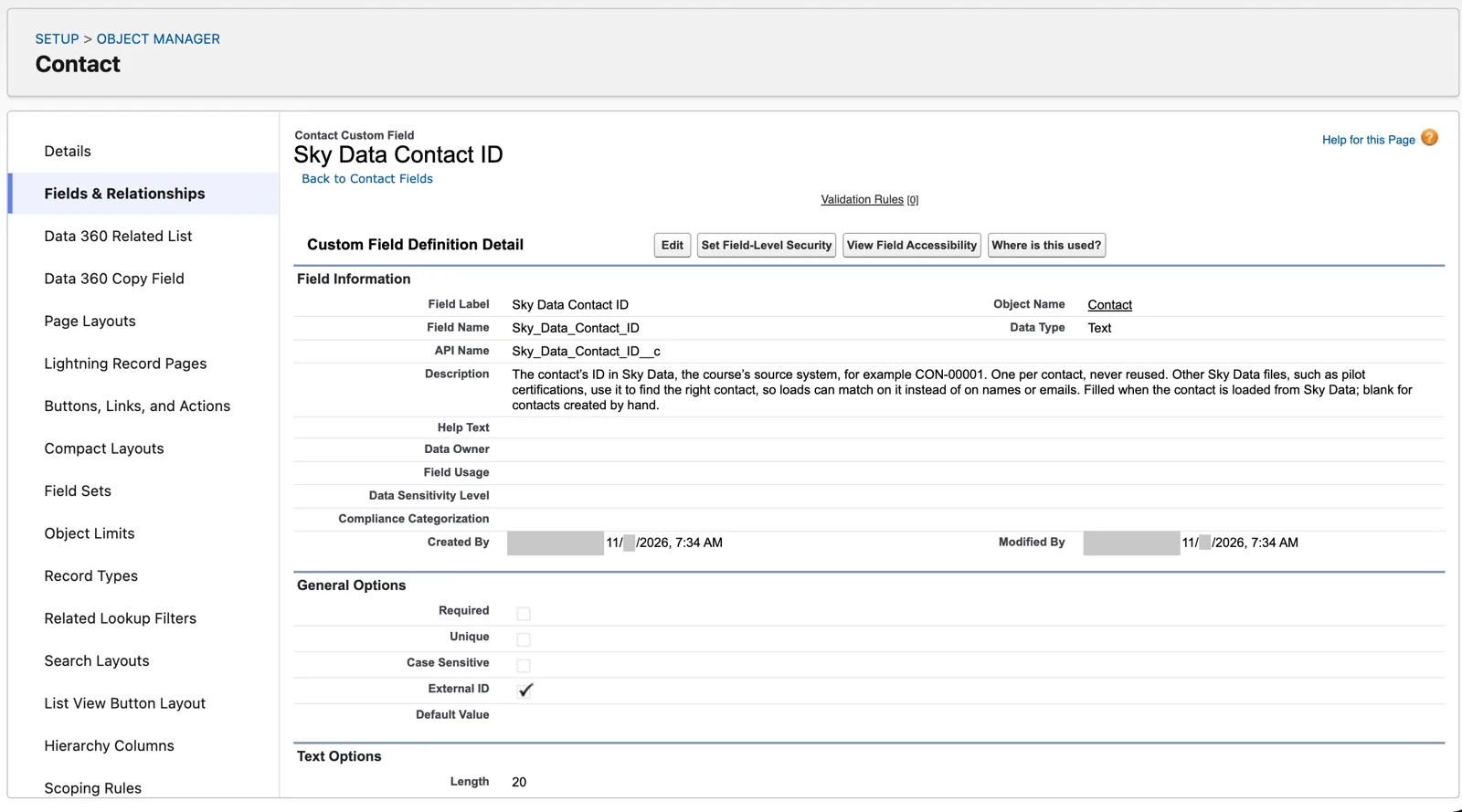
External ID ticked, Unique not: the field promises uniqueness but doesn’t enforce it (Salesforce Data 360 in a Developer Edition org, screenshot, November 2026). Full size
If you can’t answer the first one, you’re not ready to bring the source in. Chapter 6 shows where these answers go when you build the stream.
What an architect decides here
Section titled “What an architect decides here”- The primary key for each source, and who confirms it’s truly unique.
- Which fields are match keys for identity resolution, and which identify a record.
- Which key a child file joins its parent on, when it offers more than one.
- For sources with no unique field, which parts make the composite key, and that none of them can change.
- How keys from different sources are kept apart when they land side by side: the source in the key, or key qualifiers.
- For each source that can send the same record again: whether a new copy replaces the old one, or every version is kept.
Explore
Section titled “Explore”All checked 2026-11-14.
- Record Modified Field (opens in a new tab), Salesforce Help (checked 2026-11-14).
- Primary Key (opens in a new tab), Salesforce Help: the primary key, composite keys and key qualifiers.
- Use Case 2: Create a Primary Key Using a Composite Key (opens in a new tab), Salesforce Help.
- Learn About Fully Qualified Keys (opens in a new tab), Trailhead: the source key and the key qualifier.
- Data 360 Integration Patterns (opens in a new tab), Salesforce Architects: re-sent files and duplicates.
- OurAirports: Open data (opens in a new tab), the airport and runway files (public domain).