
The API Guide
Nội dung này hiện chưa có sẵn bằng ngôn ngữ của bạn.
Salesforce has a lot of doors. Some are front doors that everyone uses, like REST API. Some are side doors built for one product. Some are being closed. When you design an integration, the first job is to know which doors exist, where they are, and which ones will still be there next year.
In 2023 I gave a talk called Across the APIs. I had built a spreadsheet of every Salesforce API I had used or researched, and it came to about 89. This page is that spreadsheet, brought up to date and kept up to date.
Since then the list has kept growing, and each new door does more. That growth is what makes headless possible: a system can read, change and act on Salesforce data through the APIs alone, without anyone opening a Salesforce screen. The standard user interface matters less and less. The APIs give the data and the systems behind it flexible, more powerful ways in. The APIs are the doorways to the data. Know the doors, and you know what your design can reach.
How We Count
Section titled “How We Count”We count doors, not products. A door is an address you can call: a path such as /services/data/v68.0/sobjects, or a separate service with its own address. One product can have several doors. SOAP API has two (the Enterprise and Partner WSDLs), and every top-level REST resource counts once.
Counted that way, Salesforce has well over 100 doors. Salesforce’s own API Library (opens in a new tab) groups them into 56 APIs (checked 2026-11-01). Both numbers are right; they answer different questions.
This page lists only the documented doors, each with a link to Salesforce’s own guide. We leave out resources that Salesforce marks as internal or doesn’t document, and doors whose status we’re still checking.
Who Is Knocking?
Section titled “Who Is Knocking?”When I taught this in 2023, a door had one kind of caller: a program someone wrote. Today the same doors have three:
- A program: your integration, a middleware flow, a nightly job.
- An AI agent, calling through the Model Context Protocol (opens in a new tab) (MCP), an open standard (version 2026-07-28, checked 2026-11-01). An MCP tool is a door with a description an AI can read. Salesforce now hosts its own MCP servers.
- A screen an AI draws on the spot, inside an AI assistant. The screen calls an MCP tool, and the tool calls a door.
The new callers don’t change the questions. For every door, ask: what’s behind it, who is the call made as, what does it cost, and how long will it last. That second question is the one I always put to the room: are you going in as one fixed user, are you acting as a user, or are you asking a user to grant this system access? Get that right, and the rest of the design follows.
Doors That Are Closing
Section titled “Doors That Are Closing”Doors don’t last forever. Some close for security reasons, and some close because Salesforce wants everyone on the newer versions. Here are the ones with dates (checked 2026-11-01):
| What | When | Why, in Salesforce’s words | Source |
|---|---|---|---|
SOAP API login() | New requirements from 2026-12-01; retired in Summer ‘27 (API 31.0 to 64.0); not in 65.0 and later | “Salesforce is adopting a secure-by-default posture for authenticating external applications. SOAP API login() does not provide that posture and is being retired.” | Platform SOAP API login() Retirement & new Security Requirements (opens in a new tab) |
| OAuth username-password flow | Not available in orgs created from Summer ‘26; retired for connected apps on 2027-02-20 | “The username-password flow directly passes the user’s credentials in HTTP requests, which presents security risks.” | Retirement of OAuth 2.0 Username-Password Flow for Connected Apps (opens in a new tab) |
| OAuth user-agent and hybrid user-agent flows | Blocked in orgs created in Winter ‘27; retired on 2027-02-20 | They are “insecure because they directly expose access tokens to the browser.” | OAuth User-Agent and Hybrid User-Agent Flows Retirement (opens in a new tab) |
| API versions 31.0 to 40.0 | Deprecated in Summer ‘27, retired in Summer ‘28 | Not a security reason: “We are focusing our development efforts on enhancing the latest API versions.” | Salesforce Platform API Versions 31.0 through 40.0 Retirement (opens in a new tab) |
The SOAP API itself stays. Only its login() call goes. If your integration still logs in with a username and password, that’s a project for this year, not a surprise for next year.
How the Versions Work
Section titled “How the Versions Work”Most Salesforce doors live under one path, /services/data/, and most of them carry a version number. Every release (three a year) adds a new API version. When you see vXX.X on this page, put the version you call in its place, such as v68.0 for Winter ‘27.
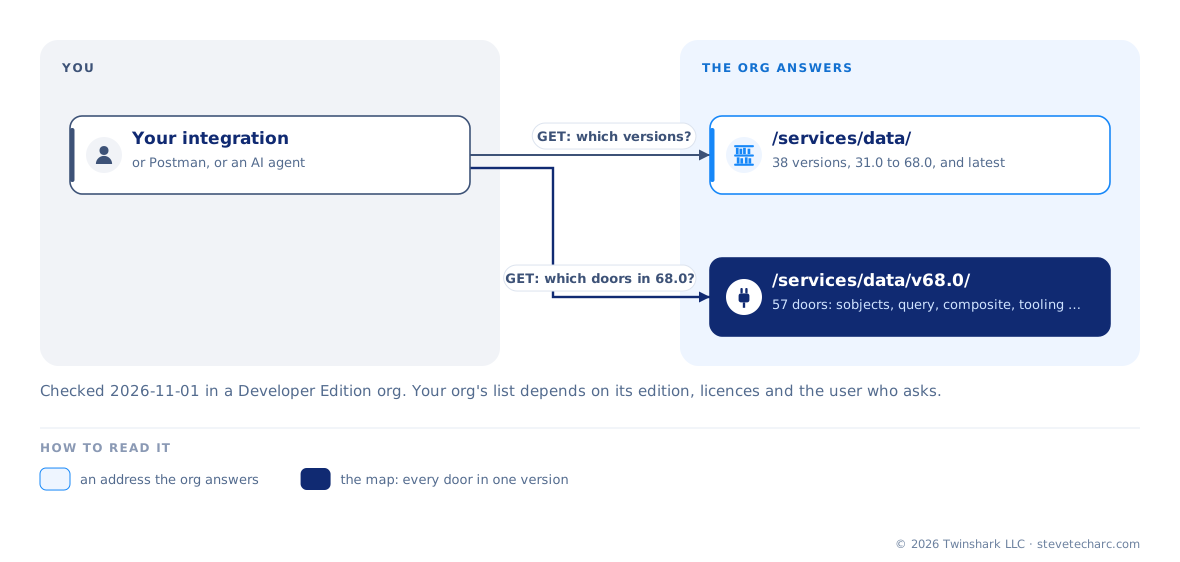
You don’t have to guess which versions an org serves. Ask it. A GET request to /services/data/ returns the list. Here is the start and the end of that list from our Developer Edition org on 2026-11-01:
[ { "label": "Summer '14", "url": "/services/data/v31.0", "version": "31.0" }, { "label": "Winter '15", "url": "/services/data/v32.0", "version": "32.0" }, ... { "label": "Winter '27", "url": "/services/data/v68.0", "version": "68.0" }, { "label": "Latest Release", "url": "/services/data/latest", "version": "68.0" }]That org served 38 versions, from 31.0 to 68.0, plus a latest entry that points at the newest one (Salesforce’s Versions resource (opens in a new tab), checked 2026-11-01, documents both). Then go one level down. A GET request to /services/data/v68.0/ returns the doors open at that version, each with its address:
{ "sobjects": "/services/data/v68.0/sobjects", "query": "/services/data/v68.0/query", "composite": "/services/data/v68.0/composite", "tooling": "/services/data/v68.0/tooling", ...}Our org listed 57 of them. That’s the map of the versioned doors, and the org draws it for you.
Why versions matter: a version fixes how a door behaves. An integration built on 58.0 keeps getting 58.0 behavior after Salesforce ships 68.0, so name the version you built and tested against. But versions don’t last forever either. API versions 31.0 to 40.0 are already on their way out (see “Doors That Are Closing”).
The Doors
Section titled “The Doors”Grouped by area. Each line shows the API, the address where it has one, whether it’s current or retiring, and Salesforce’s own guide. Some doors aren’t web addresses at all: an email address that runs your code, or a JavaScript library inside a Salesforce page. Those are described in words.
Platform
Section titled “Platform”| API | Door | Lifecycle | Salesforce guide |
|---|---|---|---|
| Apex email services | A Salesforce-generated email address (inbound email) | Current | Guide (opens in a new tab) |
| Apex REST | /services/apexrest/{namespace}/{urlMapping} | Current | Guide (opens in a new tab) |
| Apex SOAP web services | /services/Soap/class/{ClassName} | Current | Guide (opens in a new tab) |
| API Catalog Connect REST API | /services/data/vXX.X/api-catalog/{sources, apis, mcp-servers} | Current | Guide (opens in a new tab) |
| Bulk API 2.0 | /services/data/vXX.X/jobs | Current | Guide (opens in a new tab) |
| Connect REST API | /services/data/vXX.X/chatter | Current | Guide (opens in a new tab) |
| Connect REST API | /services/data/vXX.X/connect | Current | Guide (opens in a new tab) |
| Connect REST API | /services/data/vXX.X/dedupe | Current | Guide (opens in a new tab) |
| GraphQL API | /services/data/vXX.X/graphql | Current | Guide (opens in a new tab) |
| Lightning Console API | JavaScript in Lightning console apps (workspace, navigation item and utility bar APIs) | Current | Guide (opens in a new tab) |
| Metadata API | /services/Soap/m/vXX.X | Current | Guide (opens in a new tab) |
| Metadata API | /services/data/vXX.X/metadata | Current | Guide (opens in a new tab) |
| OAuth 2.0 endpoints | /services/oauth2/authorize, /token, /revoke, /userinfo, /introspect, /register; /id/keys | Current | Guide (opens in a new tab) |
| OAuth user-agent and hybrid user-agent flows | /services/oauth2/authorize (response_type=token) | Retiring: blocked in orgs created in Winter ‘27; retired 2027-02-20 | Guide (opens in a new tab) |
| OAuth username-password flow | /services/oauth2/token (grant_type=password) | Retiring: not in orgs created from Summer ‘26; retired for connected apps 2027-02-20 | Guide (opens in a new tab) |
| Pub/Sub API | api.pubsub.salesforce.com:7443 (gRPC) | Current | Guide (opens in a new tab) |
| REST API | /services/data/vXX.X/actions | Current | Guide (opens in a new tab) |
| REST API | /services/data/vXX.X/appMenu | Current | Guide (opens in a new tab) |
| REST API | /services/data/vXX.X/compactLayouts | Current | Guide (opens in a new tab) |
| REST API | /services/data/vXX.X/composite | Current | Guide (opens in a new tab) |
| REST API | /services/data/vXX.X/consent | Current | Guide (opens in a new tab) |
| REST API | /services/data/vXX.X/event | Current | Guide (opens in a new tab) |
| REST API | /services/data/vXX.X/knowledgeManagement | Current | Guide (opens in a new tab) |
| REST API | /services/data/vXX.X/limits | Current | Guide (opens in a new tab) |
| REST API | /services/data/vXX.X/localizedvalue | Current | Guide (opens in a new tab) |
| REST API | /services/data/vXX.X/parameterizedSearch | Current | Guide (opens in a new tab) |
| REST API | /services/data/vXX.X/process | Current | Guide (opens in a new tab) |
| REST API | /services/data/vXX.X/query | Current | Guide (opens in a new tab) |
| REST API | /services/data/vXX.X/queryAll | Current | Guide (opens in a new tab) |
| REST API | /services/data/vXX.X/quickActions | Current | Guide (opens in a new tab) |
| REST API | /services/data/vXX.X/recent | Current | Guide (opens in a new tab) |
| REST API | /services/data/vXX.X/search | Current | Guide (opens in a new tab) |
| REST API | /services/data/vXX.X/sobjects | Current | Guide (opens in a new tab) |
| REST API | /services/data/vXX.X/tabs | Current | Guide (opens in a new tab) |
| REST API | /services/data/vXX.X/theme | Current | Guide (opens in a new tab) |
| Salesforce Reports and Dashboards REST API | /services/data/vXX.X/analytics | Current | Guide (opens in a new tab) |
| Salesforce Reports and Dashboards REST API | /services/data/vXX.X/folders | Current | Guide (opens in a new tab) |
| SOAP API | /services/Soap/c/vXX.X (Enterprise WSDL) | Current; login() retired Summer ‘27 | Guide (opens in a new tab) |
| SOAP API | /services/Soap/u/vXX.X (Partner WSDL) | Current; login() retired Summer ‘27 | Guide (opens in a new tab) |
| SOAP API | /services/Soap/u/vXX.X login() call | Retiring: Use Any API Auth needed 2026-12-01; security token or mTLS with broad IP ranges, and off if unused six months (2026-12-15 sandboxes, 2027-01-31 production); retired Summer ‘27 (API 31.0–64.0); not in 65.0+ | Guide (opens in a new tab) |
| Tooling API | /services/Soap/T/vXX.X | Current | Guide (opens in a new tab) |
| Tooling API | /services/data/vXX.X/tooling | Current | Guide (opens in a new tab) |
| User Interface API | /services/data/vXX.X/ui-api | Current | Guide (opens in a new tab) |
| API | Door | Lifecycle | Salesforce guide |
|---|---|---|---|
| Agent API | https://api.salesforce.com/einstein/ai-agent/v1 | Current | Guide (opens in a new tab) |
| Einstein Discovery REST API | /services/data/vXX.X/smartdatadiscovery | Current | Guide (opens in a new tab) |
| Models API | https://api.salesforce.com/einstein/platform/v1 | Current | Guide (opens in a new tab) |
| Salesforce hosted MCP servers | api.salesforce.com/platform/mcp/… | Current | Guide (opens in a new tab) |
Data and analytics
Section titled “Data and analytics”| API | Door | Lifecycle | Salesforce guide |
|---|---|---|---|
| CRM Analytics REST API | /services/data/vXX.X/eclair | Current | Guide (opens in a new tab) |
| CRM Analytics REST API | /services/data/vXX.X/jsonxform | Current | Guide (opens in a new tab) |
| CRM Analytics REST API | /services/data/vXX.X/wave | Current | Guide (opens in a new tab) |
| Data 360 Connect REST API | https://{Data 360 instance}/services/data/vXX.X/ssot/… | Current | Guide (opens in a new tab) |
| Data Prep Recipe REST API | /services/data/vXX.X/wave/recipes | Current | Guide (opens in a new tab) |
| Tableau Next REST API | https://{MyDomain}.my.salesforce.com/services/data/vXX.X/… | Current | Guide (opens in a new tab) |
| Tableau REST API | /api/-/askdata | Current | Guide (opens in a new tab) |
| Tableau REST API | /api/{api-version}/sites | Current | Guide (opens in a new tab) |
Service
Section titled “Service”| API | Door | Lifecycle | Salesforce guide |
|---|---|---|---|
| Conversation Data API | https://api.salesforce.com/platform/engagement/v1.0 | Current | Guide (opens in a new tab) |
| Enhanced Chat API | Current | Guide (opens in a new tab) | |
| Field Service REST API | /services/data/vXX.X/connect/field-service/… | Current | Guide (opens in a new tab) |
| Interaction Service API | Current | Guide (opens in a new tab) | |
| Open CTI | JavaScript library in the softphone (Lightning Experience and Classic) | Current | Guide (opens in a new tab) |
| REST API | /services/data/vXX.X/scheduling | Current | Guide (opens in a new tab) |
| REST API | /services/data/vXX.X/support | Current | Guide (opens in a new tab) |
| Service Cloud Connector API | JavaScript connector between a partner telephony or CCaaS system and Salesforce | Current | Guide (opens in a new tab) |
Commerce
Section titled “Commerce”| API | Door | Lifecycle | Salesforce guide |
|---|---|---|---|
| B2B Commerce and D2C Commerce API | /services/data/vXX.X/commerce | Current | Guide (opens in a new tab) |
| B2C Commerce API | /pricing/assignments/v1/organizations/ | Current | Guide (opens in a new tab) |
| B2C Commerce API | /pricing/campaigns/{version} | Current | Guide (opens in a new tab) |
| B2C Commerce API | /product/shopper-products/v1/organizations | Current | Guide (opens in a new tab) |
| B2C Commerce Einstein API | https://api.cquotient.com/v3 | Current | Guide (opens in a new tab) |
| Composable Storefront | Current | Guide (opens in a new tab) |
Marketing
Section titled “Marketing”| API | Door | Lifecycle | Salesforce guide |
|---|---|---|---|
| Account Engagement API | /api/customField | Current | Guide (opens in a new tab) |
| Account Engagement API | /api/customField | Current | Guide (opens in a new tab) |
| Account Engagement API | /api/customField | Current | Guide (opens in a new tab) |
| Account Engagement API | /api/v5/objects | Current | Guide (opens in a new tab) |
| Account Engagement API | https://pi.pardot.com/api/v5 | Current | Guide (opens in a new tab) |
| Marketing Cloud APIs | https://{subdomain}.rest.marketingcloudapis.com, https://{subdomain}.soap.marketingcloudapis.com | Current | Guide (opens in a new tab) |
| Marketing Cloud Einstein Content Selection API | /ecs/ecs/external/api/v1/ | Current | Guide (opens in a new tab) |
| Salesforce Personalization Decisioning API | /personalization/decisions | Current | Guide (opens in a new tab) |
Revenue
Section titled “Revenue”| API | Door | Lifecycle | Salesforce guide |
|---|---|---|---|
| Revenue Cloud Developer Guide | /services/data/vXX.X/connect/… | Current | Guide (opens in a new tab) |
| Subscription Management API | /services/data/vXX.X/asset-management | Current | Guide (opens in a new tab) |
Industries
Section titled “Industries”| API | Door | Lifecycle | Salesforce guide |
|---|---|---|---|
| Agentforce Financial Services API | /services/data/vXX.X/connect/… | Current | Guide (opens in a new tab) |
| Agentforce Financial Services Integrations API | /services/data/vXX.X/connect/financialservices | Current | Guide (opens in a new tab) |
| Communications Cloud TM Forum API | Current | Guide (opens in a new tab) | |
| Consumer Goods Cloud API | /services/data/vXX.X/connect/… | Current | Guide (opens in a new tab) |
| Energy and Utilities Cloud API | Current | Guide (opens in a new tab) | |
| Healthcare API | /services/data/vXX.X/connect/health/care-services | Current | Guide (opens in a new tab) |
| Insurance APIs | /services/data/vXX.X/connect/insurance/… | Current | Guide (opens in a new tab) |
| Loyalty Management API | /services/data/vXX.X/loyalty | Current | Guide (opens in a new tab) |
| Loyalty Management Integrations API | Current | Guide (opens in a new tab) | |
| Manufacturing Cloud API | /services/data/vXX.X/connect/manufacturing | Current | Guide (opens in a new tab) |
| Net Zero Cloud API | /services/data/vXX.X/connect/sustainability/… | Current | Guide (opens in a new tab) |
| Public Sector REST API | /services/data/vXX.X/connect/… | Current | Guide (opens in a new tab) |
Other Salesforce products
Section titled “Other Salesforce products”| API | Door | Lifecycle | Salesforce guide |
|---|---|---|---|
| Heroku Platform API | https://api.heroku.com | Current | Guide (opens in a new tab) |
| MuleSoft Anypoint Platform APIs | https://anypoint.mulesoft.com/… | Current | Guide (opens in a new tab) |
| Quip Automation API | https://platform.quip.com/1/… | Current | Guide (opens in a new tab) |
| Quip Live Apps API | Current | Guide (opens in a new tab) | |
| Slack Web API | https://slack.com/api/{method} | Current | Guide (opens in a new tab) |
Your Own Doors: Apex REST
Section titled “Your Own Doors: Apex REST”Everything above is a door Salesforce builds. You can build your own. Write an Apex class, mark it with @RestResource, and it answers at:
https://{your My Domain}.my.salesforce.com/services/apexrest/{namespace}/{your path}This door is not versioned the way /services/data/ is. There is no vXX.X in the address. The class itself is saved at an API version, but the caller never sees it. If you change what the door returns, everyone calling it gets the change at once. So if you expect it to change, put a version in your own path, such as /services/apexrest/orders/v1/, and keep the old path working while callers move.
That gives you two kinds of doors to design with: versioned doors that Salesforce builds and keeps stable for you, and unversioned doors that you build and keep stable yourself. Choose a versioned door when one exists. Build your own when the work has to happen in one call on the Salesforce side.
How to Use This Page
Section titled “How to Use This Page”Before you design an integration, find your door here and open Salesforce’s guide for it. Then do what I tell every class: spin up Postman, make a test call into a sandbox, and see the door with your own eyes. A list is a starting point. The test call is the proof.
The list grows with the courses. When a course teaches a door, it’s added here, and after every Salesforce release we check the list again.
Checked 2026-11-01 against Salesforce’s API Library and a read-only scan of a Developer Edition org on API 68.0 (Winter ‘27). This page isn’t affiliated with or endorsed by Salesforce. Salesforce and its product names are trademarks of Salesforce, Inc. The page links to Salesforce’s documents and doesn’t copy them.