
Reaching a Database, and Everything Else
Dette indhold er ikke tilgængeligt i dit sprog endnu.
Module 3 of 6 in the chapter Data Connectivity and Virtualization, chapter 19 of the Integration Architect course. Each module stands on its own. Previous: What OData Is · Next: Your Own Adapter: the Apex Connector Framework
The question this module answers: Salesforce Connect doesn’t connect straight to a database. So how do you reach one, and what does each of the other adapters need in practice?
Can It Reach My Database?
Section titled “Can It Reach My Database?”Module 1 gave you the short answer: not directly. Salesforce Connect doesn’t open a database connection the way a reporting tool does. It calls a service over the web, and the service reads the database. It also told the story of a customer whose order database had no OData, so the data was fed into another database that presented itself as an OData service.
In class, the advice I give is to ask first: does the system expose an OData service? If it does, you may be able to have Salesforce go straight to it and query the data. If it doesn’t, something has to stand in front of it.
Here are the four ways I see that done. Each one adds a hop, an owner and some time to every page view, so pick the one with the fewest hops you can live with.
- The system’s own service. Some products can publish an OData, REST or GraphQL service over their own data. Ask the vendor, and ask which version. If it speaks OData, the OData adapter reads it directly (module 2).
- The integration layer publishes one. The middle from chapter 18 builds a system API over the database. If it publishes OData, the OData adapter reads it. If it publishes ordinary REST, you write a custom adapter that calls it (module 4).
- A GraphQL service in front. Salesforce’s own example for the GraphQL adapter is a relational database on Amazon RDS, reached through AWS AppSync.
- A copy where Salesforce can read it. The data is fed into a warehouse or lake that the SQL adapter reaches, like Snowflake or Amazon Athena, or into another database behind a service, as in module 1’s story. Now there’s a copy again, just not in Salesforce: someone owns keeping it fresh.
Whichever you choose, the database’s owner is now part of your design. Every page view in Salesforce becomes a query against their system, so agree the indexes, the load and the hours with them before go-live (module 2).
The SQL Adapter: Snowflake and Athena
Section titled “The SQL Adapter: Snowflake and Athena”The SQL adapter reaches Snowflake and Amazon Athena through their REST APIs. It was the Athena adapter first, and was renamed, with Snowflake added, in Summer ‘24 (module 1).
Three things to know in practice.
- Show Salesforce a view, not the warehouse. Salesforce’s setup guide says it plainly: “We also recommend creating a view or dynamic table in Snowflake to limit the data that you want Salesforce users to be able to access” (Set Up Salesforce Connect SQL Adapter for Snowflake (opens in a new tab), Salesforce Help, checked 2026-11-21). A warehouse holds far more than any Salesforce user should see. The view is where you decide what crosses.
- Athena is read-only. “For external data sources of Amazon Athena type, writable external objects aren’t supported” (Writable External Objects in Salesforce Connect (opens in a new tab), checked 2026-11-21).
- The cost moves to the warehouse. Every page view is a query that runs on the warehouse’s compute, on the warehouse’s bill. Data Architect chapter 14 makes the point well: no callout limits moves the limit, it doesn’t remove it.
If the company sends its Snowflake traffic over a private network rather than the internet, Salesforce’s Private Connect can carry it, since Winter ‘25.
The GraphQL Adapter
Section titled “The GraphQL Adapter”The GraphQL adapter reaches any system that offers a GraphQL API, and it’s been generally available since Winter ‘24. A GraphQL API lets the caller ask for exactly the fields it wants, across related types, in one request.
In practice, it’s most often the third way in front of a database: AWS AppSync publishes a GraphQL API over an Amazon RDS database, and Salesforce reads it. Like every adapter, it signs in through a named credential that points at the GraphQL endpoint.
The question to ask its owner is the same as for OData: can this service filter, page and count quickly for the questions a list view asks, at the busiest hour?
The Amazon DynamoDB Adapter
Section titled “The Amazon DynamoDB Adapter”The DynamoDB adapter reaches tables in Amazon’s DynamoDB, a key-value and document database, and has been generally available since June 2022. It fits data that already lives in AWS and is looked up by key: a device’s latest reading, a session, an order’s tracking events.
DynamoDB is built for fast reads by key, not for the wide searches and sorts a report asks for. So design the external object around how the table is keyed, and test the list views and searches people will really use before you promise them.
The Cross-Org Adapter
Section titled “The Cross-Org Adapter”The cross-org adapter lets one Salesforce org see another’s records. In class I put it as org A seeing the contents of org B. It uses Salesforce’s REST API, which brings two practical points.
It spends API calls, possibly in both orgs. In Salesforce’s words, “Depending on how the external object is accessed, each call counts toward the API usage limits of only the provider org or of both provider and subscriber orgs” (Considerations for Salesforce Connect—Cross-Org Adapter (opens in a new tab), Salesforce Help, checked 2026-11-21). Busy pages in org A can use up org B’s allocation. Size it with both orgs’ owners.
Its old way of signing in is retiring, in two steps. Since Summer ‘26, the cross-org adapter can sign in with a named credential. The legacy option has “two methods: Password authentication and the OAuth 2.0 password-based method. Both are being retired and will no longer operate.” The OAuth 2.0 password-based method goes first, with Spring ‘27; password authentication, which relies on SOAP login(), goes with Summer ‘27 (Migrate Cross-Org Adapter Auth to Named Credentials Before Spring ‘27 (opens in a new tab), Salesforce Help, published 2026-10-07, checked 2026-11-21). If you find a cross-org data source still on a password, it goes on chapter 17’s list, with an owner and a date before Spring ‘27.
Salesforce puts the same warning at the top of the External Data Sources page, for every adapter’s list:
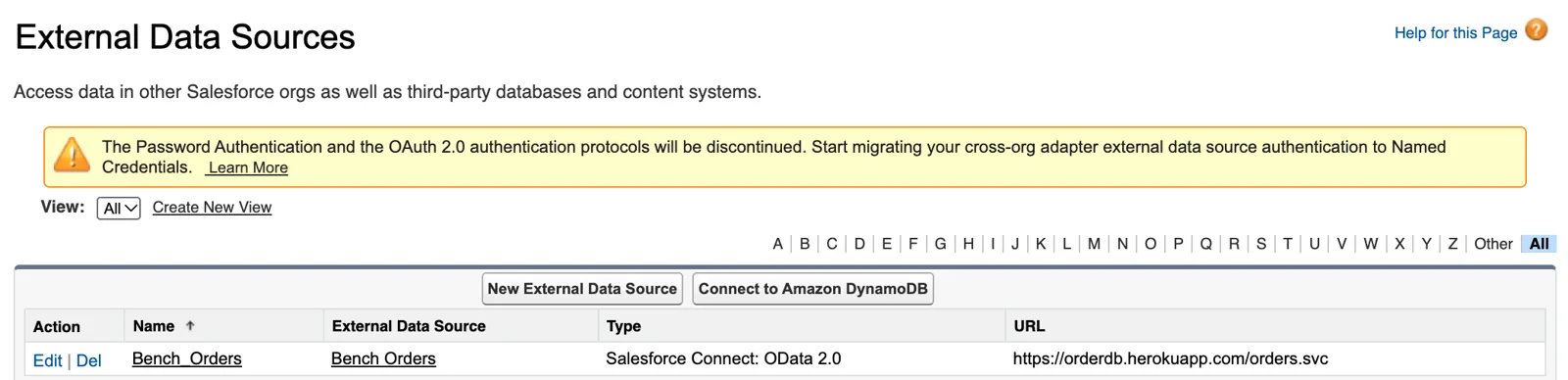
The retirement, on the page where you’d find a cross-org source (Salesforce, Setup in a Developer Edition org, screenshot, November 2026). Full size
And one design warning. Cross-org works well for one org seeing one or two others. When many orgs all want to see each other, the connections multiply the way chapter 5’s web did. Data Architect chapter 14 takes that up in One Org or Many, and chapter 21 of this course takes the integration side.
Choosing, Adapter by Adapter
Section titled “Choosing, Adapter by Adapter”Put it together, and here’s how I’d work through it.
| The data lives in | Reach it with | Check first |
|---|---|---|
| A system that publishes OData | The OData adapter, 4.01 if it can | Indexes and paging on the producer (module 2) |
| A relational database | A service in front: its own, the integration layer’s, or GraphQL | Who owns the service, and the extra hop |
| Snowflake or Athena | The SQL adapter | A view that limits what crosses; who pays for the queries |
| DynamoDB | The DynamoDB adapter | Whether the screens ask by key |
| Another Salesforce org | The cross-org adapter, with a named credential | Both orgs’ API allocations |
| An API none of these speak | A custom adapter (module 4) | Who writes and keeps the code |
The licence and the limits for each are in chapter 16 module 5. And before any of it, the question from Data Architect chapter 14: should this data be reached at all, or copied, or federated?
Test knowledge. Know which adapter fits which source: OData for systems that publish OData, cross-org for another Salesforce org, SQL for Snowflake and Athena, GraphQL for GraphQL APIs, DynamoDB for DynamoDB, and a custom adapter for anything else. Know that cross-org calls use the REST API and count against API limits, and that Salesforce Connect reaches a database only through a service in front of it.
What an Architect Decides Here
Section titled “What an Architect Decides Here”- How each database is reached: which service stands in front of it, and who owns that service.
- Which adapter, and what it needs: a view, an index, a key, a named credential.
- Who pays for every read, in API calls, compute or credits, at the busiest hour.
- Cross-org sign-in moved to named credentials before Spring ‘27.
- Whether any of this should be a copy instead.
Explore
Section titled “Explore”- Migrate Cross-Org Adapter Auth to Named Credentials Before Spring ‘27 (opens in a new tab), Salesforce Help (published 2026-10-07, checked 2026-11-26): the two retirement dates.
- Set Up Salesforce Connect SQL Adapter for Snowflake (opens in a new tab), Salesforce Help (checked 2026-11-26).
- Considerations for Salesforce Connect—Cross-Org Adapter (opens in a new tab), Salesforce Help (checked 2026-11-26): API usage and more.
- Writable External Objects in Salesforce Connect (opens in a new tab), Salesforce Help (checked 2026-11-26): what changes when you write to outside data.