
Testing and Troubleshooting What Was Taken Away
Tämä sisältö ei ole vielä saatavilla valitsemallasi kielellä.
Module 7 of 7 in the chapter Taking Access Away: Restriction and Scoping Rules, chapter 16 of Securing Salesforce: Sharing and Visibility. Each module stands on its own.
The question this module answers: A restriction rule takes access away quietly, with no share row to show for it. How do you prove it does exactly what you meant, and how do you find it when it’s the reason someone can’t see a record?
Everything in Part 2 left evidence: a row in the share table, with a row cause. A restriction rule leaves none (module 1). So testing it isn’t optional, and it isn’t something you check once. In my video I checked the small airport rule the way I check everything: I logged in as the pilot, in his own browser, and looked.
Three users, two records
Section titled “Three users, two records”In chapter 13 I gave you three users for every test: one to own, one to share with, one you’re not sharing with. You prove the positive, and you prove the negative (chapter 13, module 1). A restriction rule needs the same habit, turned around, because it takes away instead of giving.
Take the contracts rule from module 2: everyone without “See All Contracts” sees only their own region’s contracts. You need three users:
- A user the rule applies to: a sales rep in the West region.
- A user it doesn’t apply to: someone on the contracts team, with the permission.
- The administrator, who holds View All Data and sees everything regardless (module 1).
And you need two records: a West contract, and an East contract the West rep can reach through the sharing model, so the rule is the only thing standing between them.
Then:
- The positive. The West rep opens the West contract. The rule didn’t take away what it should leave.
- The negative. The West rep can’t find the East contract: not on the page, not in a list view, a lookup, a report or search. That’s the rule working.
- The control. The contracts team member sees both. If they can’t, the rule applies to more people than you meant.
Here are the three users and the two records, one test at a time. Notice where every arrow after the first one lands: on the East contract, the record the rule is there to hide.
The side effects
Section titled “The side effects”Then test the people and records around the rule, because that’s where rules go wrong:
- A user who matches no rule and shouldn’t: an integration user, an agent’s user, someone with an empty region. They see everything the sharing model opened (module 3).
- A user who could match two rules, if the object has more than one. Salesforce won’t tell you; only your test will (module 3).
- A record with an empty or wrong field value. It vanishes for everyone the rule applies to (module 2).
- The records hanging off it: notes, files and other child records, which the rule doesn’t touch (module 4).
- The side doors on activities: calendar subjects, Chatter posts, search shortcuts (module 4).
Three of those fit in one picture, on the same users and records as the one above. The rep still can’t open the East contract, but the note on it is another matter.
Testing as the user
Section titled “Testing as the user”The quickest way to see what the rule leaves is to be the user. An admin can log in as them, as you did in chapter 4 (chapter 4, module 6): “To help troubleshoot user issues, admins can log in to a Salesforce org or Experience Cloud site as the employee user experiencing the problem” (Log In as Another User (opens in a new tab), Salesforce Help, checked 2026-11-26).
Check every place the rule applies, not just the record page: list views, lookups, related lists, reports, search. And try an old link to a hidden record: “If a user has a link to a record that is no longer accessible after a restriction rule is applied, the user sees an error message” (Restriction Rules (opens in a new tab), Salesforce Help, checked 2026-11-26). That error is your proof the rule reached the record.
In Apex tests, and in code
Section titled “In Apex tests, and in code”Chapter 13 showed how System.runAs lets a test become a user, so “that user’s sharing rules and object-level and field-level permissions are enforced” (chapter 13, module 3). The pages I checked don’t say whether a restriction rule applies inside a runAs block. Don’t assume it either way: write one test with a matching and a non-matching record, run it in your org, and keep it.
What the pages do say is the part that matters most: “Restriction rules aren’t applied for code executed in System Mode” (Restriction Rule Considerations (opens in a new tab), Salesforce Help, checked 2026-11-26). So for every Apex class, flow and integration that reads the object, ask how it runs. If it runs in system mode, the rule doesn’t protect anything it returns to a user. Chapter 17 is about writing that code safely.
When a user can’t see a record: is it a rule?
Section titled “When a user can’t see a record: is it a rule?”Now the other side: someone says “I can’t see it,” and you suspect a rule. Chapter 13 put restriction rules last in its walk-through (chapter 13, module 5). Here’s how to settle it quickly.
The query says yes, the screen says no. “The UserRecordAccess object doesn’t consider whether a user’s access is blocked due to a restriction rule.” (Restriction Rule Considerations). When UserRecordAccess says they have access and they can’t open the record, that’s your first sign.
The Sharing Hierarchy can tell you directly. On the record, the Sharing Hierarchy lists who has access, and “In editions that support restriction rules, this list can include users who don’t have access due to a restriction rule.” Click View on the user: “If a restriction rule blocks access to the record, a message is shown to confirm that access is blocked” (Viewing Which Users Have Access to Your Records in Lightning Experience (opens in a new tab), Salesforce Help, checked 2026-11-26). Chapter 13 module 4 walks through the tool.
Then find which rule. Look at each active rule on the object. Whose user criteria matches this user? There should be exactly one. Then read the record criteria against the record: is the field empty, or different from what you expected?
And rule out the look-alikes. Two things look like a restriction rule and aren’t. If the user can open the record from a list view but not find it by search, that’s probably search crowding: search limits the matches before it applies the user’s access (module 5). If a list view or report shows fewer records than expected but the record opens fine, check whether Filter by scope is selected: that’s a scoping rule (module 6).
Here’s what that looks like on a lab record a restriction rule hides. The list says Read Only; View says blocked.
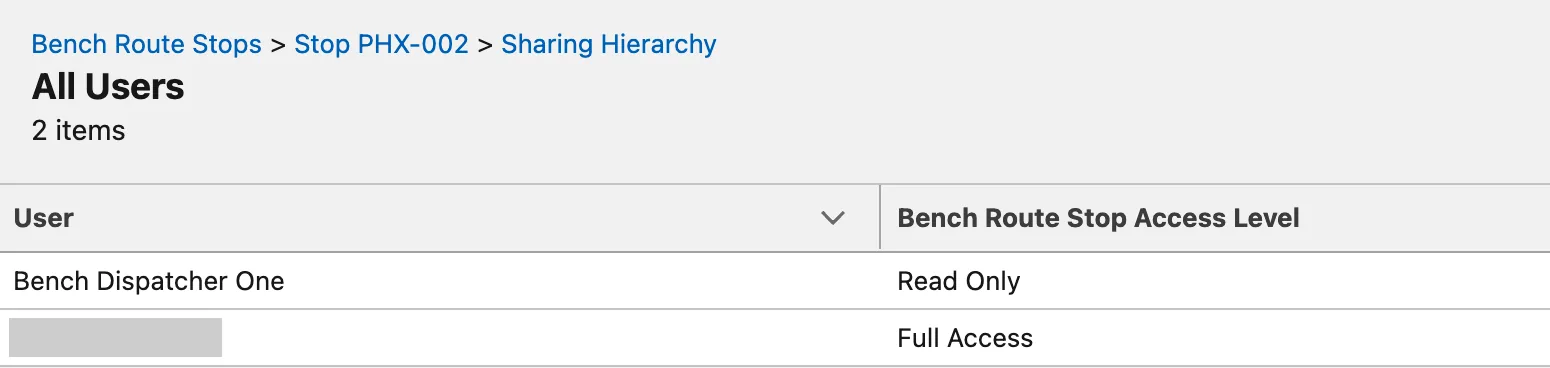
The list counts Bench Dispatcher One as Read Only (Salesforce, a record page in a Partner Developer Edition org, screenshot, November 2026). Full size

View tells the truth: a restriction rule blocks access (Salesforce, a record page in a Partner Developer Edition org, screenshot, November 2026). Full size
Test again when something changes
Section titled “Test again when something changes”A rule depends on fields, values and users that change under it. Run the three users again whenever:
- A rule is added, changed or deployed to another org (module 3).
- A picklist value, custom permission or field a rule uses is added, renamed or deleted (module 2).
- People move: a reorganization, a new region, a new permission set group.
- A new integration, flow or agent starts reading the object.
Keep the test with the rule, as chapter 13 module 4 keeps the evidence: who you tested as, which records, and what each one saw. That’s what you’ll show an auditor, and what the next admin will run before they change it.
Test knowledge. Know how to prove a restriction rule: a user it applies to, a user it doesn’t, and an administrator with View All, against a record that matches and one that doesn’t. Know that UserRecordAccess doesn’t consider restriction rules, that the Sharing Hierarchy can list users a restriction rule blocks and confirms it with a message, that rules aren’t applied to code in system mode, and that a link to a record hidden by a rule shows an error. Know the look-alikes: search crowding, and a scoping rule with Filter by scope selected. A likely area, not a known question.
What an architect decides here
Section titled “What an architect decides here”- The test for each rule: which three users, which two records, and every place it applies.
- Which code, flows, integrations and agents read the object, and whether any run in system mode.
- Where the test lives, and who runs it again when fields, values, permissions or people change.
- The support path for “I can’t see it”: the Sharing Hierarchy first, then the rule’s criteria, then the look-alikes.
Beyond the exam: what AI changes. Add the agent’s user to the three, as a fourth. Ask the agent, in its own words, for the record the rule should hide, and check it says it can’t find it. Then ask for something that would need that record to answer, and check the answer doesn’t leak it anyway, through an action that runs in system mode or through a related record the rule doesn’t touch. Chapter 20 covers agents.
Explore
Section titled “Explore”- Restriction Rule Considerations (opens in a new tab), Salesforce Help (checked 2026-11-26)
- Viewing Which Users Have Access to Your Records in Lightning Experience (opens in a new tab), Salesforce Help (checked 2026-11-26)
- Log In as Another User (opens in a new tab), Salesforce Help (checked 2026-11-26)
- Restriction Rules (opens in a new tab), Salesforce Help (checked 2026-11-26)