
Copy, Virtualize or Federate
תוכן זה אינו זמין עדיין בשפה שלך.
The question this module answers: Should this data be copied into Salesforce at all?
Here’s a question I asked a room of architects once, about a company that sold equipment to hospitals. They had years of orders in their order system: more than 10 million orders, and by the time you added the line items, somewhere between 50 and 100 million rows. The salespeople wanted to open a hospital’s account in Salesforce and see what it had bought. So, do you load 100 million line items into Salesforce?
The answer is you don’t.
But that doesn’t mean the answer is “copy nothing,” either. This module is about the decision that comes before any object or field gets designed: should this data be copied into Salesforce at all? And if not all of it, which part?
Three Choices
Section titled “Three Choices”When data lives somewhere else and Salesforce needs it, I see three choices. They can look the same to a user. Architecturally, they’re very different.
Copy it. Move the data into Salesforce and keep it in step. Now it’s a record like any other: page layouts, sharing, reports, flows, search, and the AI features built on the data model. It’s fast, and it’s there when the other system is down. What you’ve accepted is another copy, and every copy brings responsibility: synchronization, reconciliation, storage, a decision about which system is authoritative, and what happens when the source changes and your copy doesn’t. Chapter 9 was about moving it well.
Virtualize it. Leave the data where it lives and fetch it when someone looks. Salesforce calls this data virtualization: its Data Integration with Salesforce (opens in a new tab) decision guide says “Unless the data absolutely needs to reside in Salesforce, consider data virtualization with Salesforce Connect instead,” and the exam guide asks when to use “virtualized data” (both checked 2026-11-28). That’s Salesforce Connect and its external objects, which chapter 3 introduced, or a custom component that calls the other system and throws the answer away when the page closes. You avoided a copy. You accepted a dependency: every read is now a trip to the other system.
Federate it. Let a data platform query the data where it lives, without first loading it into its own storage. In the Salesforce world that’s Data 360’s zero copy federation with warehouses and lakehouses. Salesforce’s Data 360 Interoperability (opens in a new tab) decision guide (checked 2026-11-28) describes three ways it works: live query, “for interactive analysis and real-time data dashboards”; an accelerated query, a cache “for frequent data queries that don’t change often”, refreshed at intervals from 15 minutes to 7 days; and file federation, “for large-scale batch processing and AI model training” on the data in a data lake. Chapter 15 takes Data 360 itself. Here, it’s the third choice on the table.
None of these is the modern one, or the right one. In class I tell people what I’m looking for when I virtualize instead of copy: you have a large amount of data you don’t want to copy in, you need small amounts of it at a time, and you want real time access to it. When those three are true, virtualizing looks good. When they aren’t, keep asking.
My Four Questions
Section titled “My Four Questions”When I’m deciding whether to copy or leave data where it lives, I come back to four questions: size, change rate, complexity and action. Let’s take each one on Steve Trucking.
Since Checkpoint 2, a completed delivery stays in the org for 13 months and then leaves for one archive in Snowflake, by the partner key, beside RouteDesk’s 4.8 million older deliveries and the status history. That’s the right home for it. Now Redrock’s auditors write in: they’re questioning last year’s delivery counts for one of their distribution centers, and they want the deliveries behind the invoice. Those deliveries aren’t in Salesforce any more. So what do we do?
1. Size. How much data is there, and how much does Salesforce need? The archive grows by millions of deliveries a year. The coordinator answering the auditors needs a few hundred of them, once. Notice the question isn’t “how much data exists?” It’s “how much of it do we need here?” The bigger the gap between those two numbers, the stronger my reason has to be for keeping a complete copy. Here, there’s no reason at all to bring the archive back in.
2. Change rate. How often does it change at the source? Archived deliveries never change, which means a copy wouldn’t go stale. That’s a point for copying, so size has to carry this one. Now look at a truck’s position in FleetLink. It changes every few seconds, and chapter 9’s contract C8 already made the call: Salesforce takes only the latest position, not the 73 million readings a year. When the question is “where is the truck right now?”, a copy refreshed every few minutes is a slightly old answer to a question another system already knows. The faster data changes at the source, the harder it is to keep a copy honest.
3. Complexity. Is the source a domain of its own? I once worked with a satellite company where we tracked the status of beams. The system behind that had satellites, beams, coverage, telemetry and engineering detail, a whole world. The salesperson needed to know whether a customer’s beam was healthy. Do I rebuild that world in Salesforce for one answer? No. I show the part Salesforce needs and leave the domain with the system built to own it. Steve Trucking’s version is smaller: the archive has its own shape, keyed by partner, built for history, not for today’s work.
4. Action. This is the question that pushes me back toward copying. Does Salesforce need to respond to and act on the data? Looking at data is one thing. Driving a process from it is another. Back to the hospital equipment: the line items stayed in the external database, and Salesforce reached them through Salesforce Connect. But the orders themselves came into Salesforce as a custom object, kept in step by a sync, and here’s why. An external object isn’t stored in Salesforce. Nothing in the org sees it change, so the business got no flows, no automation and no notifications from it. They needed all three on orders. On line items, they didn’t.
My class line about external objects was “you don’t get flows, you don’t get triggers.” That was true in 2024 for anything that reacts to a change, and it’s mostly still true, but Salesforce has added two things, so here’s the current picture. A flow can read and write external objects; Salesforce asks that you commit your own records first and reach the external system in a separate transaction, and approval processes and workflow rules aren’t supported (Salesforce Connect Support for Flows and Processes (opens in a new tab), checked 2026-11-28). And External Change Data Capture, for the OData 4.0 and 4.01 adapters, “polls the external system at configurable intervals (5–30 minutes) for tracked changes” and publishes a change event you can subscribe to, or handle with an Apex trigger. That trigger “runs after an event occurs”, receives the change event, “not the object that caused the change”, and runs in a transaction separate from the original change (Use External Change Data Capture (opens in a new tab) and its considerations (opens in a new tab), checked 2026-11-28). So Salesforce can now hear about an external change, within minutes. What it still can’t do is act inside the moment the data changes, the way a record-triggered flow does on a record you own. If the process has to react at once, or has to hold the data when the source is gone, copy the part it acts on.
Copy the Part You Need
Section titled “Copy the Part You Need”Look at what those four questions did. Not one of them said “copy everything” or “copy nothing.” That’s the pattern I want you to remember: leave the large or specialized domain where it belongs, and copy the small part Salesforce has to act on.
Back to Redrock’s auditors. The coordinator opens the distribution center’s account, under Redrock, and sees its archived deliveries, fetched from Snowflake by the partner key, read-only, through Salesforce Connect’s SQL adapter for Snowflake (chapter 7 showed that adapter). No copy. Then the coordinator opens a dispute Case, because now there’s work: an owner, a deadline, a response to Redrock. The Case does need some data in Salesforce, so it gets a copy of only what the dispute acts on: the partner keys of the questioned deliveries, their dates and the counts. The archive stays where it is. The Case carries the key back to it.
Notice two more habits in that design. First, the virtual data is scoped to a parent. In my experience Salesforce Connect works well when an account, or another parent, narrows the list: “this distribution center’s deliveries from last year,” not “every delivery in the archive.” The parent narrows the query, limits what crosses the boundary, and matches what the user is actually doing. Even then, be ready for some delay. Module 2 shows how those relationships work.
Second, it uses more than one method. I say this in every integration class: sometimes you don’t just use one integration method. Virtualize the archive, a small copy for the Case, the latest value from FleetLink. Each piece of data got the method that fits its job.
“We Need the Data in Salesforce”
Section titled ““We Need the Data in Salesforce””When someone tells me “we need the data in Salesforce,” I ask what they mean, because it can mean very different things:
- Users need to see it.
- Salesforce needs to store it.
- Salesforce needs to report across it.
- Salesforce needs to act when it changes.
- Users need to change it.
- Salesforce needs it when the source is down.
- An agent needs to search it, many times a minute.
Seeing points toward virtualizing. Acting, reporting at scale and surviving an outage point toward copying. “Need the data” isn’t a requirement yet. Ask what Salesforce has to do with it, then choose.
Every Virtual Read Is a Dependency
Section titled “Every Virtual Read Is a Dependency”People sometimes say “let’s virtualize it so we don’t have to integrate it.” Be careful. You still integrated the two systems. You changed when the integration happens: instead of moving data ahead of time, you make the call at the moment the user asks. If the source answers in half a second, nobody notices. If it takes thirty, you have a problem. If it’s down, the page has a hole in it.
Salesforce says the same about mashups in Best Practices for Deployments with Large Data Volumes (opens in a new tab) (Winter ‘27, checked 2026-11-28). Keeping a large data set in another application and showing it in Salesforce reduces the data in the org, and its first advantage is “Data is never stale.” Then the disadvantages: “Accessing data takes more time,” and “reporting and workflow do not work on the external data.” And: “mashups are limited to short interactions and small amounts of data.” That’s the trade in Salesforce’s own words. Fresh, and lighter on the org, but slower, with fewer features, for small amounts at a time.
Test knowledge. Know when to virtualize, and the trade-off Salesforce states for mashups in large data volumes: “Data is never stale”, but “Accessing data takes more time”, “reporting and workflow do not work on the external data”, and mashups “are limited to short interactions and small amounts of data.” Know the questions that point toward copying instead: the data is used constantly, must be reported on or automated, or must be there when the source isn’t.
So freshness and availability pull in different directions. A copy is there when the source is down, but it ages. A live read is current, but only when the source answers. What does the business actually value? If yesterday’s value is unacceptable, a nightly copy is wrong. If the work must continue when the source is down, a pure live read is wrong. Salesforce’s Reliability (opens in a new tab) guidance (Well-Architected, checked 2026-11-28) gives you the middle ground: keep calls to a user waiting at “5–10 seconds maximum to maintain responsive UI as users tend not to wait longer”; “Pre-populate the cache during successful operations”, because “The cache provides stale but available data, which is better than complete failure for many use cases”; and use a circuit breaker so that, when a system keeps failing, “requests fail immediately without attempting external calls.” For Redrock’s auditors, a slow archive is fine. For a care agent checking a truck’s position while a customer waits, design what the page says when FleetLink doesn’t answer.
“No Callout Limits” Moves the Limit
Section titled ““No Callout Limits” Moves the Limit”Here’s a fact that changed since I first taught Salesforce Connect. For the OData 2.0, 4.0 and 4.01 adapters, Salesforce says there are no callout limits: “However, the external system may have its own limits on how much traffic it can accept.” For the Amazon DynamoDB, GraphQL and SQL adapters (Amazon Athena and Snowflake), also no callout limits, “However, callouts can incur charges from the hosting provider of the external data source.” And for the cross-org adapter, “Each callout counts towards the API usage limits of the provider org” (General Limits for Salesforce Connect (opens in a new tab), checked 2026-11-28).
Read that carefully. Salesforce no longer stops you, so the limit moved to the system on the other side: its capacity, its bill, or its API allowance. Every time a Steve Trucking coordinator opens a distribution center’s archived deliveries, Snowflake runs a query, and Snowflake charges for the work. That’s fine for a few hundred audit questions a year. Now let’s add something that asks far more often.
For the cross-org adapter, the allowance it spends is the one every org shows on Company Information in Setup: API Requests, Last 24 Hours. The maximum is set by the org’s edition and licenses, so the number below is this org’s, not yours.
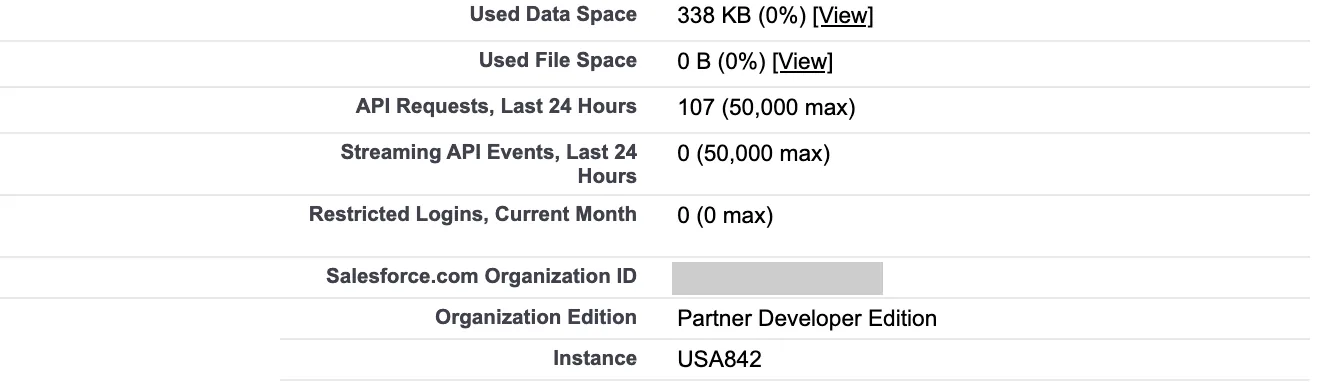
Where an org’s API allowance shows: Company Information. The 50,000 is a Partner Developer Edition’s (Salesforce, Setup in a Partner Developer Edition org, screenshot, November 2026). Full size
Agents Change the Load Pattern
Section titled “Agents Change the Load Pattern”A care agent opens an account, looks at five invoices, clicks one. No problem. Now give an AI agent the same virtual source. It may look up twenty customers, then their invoices, then the related deliveries, compare dates, try another query, refine its answer, all in a few seconds. That’s useful, and it’s a completely different load.
I’m careful about letting agents loose on virtualized data. Even if it’s fine for a human user, an agent can hit it much harder: it can strain the source, run up its costs, and burn credits. A source that performs well for people proves nothing about how it performs as an agent’s retrieval source. So for an agent I ask: does it need the live value, how often will it ask, how much can it pull back, and would a fast copy, or a narrow action that returns only the answer, be safer? I’d rather give agents data that’s built to perform, or a copy. That’s also why, at Checkpoint 2, I recommended that no agent reads the Snowflake archive: no agent’s job at Steve Trucking needs it.
Federation has the same shape, with a price on each question. The Data 360 decision guide prices one example both ways: about 4,200 credits a month for live queries against about 600 with acceleration, because the data changes less often than it’s read (Data 360 Interoperability (opens in a new tab), an example, not a price list). Its rule: “when data is accessed frequently but changes infrequently, Accelerated Query is typically more cost-effective,” and “when data changes frequently (relative to access frequency), Live Query or ingestion is more appropriate.” Agents ask often. Count their questions before you decide.
Chapter 12 asked: what is this agent allowed to know and do? Now add: how hard is it allowed to hit the source while doing it?
Zero Copy Is a Capability, Not a Goal
Section titled “Zero Copy Is a Capability, Not a Goal”I don’t get extra points for copying zero bytes. And I don’t get extra points for putting everything in Salesforce, either.
Both sides have a fair case, and Salesforce makes both. The Agentic Enterprise (opens in a new tab) (Well-Architected, checked 2026-11-28): “Federated access lets agents reason across data wherever it lives. It reduces duplication for connected sources and presents a unified view.” Resource and Cost Optimization (opens in a new tab) (checked 2026-11-28): “External storage keeps data queryable through Salesforce Connect while reducing org volume.” And the Data 360 decision guide on the other side: “Use ingestion when full control, auditing, and traceability are required.”
So if federating something gives you a slow page, a dependency the business can’t live with, a bill nobody predicted or an agent that can’t answer, zero copy was the wrong call for that data. And if you copy data that already has a good authoritative home, only to keep it in step forever, that was the wrong call too. Put each piece where it best serves the work.
Salesforce Connect, Federation or Integration?
Section titled “Salesforce Connect, Federation or Integration?”Once you’ve decided Salesforce needs data from somewhere else, there’s still a choice of mechanism. They overlap, but they aren’t interchangeable. Here’s how I’d draw the line today:
| Integration (copy) | Salesforce Connect (virtualize) | Data 360 federation | |
|---|---|---|---|
| Best when | Salesforce acts on it, or needs it when the source is down | Users see a small part, on a record, now | Analysis, segments, unified profiles and agents’ grounding across platforms |
| Freshness | As fresh as the sync | Live on every read | Live, or cached (15 minutes to 7 days), or file |
| Volume in Salesforce | Everything you copy | None; small amounts per read | None in the CRM; the source does the work |
| Automation | Full: flows, triggers, approvals | Flows in a separate transaction; changes heard within 5–30 minutes (OData 4.0, 4.01) | In Data 360’s own processes |
| Reporting | Full | With limits; slower; a subset of large sources | In Data 360 and its analytics |
| Source down | The copy still answers | The page has a gap | The query fails |
| Cost | Storage and the integration | A license per connection; the source’s capacity or bill | Credits per query, or per refresh |
| Who must keep it in step | You | The source | The source |
Don’t make this decision from a diagram alone. Test the actual workload: how long the external query takes, how many rows come back, how many calls one page makes, what happens at peak, what happens when the source is down, and what happens when an agent uses it. Then decide.
What an Architect Decides Here
Section titled “What an Architect Decides Here”- Whether each piece of data is copied, virtualized or federated, using size, change rate, complexity and action.
- Which small part to copy when Salesforce must act on data that otherwise stays where it lives.
- What “we need the data” means: see, store, report, act, change, survive an outage, or feed an agent.
- What the user sees when the source is slow or down: timeouts, a cache, a message.
- Where the limit moved: the source’s capacity, its charges, or another org’s API allowance.
- How often agents may query a virtual or federated source, and whether they get a copy or a narrow action instead.
- Which mechanism carries it: integration, Salesforce Connect or Data 360 federation.
Beyond the exam: “zero copy” is a capability you’ll hear a lot about. The exam asks when to use virtualized data; the job asks what each read costs, who answers when the source can’t, and how many times an agent will ask. Every choice in this module is a trade, and the trade is yours to state.
Explore
Section titled “Explore”- Earlier in the course: chapter 3, Where Data Lives; chapter 7, Archiving and Purging; chapter 9, The Integration Data Contract; chapter 12, Checkpoint 2.
- Salesforce, Best Practices for Deployments with Large Data Volumes: Using Mashups (opens in a new tab), Winter ‘27, checked 2026-11-28.
- Salesforce Help: General Limits for Salesforce Connect (opens in a new tab), Salesforce Connect Support for Flows and Processes (opens in a new tab), Use External Change Data Capture to Track Data Changes on External Objects (opens in a new tab) and External Change Data Capture Considerations (opens in a new tab), checked 2026-11-28.
- Salesforce: Salesforce Certified Platform Data Architect Exam Guide (opens in a new tab) (questions align to Spring ‘23) and Access External Data With Salesforce Connect (opens in a new tab), checked 2026-11-28.
- Salesforce Architects: Salesforce Data Virtualization (opens in a new tab) and Data 360 Architecture (opens in a new tab), checked 2026-11-28 (no page dates).
- Salesforce Architects, decision guides: Data Integration with Salesforce (opens in a new tab), checked 2026-11-28, and Data 360 Interoperability (opens in a new tab), checked 2026-11-28 (no page dates).
- Salesforce Well-Architected: Reliability (opens in a new tab), Resource and Cost Optimization (opens in a new tab) and The Agentic Enterprise (opens in a new tab), checked 2026-11-28.