
How Fresh Is CRM Data?
Questi contenuti non sono ancora disponibili nella tua lingua.
Module 4 in the chapter Bringing In CRM Data, chapter 5 of the Data 360 Architect course. Each module stands on its own. Previous: Custom Objects: From Core to Data 360
The question this module answers: How soon does a change in your org show up in Data 360, and what decides it?
A pilot’s certification expires today, and someone updates it in core. When does Data 360 know? The answer has changed a lot since I first recorded this, and it now depends on choices you make. So let’s start with what changed.
What changed
Section titled “What changed”When I first walked through the doors, the CRM connector did, in my words then, “hourly upserts and bi-weekly full refreshes.” Today, Salesforce’s schedule page reads differently:
- Incremental refreshes run “every 10 minutes”. They start after a full refresh and fetch the changes made since. Refresh times vary.
- Periodic full refresh “is disabled in new data streams… to save costs where refresh is not required.” If you need one, you turn it on by setting a full refresh interval.
- You can refresh on demand, with Refresh Now on the data stream, and see each run in its refresh history.
- A deleted field is processed in the next incremental refresh.
That second point is worth a moment. A full refresh re-reads everything. Bringing CRM rows in doesn’t cost credits (more on that below), but the work a full refresh can set off downstream does: transforms and calculated insights that read the refreshed data are billed. So Salesforce now leaves it off unless you ask. Ask only when the business has a reason.
Batch or streaming
Section titled “Batch or streaming”Each CRM stream runs in one of two modes, and Salesforce describes them plainly:
- Batch “checks the data once at scheduled intervals of 10-15 minutes.”
- Streaming “processes data with minimal latency, and reflects changes as soon as they’re made in the org.”
Every stream starts in batch, for its first load. Then, if it’s eligible, it moves to streaming. To be eligible, the object must support change events. You can see which mode a stream is in from the Frequency field on its record page.
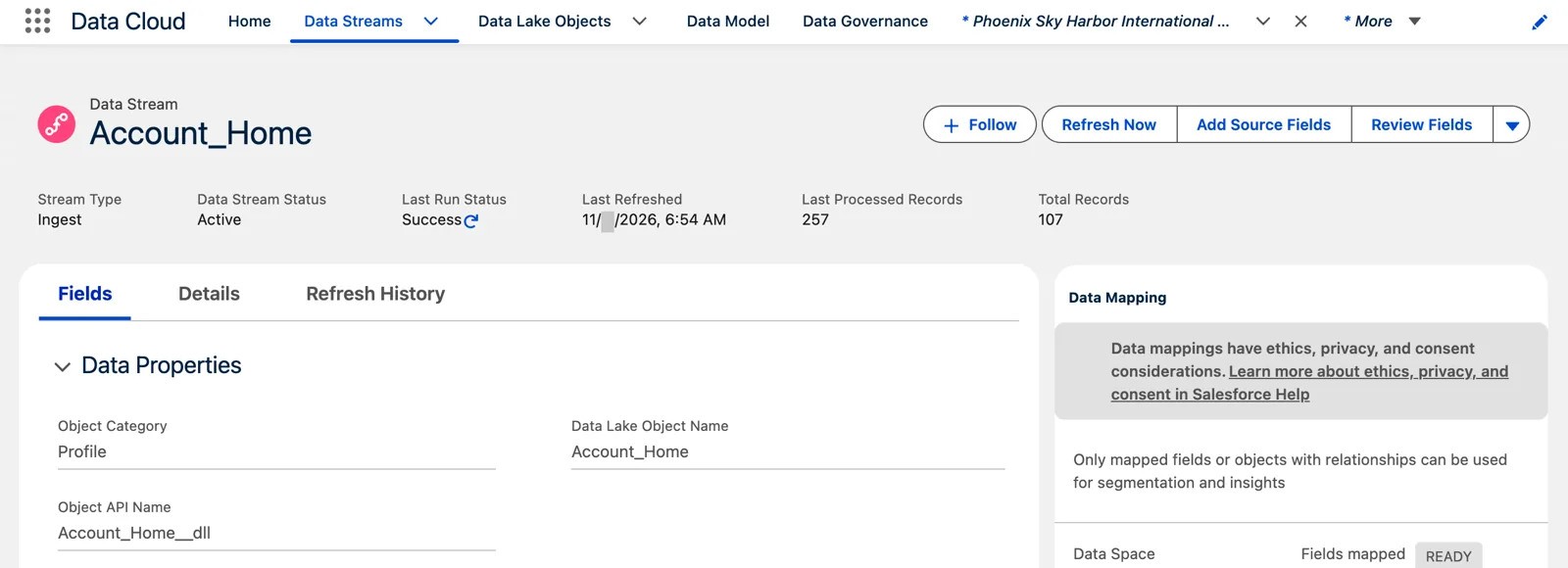
A minute after the load in core, the lake had it: 107 accounts (Salesforce Data 360 in a Developer Edition org, screenshot, November 2026). Full size
What matters for an architect is the list of things that keep a stream in batch. From Salesforce’s page:
- Batch-ingested formula fields in the stream. If you want streaming, leave them out; if periodic batch is fine, leave them in.
- Custom objects still In Development, not Deployed (module 3).
- A Deleted Record data lake object.
- Users added to the Data Cloud Salesforce Connector permission set. It’s meant for the Platform Integration User only (module 3); adding other people stops Data 360 from assigning what streaming needs.
So “how fresh” isn’t only a setting. It’s a result of how you built the object and the stream.
Accelerated Data Ingest
Section titled “Accelerated Data Ingest”There’s one more step toward real time. Accelerated Data Ingest, generally available in the June 2026 release, sends CRM data into Data 360’s real-time layer. Salesforce’s page says the data becomes available there “within approximately one minute of landing in the DLO,” and adds, plainly: “The one-minute delay is expected but not guaranteed by an SLA.”
That real-time layer is what real-time identity resolution, insights, segments and actions run on. Salesforce’s use cases are agents that need current profile data, alerts when a customer’s record changes, and personalization on websites and apps. You turn it on in the settings of a real-time data graph. All of that is chapter 13. Here, it’s enough to know the option exists, and that “about a minute, no promise” is the honest way to describe it.
Freshness still costs credits
Section titled “Freshness still costs credits”Bringing CRM data in is free. Salesforce’s billing page says ingestion through the CRM connector has used no credits since August 7, 2025, and the same goes for the other Salesforce connectors on that page: Marketing Cloud, B2C Commerce CDP, B2C Commerce Intelligence and Marketing Cloud Personalization. “Free” here is about credits; storage is priced separately. Freshness still costs, in two places. Accelerated Data Ingest feeds the real-time layer, and that layer is billed by the events it processes. And every load starts work downstream that is billed: the transforms, identity resolution, insights and segments that run on the new data.
So every step toward real time still costs something. I don’t want my sandboxes constantly burning credits; in production you would most likely have a scheduled frequency. It’s the same rule as the S3 schedule in chapter 4: pick the slowest freshness the use case allows.
Here’s the question to ask the business, for each object: if this changes in core, how soon must Data 360 know? Within the hour is batch. Within minutes is streaming. Within about a minute, for an agent or an alert, is Accelerated Data Ingest. And “whenever” may not need a full refresh at all.
What an architect decides here
Section titled “What an architect decides here”- How fresh each CRM object needs to be, from the business’s answer.
- Which streams should run in streaming mode, and what to keep out of them (batch formula fields) so they can.
- Whether any stream needs a periodic full refresh, and why.
- Whether Accelerated Data Ingest is needed, knowing its minute is expected, not guaranteed.
Explore
Section titled “Explore”All checked 2026-11-14.
- Data Stream Schedule in Data 360 (opens in a new tab), Salesforce Help: the CRM connector’s schedule.
- CRM Connector Streaming (opens in a new tab), Salesforce Help: batch, streaming and what keeps a stream in batch.
- Accelerated Data Ingest (opens in a new tab), Salesforce Developers.
- Data Services Billable Usage Types for Data 360 (opens in a new tab), Salesforce Help (checked 2026-11-14): CRM connector ingestion, the “Internal Data Pipeline”, included with Data 360 since August 7, 2025.