
Sharing Sets, Share Groups, Account Relationships
Ta treść nie jest jeszcze dostępna w Twoim języku.
Module 8 of 9 in the chapter Steve’s 25 Ways to Share a Record: The Map, chapter 5 of Securing Salesforce: Sharing and Visibility. Each module stands on its own.
The question this module answers: Most of the map needs a role and a share table. What about external users whose license gives them neither?
Here’s a thing I said in module 1: not every way works for every user. The license matters, especially for community users. Set 7 is the set for them.
Think of the licenses as seats in a stadium. Way at the back, the seat in the corner with a bench, where you can barely see the field: that’s Customer Community, the cheap seats, built for huge numbers of users. Come down the stadium and you get Customer Community Plus, with some soft cushions: roles and sharing. Closer still, Partner Community. And on the field, your own people, on internal licenses.
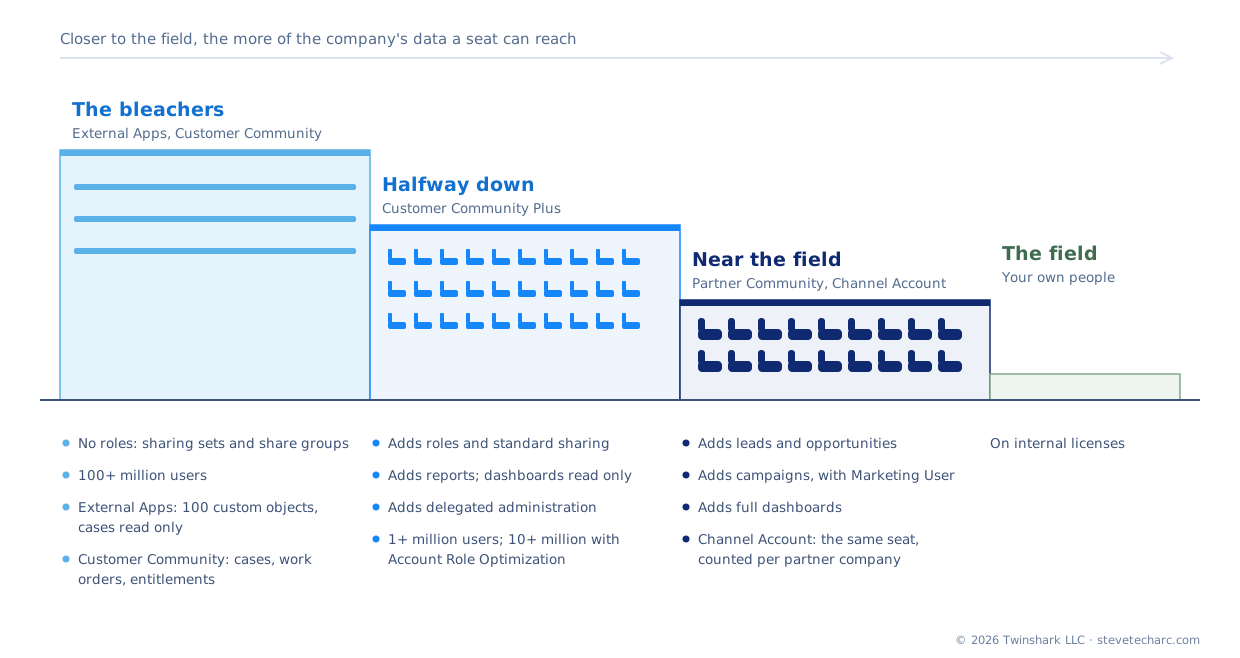
The cheap seats: no role, no share table
Section titled “The cheap seats: no role, no share table”The users in the back seats are what Salesforce calls high-volume users. “Unlike other users, high-volume community or site users don’t have roles, which eliminates performance issues associated with role hierarchy calculations. High-volume users include the External Apps, Customer Community, High Volume Customer Portal, and Authenticated Website license types” (About High-Volume Community or Site Users (opens in a new tab), Salesforce Help, checked 2026-11-01).
No role means most of this chapter doesn’t work for them. Salesforce’s list: you can’t manually share records they own; you can’t put them in public groups, owner-based sharing rules, or account, opportunity or case teams; and you can’t assign them to territories (same page). Their records can only be shared through guest user rules, criteria-based rules, and share groups.
So you can’t create owner-based rules for them, or teams, or most of the rest. They need their own ways, in both directions: records coming in to them, and their records going out to your people.
Way 20: sharing sets
Section titled “Way 20: sharing sets”A sharing set brings records in. Salesforce: “A sharing set grants site users access to any record associated with an account or contact that matches the user’s account or contact” (Create a Sharing Set for Experience Cloud Site Users (opens in a new tab), Salesforce Help, checked 2026-11-01).
The key is the link. The records you want to share must have a lookup to the user’s account or contact. In my demo, I create an airline training object with a lookup to the account. The sharing set says: for site users with this profile, show the airline training records whose account matches the user’s account. Now each site user sees their own company’s training records, and nobody else’s.
A few things from the same page:
- Read Only or Read/Write. You choose the access level for each object in the set.
- One sharing set per profile. “You can have one sharing set per profile only.”
- Not up the hierarchy. “Record access granted to users via a sharing set isn’t extended to their superiors in the role hierarchy.”
- Only objects that can link. The list leaves out objects that are Public Read/Write, and “Custom objects that don’t have an account or contact lookup field.”
- Children don’t bring the parent. “Sharing sets for contacts, cases, and opportunities don’t automatically grant access to these objects’ parent accounts. To grant access, include the account in the sharing set as well.”
And something that’s changed since I first taught this. Sharing sets used to be only for the cheap seats. Salesforce now describes them for Experience Cloud site users generally, while the share groups that go with them still aren’t “available to users with Customer Community Plus and Partner Community licenses” (same page). Chapter 15 sorts out which seat gets what.
Way 21: share groups
Section titled “Way 21: share groups”Now the other direction. In my demo, the site user clones a training record twice. Those two records are owned by the site user. That user has no role, so how does anyone inside your company see them, if the object is Private?
That’s the share group. Salesforce: “Share groups allow you to share records owned by high-volume Experience Cloud site users with authenticated internal and external users.” A share group belongs to a sharing set, and you add members to it: “both internal users from your org as well as external users from the same parent account as the high-volume user” (Use Share Groups to Share Records Owned by High-Volume Experience Cloud Site Users (opens in a new tab), Salesforce Help, checked 2026-11-01).
So sharing sets share with them, and share groups share their records inside. I used to call them sharing groups; share groups is Salesforce’s name, and the one this course uses.
Two warnings from the same page. You can’t use a share group to share these records with guest users; use guest user sharing rules for that. And “Deactivating a share group removes all other users’ access to records owned by high-volume users.”
In and out for a high-volume user
Section titled “In and out for a high-volume user”Put the two together and you have the pattern for every high-volume user: in through a sharing set, out through a share group.
And notice what’s missing: rows. Salesforce says so on the AccountShare page: “For some sharing mechanisms, such as sharing sets, sharing entries aren’t stored at all” (AccountShare (opens in a new tab), Object Reference, Winter ‘27, checked 2026-11-01). The share table we’ve been building all chapter won’t show you a sharing set. Module 9 comes back to that.
Way 22: account relationship data sharing rules
Section titled “Way 22: account relationship data sharing rules”The last way in this set is for users who do have the share table: Customer Community Plus and partner users, the seats with cushions. Sometimes one partner company needs to see another’s records. A distributor and its resellers, say, or two partners working the same deal.
An account relationship data sharing rule does that, account to account. You enable account relationships, create a rule, and then an account relationship between two accounts that uses it. The rule “defines the relationship type, the type of information shared, and the record access granted.” The access is Read or Write, and the records are picked by owner or by account: a lookup “to a user or an account” (Configure Account Relationship Data Sharing Rules (opens in a new tab), Salesforce Help, checked 2026-11-01).
They work on “accounts, campaigns, cases, contacts, custom objects, leads, opportunities, orders,” and the partner fund and marketing budget objects (same page). And one warning before you turn it on: “After you enable account relationships in your org, you can’t disable it” (same page).
It’s a powerful tool for partner networks. Chapter 15 walks through the details.
Where this goes deep
Section titled “Where this goes deep”Chapter 14, External Users: Sites, Communities, Licenses and Roles, covers the seats themselves. Chapter 15, Sharing Sets, Share Groups and Data Sharing for High-Volume Users, takes these three ways apart. For now, know which seat a user is in, because that decides which of the 25 ways can reach them.
What an architect decides here
Section titled “What an architect decides here”- Which license each kind of external user gets, knowing the cheap seats have no role and no share table.
- For high-volume users, which objects they see through sharing sets, and that each one has an account or contact lookup.
- For records high-volume users create, who inside needs them, through which share group.
- Whether partner accounts need to see each other’s records, and whether to turn on account relationships, which can’t be turned off.
- That external access is checked as carefully as internal, with an external user among the three test users.
Beyond the exam: what AI changes. An agent on a customer site answers as the site user. If that user is in the cheap seats, everything the agent can find came through a sharing set or the user’s own records. Read the sharing sets the way the agent will: every record on the customer’s account, on every object in the set. Chapter 20 covers agents.
Explore
Section titled “Explore”- About High-Volume Community or Site Users (opens in a new tab), Salesforce Help (checked 2026-11-01)
- Create a Sharing Set for Experience Cloud Site Users (opens in a new tab), Salesforce Help (checked 2026-11-01)
- Use Share Groups to Share Records Owned by High-Volume Experience Cloud Site Users (opens in a new tab), Salesforce Help (checked 2026-11-01)
- Configure Account Relationship Data Sharing Rules (opens in a new tab), Salesforce Help (checked 2026-11-01)
- AccountShare (opens in a new tab), Object Reference (checked 2026-11-01)