
When Sharing Recalculates, and What It Locks
Questi contenuti non sono ancora disponibili nella tua lingua.
Module 4 of 6 in the chapter Sharing at Scale, chapter 22 of Securing Salesforce: Sharing and Visibility. Each module stands on its own.
The question this module answers: You change a default, a rule, a role or a group. When does access actually change, what can’t you touch while it does, and what’s left behind afterwards?
Every change is work somewhere
Section titled “Every change is work somewhere”A sharing change is a promise: from now on, these people see these records. Salesforce keeps that promise by recalculating, adding and removing share rows until the tables match the new design. Module 1 counted the rows; module 3 showed the locks while groups change. This module is about the recalculation itself: how each kind runs, what it holds, and what it leaves.
Salesforce has changed how much of this happens in the background over the last few releases. So I’ll give you each piece with its date.
What recalculates, and how
Section titled “What recalculates, and how”| You change | How Salesforce recalculates | Where it’s taught |
|---|---|---|
| An org-wide default or a sharing rule | Automatically, “asynchronously and in parallel”; the account family together; Apex sharing recalculations run too; an email when it’s done | Below, and chapter 7 module 2 |
| A role or a group, at volume | Some recalculation runs asynchronously, so access can arrive a little later; a release update, enforced in Spring ‘27 | Chapter 11 module 5, chapter 8 module 4 |
| The rules behind Apex managed sharing | Your own batch class, attached to the custom object | Chapter 11 module 5 |
| Many changes at once, in a realignment | Deferred: suspend, change, then recalculate once | Module 5 |
The first row is worth reading closely, because it’s the one everyone meets. “When you update organization-wide defaults or sharing rules, automatic sharing recalculation is processed asynchronously and in parallel” (Automatic Recalculation of Org-Wide Defaults and Sharing Rules (opens in a new tab), Salesforce Help, checked 2026-11-26). Three details from the same page:
- The account family moves together. “If sharing rules are recalculated for accounts, cases, contacts, or opportunities, sharing rules are also recalculated for the other three objects,” because cases, contacts and opportunities are children of accounts.
- Apex comes along. “When sharing is recalculated, Salesforce also runs all Apex sharing recalculations.” The batch class from chapter 11 runs whether you asked for it or not.
- You can watch it. “You can monitor the progress of your parallel sharing rule or organization-wide default recalculation on the Background Jobs page,” and you get an email when it’s done.
For the second row, the date matters. The asynchronous recalculation after role and group changes is a release update, first available in Spring ‘26 and enforced in Spring ‘27. Code that changes a role and then expects the new access on the next line is the code to find before then. Release updates can move, so check its date on the Release Updates page in Setup.
Here’s that release update on its own card, with its dates:
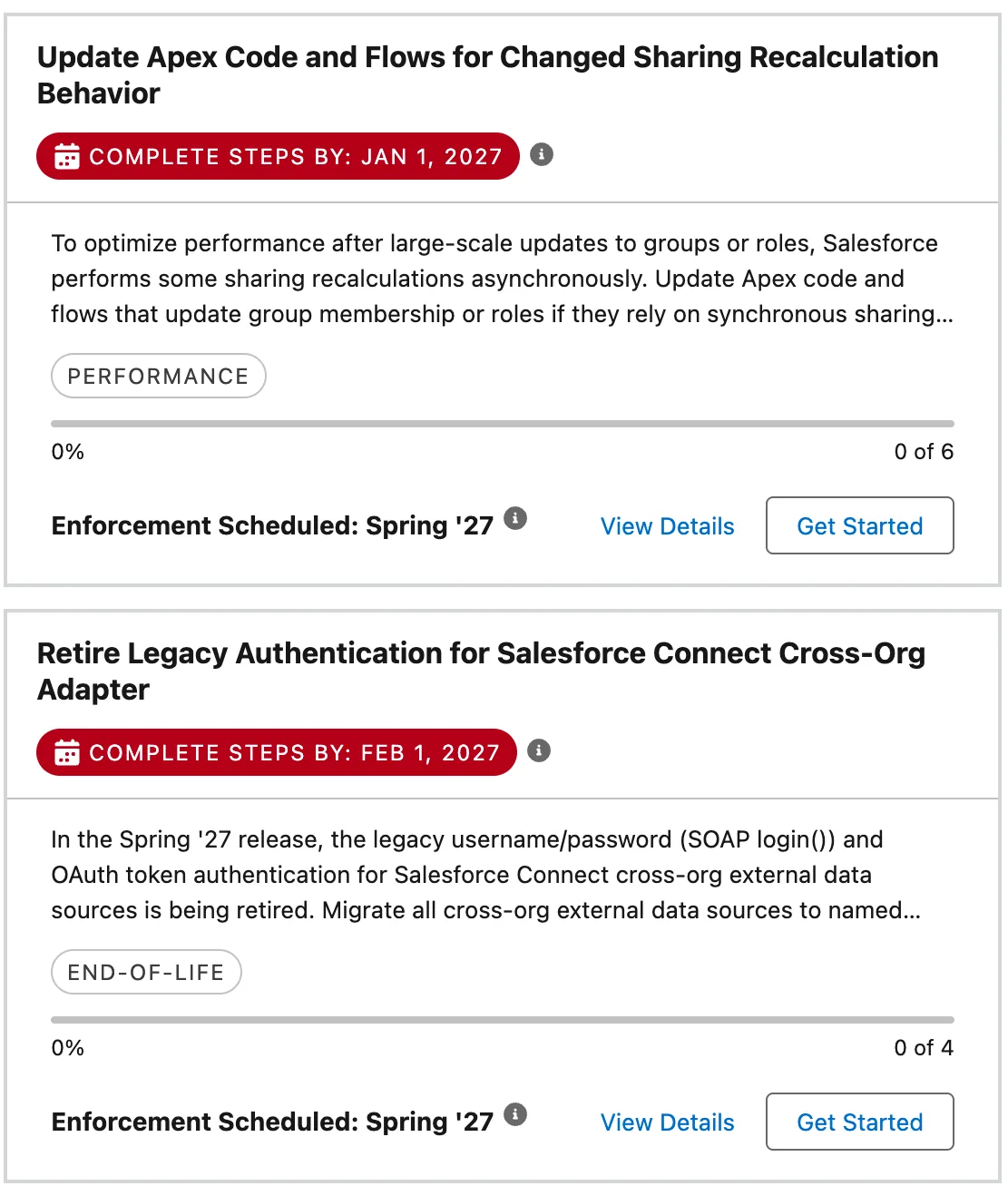
The update on Salesforce’s own card, enforcement scheduled for Spring ‘27; check your own org’s card for its date (Salesforce, Setup in a Partner Developer Edition org, screenshot, November 2026). Full size
The share locks
Section titled “The share locks”While a recalculation runs, some changes wait. Salesforce calls the rules for this object-specific share locks: “The object-specific share locks feature enables you to make changes to a sharing rule for other objects simultaneously,” and “without object-specific share locks, you can’t submit simultaneous sharing changes until recalculation across all objects is complete” (Object-Specific Share Locks (opens in a new tab), Salesforce Help, checked 2026-11-26).
What’s locked, in Salesforce’s words (same page):
- Criteria-based rules. While one recalculates, “you can’t edit or delete that rule. But you can create, edit, or delete any other criteria-based or owner-based sharing rule for that object.”
- Owner-based rules. While one recalculates, “you can’t create, edit, or delete owner-based sharing rules for that object targeting the same group of users.” Other target groups are fine.
- Defaults and rules block each other. “You can’t modify the org-wide defaults when a sharing rule recalculation for any object is in progress. Similarly, you can’t modify sharing rules when recalculation for an org-wide default update is in progress.”
- The account family is locked together. “Locks aren’t shared across objects, except across accounts and associated account children”: a change to an account rule blocks case, contact and opportunity rules until it finishes.
And one instruction worth taping to the monitor: “Use the Recalculate buttons on the Sharing Rules related lists only if sharing rule updates have failed or aren’t working as expected.” Clicking Recalculate “locks sharing rules for that object.” It isn’t a refresh button.
So plan the order of sharing changes the way you’d plan a deployment: defaults first or rules first, not both at once; account-family changes one at a time; and nobody pressing Recalculate to see if it helps.
When access goes, and when it doesn’t, yet
Section titled “When access goes, and when it doesn’t, yet”The last piece is cleanup. When the reason for a share goes away, the share row has to go too. Salesforce does some of that later, on purpose: “Obsolete shares are removed asynchronously after groups are deleted or users are deactivated so that admins can perform other operations without waiting for shares to be deleted” (Asynchronous Deletion of Obsolete Shares (opens in a new tab), Salesforce Help, checked 2026-11-26).
Two cases, and they behave differently (same page):
- Deleting a public group, queue, role or territory. The shares to it become obsolete and are deleted “during off-peak hours,” but the access goes at once: “Members of these groups lose access to records immediately. Users higher than these members in the role hierarchy also lose access.”
- Deactivating a user. Their “manually assigned shares and their team shares are deleted asynchronously. Until the obsolete shares are deleted, users higher in the role hierarchy retain access to the records associated with these shares.” Salesforce’s advice: “If that visibility is a concern, remove the record access granted to the user before deactivating the account.”
Read that second one again with a leaver in mind. Someone leaves, you deactivate them, and for a while their manager can still see the records that were shared with them by hand or through a team. Usually that’s fine. For a confidential case or an HR record, it isn’t. That’s the access-that-ends question from chapter 3 module 4, and the answer is a step in your leaver process, before deactivation.
Test knowledge. Know that org-wide default and sharing rule changes recalculate automatically, asynchronously and in parallel, with the account family (accounts, cases, contacts, opportunities) together and Apex sharing recalculations alongside; that object-specific share locks let you change other objects’ rules while one recalculates, but org-wide defaults and rules block each other and the account family is locked together; that the Recalculate button is for failed updates only; that role and group changes are moving to asynchronous recalculation; and that obsolete shares are deleted asynchronously, so a deactivated user’s manual and team shares stay visible to the role hierarchy above until deleted. This supports IMP-1, the scalability implications of the sharing solution. A likely area, not a known question.
What an architect decides here
Section titled “What an architect decides here”- The order of sharing changes in any release: defaults and rules apart, account-family changes one at a time.
- Who may press Recalculate, and when (only after a failed update).
- Which code changes roles or groups and then relies on the new access straight away, before the Spring ‘27 enforcement.
- Where recalculation is watched: the Background Jobs page, and who reads the completion email.
- A leaver step that removes manual and team access before deactivation, where the records are sensitive.
Beyond the exam: what AI changes. “Fix the sharing so the West team can see these accounts” is one sentence to an agent and a recalculation to Salesforce. If the agent makes five such changes in a minute, the share locks decide which ones wait. Let it propose the changes; schedule them like any other.
Explore
Section titled “Explore”- Automatic Recalculation of Org-Wide Defaults and Sharing Rules (opens in a new tab), Salesforce Help (checked 2026-11-26)
- Object-Specific Share Locks (opens in a new tab), Salesforce Help (checked 2026-11-26)
- Asynchronous Deletion of Obsolete Shares (opens in a new tab), Salesforce Help (checked 2026-11-26)