
HTTP Status Codes
Dette innholdet er ikke tilgjengelig på ditt språk.
Every answer in HTTP starts with a three-digit number. Before you read the body, before you read the logs, before you call anyone, read that number. Always, always check the status code. It tells you whether it worked, and if it didn’t, whose problem it is.
This page is every standard status code in one place, in plain words, with the two questions an architect asks of each one: whose is it to fix, and should we try again? Where Salesforce uses a code in its own way, that’s here too.
The list comes from the official registry, kept by IANA, and the standard behind it, RFC 9110 (HTTP Status Code Registry (opens in a new tab), IANA, last updated 2025-09-15; RFC 9110: HTTP Semantics (opens in a new tab), IETF, June 2022; both checked 2026-11-01). Any system can use these codes. Not every system uses all of them, and some use them a little differently, so the system’s own documentation always has the last word.
The First Digit Tells You Most of It
Section titled “The First Digit Tells You Most of It”There are five groups, by the first digit:
- 100s, informational. “Got it, keep going.” You’ll rarely see these yourself; the software handles them.
- 200s, success. It worked.
- 300s, redirection. The answer is somewhere else. Go there.
- 400s, client error. Something about the request is wrong. The client has to fix it.
- 500s, server error. The server couldn’t do it. The client can’t fix that.
And the first digit is a rule, not only a habit. RFC 9110 says a client that gets a code it doesn’t recognize should treat it like the x00 of its group: an unknown 471 is handled as a 400, an unknown 599 as a 500. So even a code you’ve never seen tells you which side to look at.
What to do next depends on the code, not only the group. The 429 is the one to remember: it’s a 400, but the request isn’t wrong. It’s just too soon.
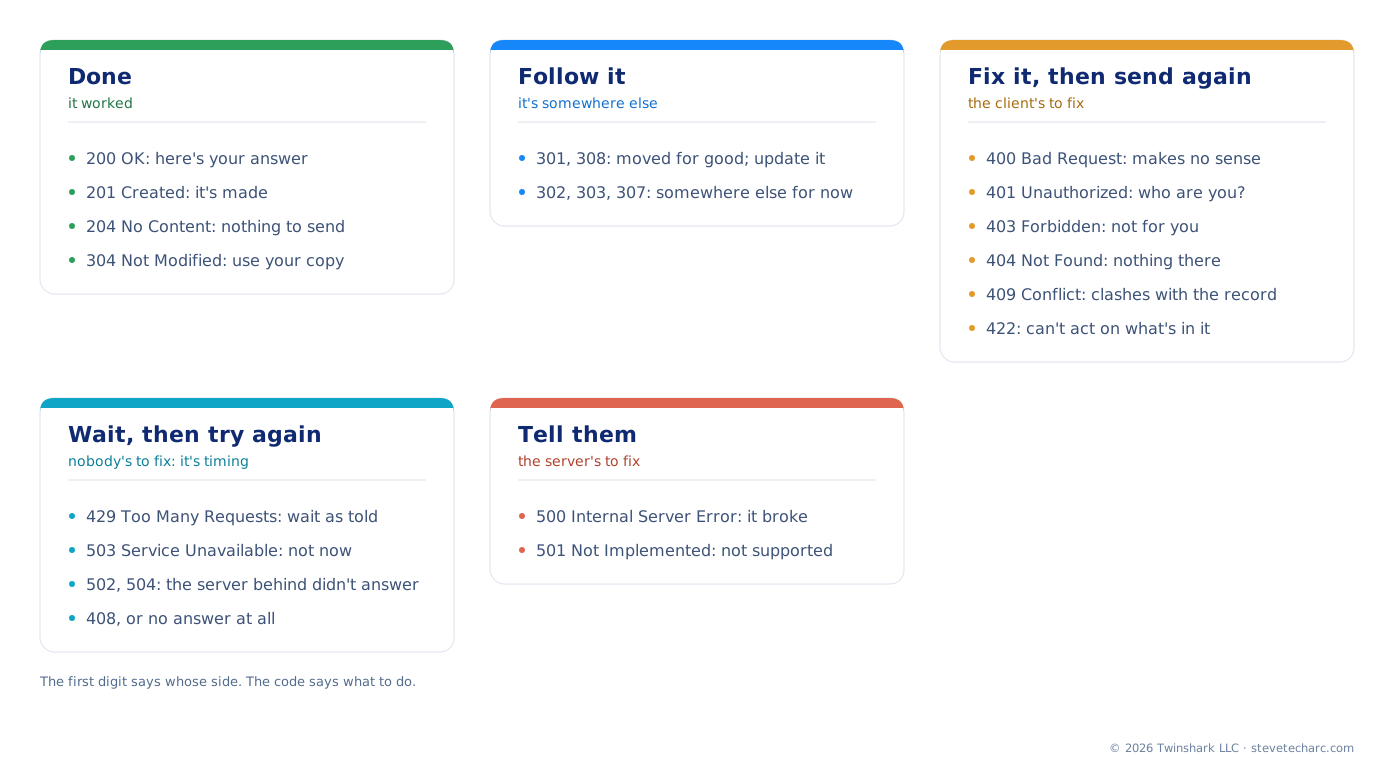
What to do with the answer.
The Ones You’ll Actually Meet
Section titled “The Ones You’ll Actually Meet”Out of about sixty, these are the codes that come up again and again between systems. Start here.
| Code | Name | What it means | Whose to fix | Try again? |
|---|---|---|---|---|
| 200 | OK | It worked. Here’s the answer. | Nobody | No need |
| 201 | Created | It worked, and something new was made. | Nobody | No need |
| 204 | No Content | It worked, and there’s nothing to send back. | Nobody | No need |
| 301 | Moved Permanently | It lives at a new address for good. | The client: update the address | Yes, at the new address |
| 304 | Not Modified | Nothing changed since you last asked. Use your copy. | Nobody | No need |
| 400 | Bad Request | The request makes no sense to the server. | The client | Not until it’s fixed |
| 401 | Unauthorized | Who are you? The sign-in is missing, wrong or expired. | The client | After signing in again |
| 403 | Forbidden | I know who you are, and it’s not for you. | The client, or whoever gives it access | Not with the same access |
| 404 | Not Found | Nothing there: wrong address, or no such record. | The client | Not until it’s fixed |
| 409 | Conflict | The request clashes with the current state of the record. | The client | After resolving the clash |
| 422 | Unprocessable Content | The format is right, but the server can’t act on what’s in it. | The client | Not until it’s fixed |
| 429 | Too Many Requests | Too many, too fast. Slow down. | Nobody: wait | Yes, after the wait it gives |
| 500 | Internal Server Error | Something broke on the server. | The server | Maybe later; tell them |
| 502 | Bad Gateway | A server in the middle got a bad answer from the one behind it. | The server side | Yes, with growing waits |
| 503 | Service Unavailable | Not now: overloaded or down for maintenance. | Nobody: wait | Yes, after the wait it gives |
| 504 | Gateway Timeout | A server in the middle gave up waiting for the one behind it. | The server side | Yes, with growing waits |
Should We Try Again?
Section titled “Should We Try Again?”Trying again is the right answer for some codes and the wrong one for others. Salesforce’s Well-Architected guidance matches the retry to the failure (Reliability (opens in a new tab), Salesforce Architects, checked 2026-11-01):
- 429: wait as long as the server says, in its
Retry-Afterheader, then try again. - 500s: try again, waiting longer each time: one second, two, four, eight, with a limit of 30 to 60 seconds.
- No answer at all, a timeout: try again after a short wait. The request may never have arrived.
- Every other 400: “Don’t retry; fix the request.” The same wrong request gets the same answer.
And count your tries. Something that fails every time shouldn’t be tried forever. After the last try, stop, log it, and tell a person.
One more check before any retry: is it safe to send twice? A GET only reads, so sending it again does no harm. A POST that creates a delivery might create two. If you’ll retry a create, give the request something the server can match, such as an external ID, so the second try updates instead of duplicating.
Every Standard Code
Section titled “Every Standard Code”The full registry, group by group. “Defined in” is the standard that defines the code; most are in RFC 9110.
100s: Informational
Section titled “100s: Informational”| Code | Name | What it means | Defined in |
|---|---|---|---|
| 100 | Continue | Go ahead and send the rest of the request. | RFC 9110 |
| 101 | Switching Protocols | The server is switching to the protocol the client asked for, such as WebSocket. | RFC 9110 |
| 102 | Processing | Still working on it (from WebDAV). | RFC 2518 |
| 103 | Early Hints | Here are some headers early, so you can start loading. | RFC 8297 |
| 104 | Upload Resumption Supported | A temporary registration for resumable uploads, due to expire 2026-11-13. | IETF draft |
200s: Success
Section titled “200s: Success”| Code | Name | What it means | Defined in |
|---|---|---|---|
| 200 | OK | It worked. Here’s the answer. | RFC 9110 |
| 201 | Created | It worked, and something new was made. | RFC 9110 |
| 202 | Accepted | Received, but not done yet. It might still fail later. | RFC 9110 |
| 203 | Non-Authoritative Information | It worked, but something in the middle changed the answer. | RFC 9110 |
| 204 | No Content | It worked, and there’s nothing to send back. | RFC 9110 |
| 205 | Reset Content | It worked. Clear the form. | RFC 9110 |
| 206 | Partial Content | Here’s the part you asked for, not the whole thing. | RFC 9110 |
| 207 | Multi-Status | Several results in one answer, one for each part (from WebDAV). | RFC 4918 |
| 208 | Already Reported | Already listed earlier in this answer (from WebDAV). | RFC 5842 |
| 226 | IM Used | Here’s the change since your copy, not the whole thing. | RFC 3229 |
A 202 deserves a second look. It means “I’ve got it,” not “it’s done.” Whatever you sent can still fail after the 202 comes back, so you need another way to find out how it ended.
300s: Redirection
Section titled “300s: Redirection”| Code | Name | What it means | Defined in |
|---|---|---|---|
| 300 | Multiple Choices | There’s more than one match. Pick one. | RFC 9110 |
| 301 | Moved Permanently | It lives at a new address for good. | RFC 9110 |
| 302 | Found | It’s at another address for now. | RFC 9110 |
| 303 | See Other | The answer is at another address. Go and get it there. | RFC 9110 |
| 304 | Not Modified | Nothing changed since you last asked. Use your copy. | RFC 9110 |
| 305 | Use Proxy | No longer used: deprecated. | RFC 9110 |
| 306 | (Unused) | No longer used: reserved. | RFC 9110 |
| 307 | Temporary Redirect | It’s at another address for now. Send the same request there. | RFC 9110 |
| 308 | Permanent Redirect | It lives at a new address for good. Send the same request there. | RFC 9110 |
Between systems, you’ll rarely see a 300. In signing in, they’re everywhere: single sign-on sends the browser back and forth with redirects.
400s: Client Error
Section titled “400s: Client Error”| Code | Name | What it means | Defined in |
|---|---|---|---|
| 400 | Bad Request | The request makes no sense to the server. | RFC 9110 |
| 401 | Unauthorized | Who are you? The sign-in is missing, wrong or expired. | RFC 9110 |
| 402 | Payment Required | Reserved for future use. | RFC 9110 |
| 403 | Forbidden | I know who you are, and it’s not for you. | RFC 9110 |
| 404 | Not Found | Nothing there: wrong address, or no such record. | RFC 9110 |
| 405 | Method Not Allowed | That verb isn’t allowed here: a DELETE where only GET works, for example. | RFC 9110 |
| 406 | Not Acceptable | The server can’t answer in the format you asked for. | RFC 9110 |
| 407 | Proxy Authentication Required | Sign in to the proxy in the middle first. | RFC 9110 |
| 408 | Request Timeout | The server stopped waiting for the rest of your request. | RFC 9110 |
| 409 | Conflict | The request clashes with the current state of the record. | RFC 9110 |
| 410 | Gone | It used to be here, and it’s gone for good. | RFC 9110 |
| 411 | Length Required | Say how big the body is. | RFC 9110 |
| 412 | Precondition Failed | A condition you set in the headers wasn’t true. | RFC 9110 |
| 413 | Content Too Large | The body is too big. | RFC 9110 |
| 414 | URI Too Long | The address is too long. | RFC 9110 |
| 415 | Unsupported Media Type | The server doesn’t take the format you sent. | RFC 9110 |
| 416 | Range Not Satisfiable | The part you asked for doesn’t exist. | RFC 9110 |
| 417 | Expectation Failed | The server can’t meet what you said you expect. | RFC 9110 |
| 418 | (Unused) | Reserved. It began as a joke in an RFC published on 1 April, and was used too often to give to anything else. | RFC 9110 |
| 421 | Misdirected Request | You reached a server that can’t answer for that address. | RFC 9110 |
| 422 | Unprocessable Content | The format is right, but the server can’t act on what’s in it. | RFC 9110 |
| 423 | Locked | The thing you want to change is locked (from WebDAV). | RFC 4918 |
| 424 | Failed Dependency | This failed because something it depended on failed (from WebDAV). | RFC 4918 |
| 425 | Too Early | The server won’t risk handling this yet. | RFC 8470 |
| 426 | Upgrade Required | Switch to a newer protocol, then ask again. | RFC 9110 |
| 428 | Precondition Required | This request must be conditional. Add a condition. | RFC 6585 |
| 429 | Too Many Requests | Too many, too fast. Slow down. | RFC 6585 |
| 431 | Request Header Fields Too Large | The headers are too big. | RFC 6585 |
| 451 | Unavailable For Legal Reasons | Blocked for a legal reason. | RFC 7725 |
Two of these get mixed up all the time. A 401 is about who you are: sign in again. A 403 is about what you’re allowed: signing in again won’t help. RFC 9110 says a client shouldn’t keep repeating a 403 with the same credentials.
500s: Server Error
Section titled “500s: Server Error”| Code | Name | What it means | Defined in |
|---|---|---|---|
| 500 | Internal Server Error | Something broke on the server. | RFC 9110 |
| 501 | Not Implemented | The server doesn’t support what you asked for. | RFC 9110 |
| 502 | Bad Gateway | A server in the middle got a bad answer from the one behind it. | RFC 9110 |
| 503 | Service Unavailable | Not now: overloaded or down for maintenance. | RFC 9110 |
| 504 | Gateway Timeout | A server in the middle gave up waiting for the one behind it. | RFC 9110 |
| 505 | HTTP Version Not Supported | The server doesn’t speak that version of HTTP. | RFC 9110 |
| 506 | Variant Also Negotiates | The server’s own setup is wrong. | RFC 2295 |
| 507 | Insufficient Storage | The server has no room to save it (from WebDAV). | RFC 4918 |
| 508 | Loop Detected | The server went round in a loop (from WebDAV). | RFC 5842 |
| 510 | Not Extended | Obsolete: no longer in use. | RFC 2774 |
| 511 | Network Authentication Required | Sign in to the network first, like a hotel’s Wi-Fi page. | RFC 6585 |
The 502 and 504 are worth knowing in integration. They mean there’s a server in the middle, such as a gateway, a load balancer or middleware, and the problem is behind it. The server you called is fine. The one behind it isn’t.
What Salesforce Adds
Section titled “What Salesforce Adds”Salesforce’s REST API uses the standard codes, and its guide says what each one means there (Status Codes and Error Responses (opens in a new tab), REST API Developer Guide, checked 2026-11-01). A few are worth knowing because they aren’t what you’d guess:
- 300, when an external ID matches more than one record. An upsert by external ID expects one match. Two records with the same external ID gets a 300, with the list of matches.
- 403 with
REQUEST_LIMIT_EXCEEDED, when the org is out of API calls. Many APIs say “too many” with a 429. Salesforce’s REST API says it with a 403 and that error code. So read the body of a 403 before you decide it’s a permission problem. - 404, “verify that there are no sharing issues.” A record the user can’t see looks the same as a record that doesn’t exist. A 404 for an integration user can be a sharing problem, not a wrong ID.
- 409, with a check of the API version. A conflict can mean the resource doesn’t fit the version you asked for.
- 410, for something retired. When an API version or resource is retired, its address answers 410. Update the reference.
- 414 and 431, at 16,384 bytes. That’s the limit for the address, and for the address and headers together.
- 420 and 502, from Salesforce Edge. Salesforce Edge sits in front of the org. A 420 means it had no route for the address, and 502 means it couldn’t reach the org. 420 isn’t in the standard registry at all: it’s Salesforce’s own.
Salesforce also puts its own error code in the body, such as MALFORMED_ID or NOT_FOUND, beside a message and the field it’s about. The status says which side; the body says what exactly.
And in Flow, an HTTP callout treats “a response status code of 300 or greater” as an error, and sends the flow down its fault path (HTTP Callout Considerations and Limits (opens in a new tab), Salesforce Help, checked 2026-11-01). So in a flow, even a redirect is a fault.
Codes Outside the Standard
Section titled “Codes Outside the Standard”You’ll meet numbers that aren’t in the registry. Salesforce’s 420 is one. Other products, proxies and content delivery networks use their own too. Don’t try to memorize them. Do two things:
- Read the first digit. RFC 9110’s rule still holds: an unknown 4xx is the client’s side, an unknown 5xx the server’s.
- Look it up in that system’s documentation, and add it to your integration’s runbook, so the next person doesn’t have to.
Explore
Section titled “Explore”- IANA, HTTP Status Code Registry (opens in a new tab): the official list, last updated 2025-09-15, checked 2026-11-01.
- IETF, RFC 9110: HTTP Semantics (opens in a new tab), section 15, and RFC 6585 (opens in a new tab), for 428, 429, 431 and 511.
- Salesforce, Status Codes and Error Responses (opens in a new tab), REST API Developer Guide, checked 2026-11-01.
- Salesforce Architects, Well-Architected, Reliability (opens in a new tab): retries by failure type, checked 2026-11-01.
- In the courses: The REST Request, Taken Apart, where the codes are first taught, and What You’ll See When It Breaks, for the codes on a Flow fault path.