
Internal User Licenses
Dette innholdet er ikke tilgjengelig på ditt språk.
In class I ask: the CEO wants pretty dashboards. Sales license or Service? Most people guess, and most people guess without asking the real question, which is: what data sits under that dashboard, and which license reaches it? Licenses are part of the data model. They decide which objects your users can touch, so they decide which objects your design can count on.
This page is about your own people, the users inside the company. The licenses for customers and partners have their own page, Experience Cloud Licenses. Salesforce doesn’t publish the internal licenses as one grid. They’re spread across several Help pages, in paragraphs. This page puts them side by side, in the same three cuts:
- On the field: the internal licenses from the smallest to the biggest, and what each one adds.
- The architect’s questions: grids for the rows that change a design.
- Every license, for lookup, at the bottom.
Internal or External? Decide That First
Section titled “Internal or External? Decide That First”Salesforce’s rule is simple: “Anyone who is an employee of a company or needs employee privileges requires an internal license.” That includes people who aren’t on the payroll. Consultants who run your org, and accountants or lawyers who work for other companies too, get internal licenses when you treat them as employees: “The key point is that you’re treating all these users as employees.”
Everyone else gets an external license, and that’s not a cost saving you can skip. “The incorrect use of an internal license for an external use case can provide external users unwanted or inappropriate access to your data and records.” The rule works the other way too: Experience Cloud licenses “are only to be used by external users. Don’t assign them to internal employees or contractors.” (When to Use an Internal or External License (opens in a new tab), Salesforce Help, checked 2026-11-01.)
So the first question about any user isn’t which license. It’s: are we treating this person as one of us?
On the Field
Section titled “On the Field”On the Experience Cloud page, the external licenses are seats in a stadium, and the field is your own people. Down on the field, there are positions too. Here they are from the smallest to the biggest. Each step lists what it adds.
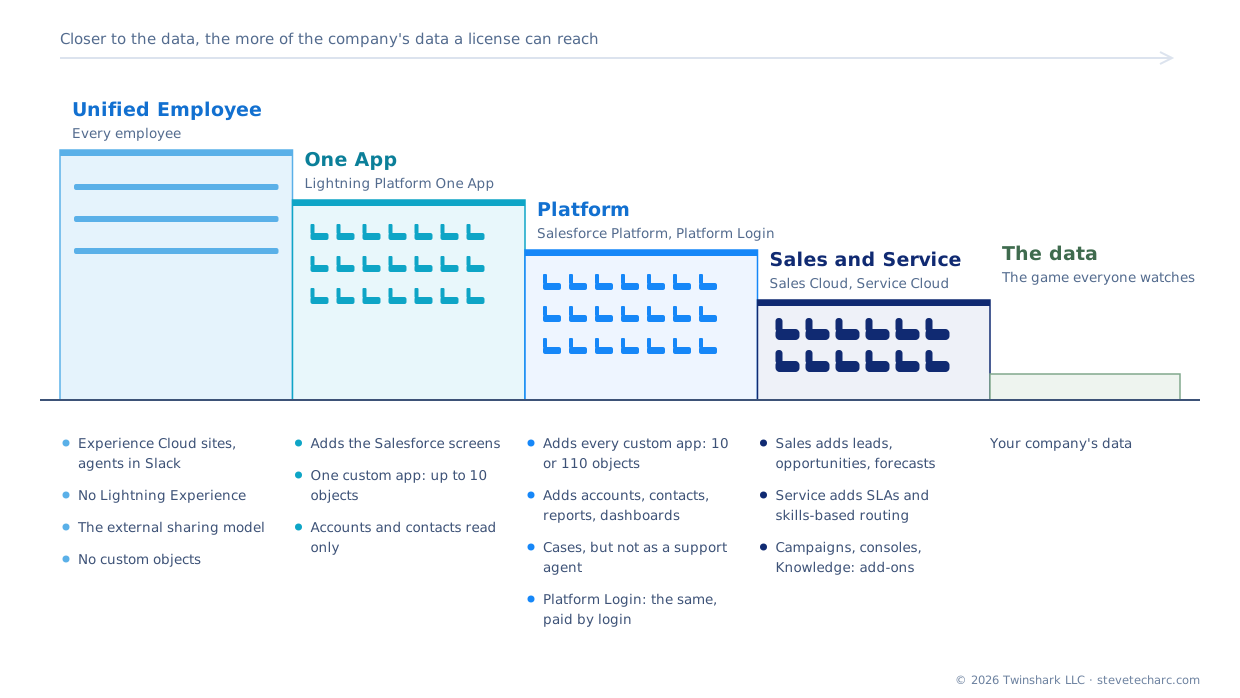
The same four, side by side:
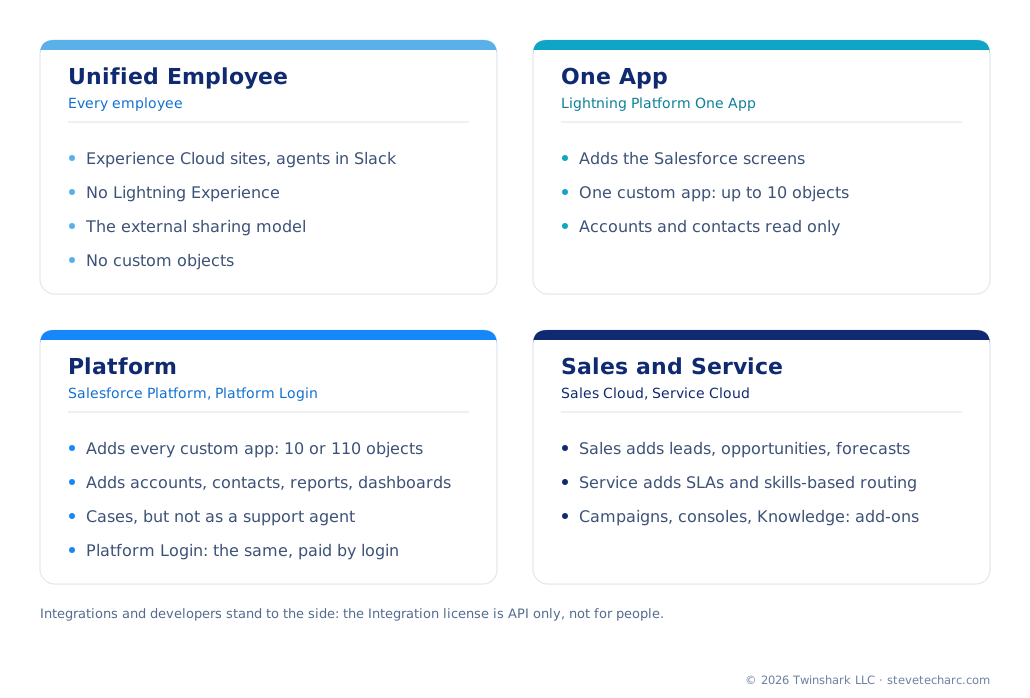
Unified Employee: every employee, without the Salesforce screens. The newest one. It’s “designed for every employee user at your company,” with access to Experience Cloud sites and employee agents in Slack. What it doesn’t give is just as important:
- No Lightning Experience. The license “doesn’t provide employee users access to Lightning Experience in your Salesforce org.”
- The external sharing model. It “uses the external org-wide default sharing model,” which is “more restrictive than the scope for other internal authenticated users.” An internal license that shares like an external one: know that before you design around it.
- A short object list: accounts, contacts, documents and Knowledge to read; cases, activities and employee records to work on (some with a permission set license). No custom objects, unless they come in a security-reviewed managed package from AppExchange.
Lightning Platform One App: one custom app. Adds the Salesforce screens and one custom app, “defined as up to 10 custom objects,” with unlimited custom tabs. Accounts and contacts are read only, and its users can see a dashboard only if the dashboard’s running user has the same license. This is the ten-object license from chapter 3, where a whole workforce directory had to fit into two objects.
Salesforce Platform: every custom app. Adds all the custom apps in the org, and full access to accounts and contacts, reports, dashboards, documents and tasks. It’s sold today as Lightning Platform Starter (10 custom objects per license) and Lightning Platform Plus (110), and both “contain the Salesforce Platform user license.” What it doesn’t get: “forecasts, leads, campaigns, and opportunities.” Cases are there, with a catch: “A Service Cloud license is required for users acting as support agents.”
Salesforce Platform Login: the same seat, paid by the visit. Since October 15, 2024, the Platform license has a login-based twin, with “the same features and functionality … but with a flexible, usage-based, pricing option.” Several logins on the same day count as one.
Sales Cloud and Service Cloud: the whole CRM, two ways. Nearest the data there are two positions side by side. Both sit on the same user license, Salesforce: “Designed for users who require full access to standard CRM and AppExchange apps,” entitled to “any standard or custom app.” What separates them is the product your company bought, Agentforce Sales (formerly Sales Cloud) or Agentforce Service (formerly Service Cloud), and the add-ons on top. And that separation decides the objects, so it decides the KPIs.
- Sales Cloud adds the sales objects over Platform: leads, opportunities, forecasts, and campaigns with the Marketing User add-on. Its KPIs are pipeline and forecast. Forecasting is available “in Enterprise and Unlimited Editions with Sales.”
- Service Cloud adds the service features over Platform: cases at the center, worked in the service console, service-level agreements through entitlements and milestones, skills-based routing, and Knowledge. Its KPIs are service levels: how long until a case breaches its agreement. Salesforce lists entitlement management and skills-based routing as available “with Agentforce Service.”
Many companies buy both. Then the same user license can reach both sides, and permission sets decide who works where. The grid in Sales, Service or Platform? below puts the three side by side.
Standing to the side: the ones that aren’t people, and the builders.
- Salesforce Integration. “Grants access to Salesforce data and features only through the API. This license is designed for system-to-system integrations. It can’t be used for human users.” Five come with each Enterprise, Unlimited and Performance Edition org, and one with each Developer Edition org. One integration, one integration user. Ask which identities need the data, not just which people.
- Developer and Salesforce Limited Access - Free. For people who build. In production these licenses restrict access to standard and custom objects; the Developer license comes with a Developer sandbox, a scratch org and the Dev Hub, the free one without the sandbox and scratch org.
Test knowledge. A big group of users is on the Platform license, and the design puts their work on Opportunity. What’s wrong? Platform users aren’t entitled to opportunities, so the design is broken before it starts. The fix is usually a custom object, or a different license for that group.
The Questions an Architect Asks
Section titled “The Questions an Architect Asks”Only the rows that change a design. The columns are short names: Platform is Salesforce Platform, Platform Login is Salesforce Platform Login, One App is Lightning Platform One App, and Integration is Salesforce Integration. From Salesforce Help, Standard User Licenses (opens in a new tab), Features Available with Lightning Platform Starter, Lightning Platform Plus, and Salesforce Platform Login Licenses (opens in a new tab) and Unified Employee License Details (opens in a new tab), all checked 2026-11-01.
How to read the grids. Full everything the row offers Part some of it, or with an add-on Read only No Not stated Salesforce’s page says nothing either way Not listed not on that license’s own object list. The words always say exactly what’s included; the colour and the symbol only help you see the pattern.
Sales, Service or Platform?
Section titled “Sales, Service or Platform?”The three licenses most of your users will have. Sales Cloud and Service Cloud are products, not user licenses: both columns are the Salesforce user license, in an org that bought that product. From Salesforce Help: Standard User Licenses (opens in a new tab), Available Feature Licenses (opens in a new tab), Supported Editions for Service Features (opens in a new tab) and Turn On Salesforce Forecasting and Define Forecast Settings (opens in a new tab), all checked 2026-11-01.
| Sales Cloud | Service Cloud | Platform | |
|---|---|---|---|
| User license | Salesforce | Salesforce | Salesforce Platform |
| Built for | Selling | Supporting customers | Custom apps |
| Leads, opportunities | Yes | Yes | No |
| Forecasts | Yes | Only with Sales in the org | No |
| Campaigns | With Marketing User | With Marketing User | No |
| Cases | Yes | Yes, at the center | Read, create, edit, delete¹ |
| Console | Sales console, with Sales Console User | Service console, with Service Cloud User | Lightning Console app, if enabled |
| Service-level agreements (entitlements, milestones) | No | Yes | No |
| Skills-based routing | No | Yes | No |
| Knowledge | With the Knowledge add-on | In Unlimited Edition; an add-on in others | Read only |
| Custom objects and apps | Yes | Yes | Read, create, edit, delete² |
| The KPIs it can show | Pipeline, forecasts, open cases | Service levels, case handling | The custom app’s own numbers |
¹ Not as a support agent: “A Service Cloud license is required for users acting as support agents.” ² Up to 10 custom objects per license on Lightning Platform Starter, 110 on Plus.
The “No” cells in the Sales Cloud column are for an org that bought Sales and not Service. Feature licenses and add-ons fill the gaps: a feature license lets a user “access features not included in their user license.” Marketing User for campaigns, Service Cloud User for the service console (“Access the Salesforce Console for Service”), Knowledge User for Knowledge. The sales console needs the Sales Console User permission set license instead.
So back to the CEO’s dashboards. A sales user can see the sales objects and even cases, so for pipeline and open-case counts, Sales is fine. The moment the CEO wants SLA numbers, how long until a case breaches its service level, that data sits in entitlements and milestones. Now you’re talking about Service, and about the executives’ licenses. Listen to the requirement, and find the license that sits under the data.
Who Is It For, and How Do They Use It?
Section titled “Who Is It For, and How Do They Use It?”| Sales or Service | Platform | Platform Login | One App | Unified Employee | Integration | |
|---|---|---|---|---|---|---|
| Built for | Full CRM | Custom apps | Custom apps, now and then | One custom app | Every employee, in sites and Slack | Integrations |
| Paid | Per user | Per user | Per login¹ | Per user | Not stated | Not stated |
| A person or a system | Person | Person | Person | Person | Person | System only |
| Lightning Experience | Yes | Yes | Yes | Yes | No | No |
| Sharing model it follows | Internal | Internal | Internal | Internal | External | Not stated |
¹ Several logins by one user on the same day count as one.
Which Data Can They Reach?
Section titled “Which Data Can They Reach?”| Sales or Service | Platform | Platform Login | One App | Unified Employee | |
|---|---|---|---|---|---|
| Leads, opportunities, forecasts | Yes | No | No | No | Not listed |
| Campaigns | With Marketing User | No | No | No | Not listed |
| Accounts, contacts | Yes | Read, create, edit, delete | Read, create, edit, delete | Read only | Read only |
| Cases | Yes | Read, create, edit, delete¹ | Read, create, edit, delete¹ | Not stated | Read, create, edit² |
| Custom objects | Yes | Read, create, edit, delete³ | Read, create, edit, delete³ | Read, create, edit, delete³ | No |
| Knowledge | With Knowledge User | Read only | Read only | Not stated | Read only |
¹ Not as a support agent: “A Service Cloud license is required for users acting as support agents.” ² With the Unified Employee permission set license, or another that grants case access. ³ Up to the license’s custom-object count, in Limits That Bite.
The Salesforce Integration license isn’t in this grid on purpose. It opens one door, the API, and nothing more. What the integration can reach is decided by the permission sets you give it, so give it only what that one integration needs.
Reports and Dashboards
Section titled “Reports and Dashboards”| Sales or Service | Platform | Platform Login | One App | Unified Employee | |
|---|---|---|---|---|---|
| Reports | Yes | Read, create, edit, delete | Read, create, edit, delete | Not stated | Not listed |
| Dashboards | Yes | Yes | Yes | Only if the running user has the same license | Not listed |
Salesforce’s own pages disagree on Platform dashboards. Standard User Licenses says Platform users can access “reports, dashboards”; the Platform features table leaves Dashboards blank. We follow Standard User Licenses here. If dashboards matter to your design, test it in a sandbox with a Platform user.
Limits That Bite
Section titled “Limits That Bite”| Sales or Service | Platform | Platform Login | One App | Unified Employee | Integration | |
|---|---|---|---|---|---|---|
| Custom objects per license | No limit stated | 10 (Starter), 110 (Plus) | 10 | 10, as one app | None⁵ | Not stated |
| API calls a day, per user | Not stated here | 200 Starter; 1,000 or 5,000 Plus⁴ | None added | Not stated | None added | Not stated |
| Extra data storage, per user | More (amount not stated) | 20 MB Starter; 20 or 120 MB Plus⁴ | None added | 20 MB, and 100 MB of file storage | None added | Not stated |
| Included with the org | No | No | No | No | No | Five (one in Developer Edition) |
⁴ Plus: 1,000 API calls and 20 MB in Enterprise Edition; 5,000 API calls and 120 MB in Unlimited Edition. Platform Login users have “access to org level entitlements”; the license adds none. ⁵ Except objects in a security-reviewed managed package from AppExchange.
Every License, for Lookup
Section titled “Every License, for Lookup”Every internal user license (Salesforce Help, Standard User Licenses, checked 2026-11-01)
| License | What it’s for, in Salesforce’s words or close to them | Editions |
|---|---|---|
| Salesforce | “Full access to standard CRM and AppExchange apps”; any standard or custom app | All |
| Salesforce Platform | “Access to custom apps but not to standard CRM functionality”; sold as Lightning Platform Starter and Plus | Enterprise, Unlimited, Performance, Developer |
| Salesforce Platform Login | The Platform license, paid by login; available since October 15, 2024 | Enterprise, Unlimited, Performance, Developer |
| Lightning Platform - One App | One custom app (up to 10 custom objects), read-only accounts and contacts | Enterprise, Unlimited |
| Force.com - App Subscription | A Light App or an Enterprise App, each up to 10 custom objects and 10 custom tabs; only the Enterprise App has record-level sharing, the Bulk and Streaming APIs, and read/write accounts and contacts | Enterprise, Unlimited, Performance |
| Company Community User | Employee communities: custom tabs, Files, Chatter and an Experience Cloud site; up to 10 custom objects; accounts, contacts, cases, documents | Enterprise, Unlimited, Performance, Developer |
| Unified Employee | Every employee: Experience Cloud sites and employee agents in Slack; no Lightning Experience; external sharing model | Professional, Enterprise, Unlimited, Performance |
| Salesforce Integration | API only, for system-to-system integrations, not for people | Enterprise, Unlimited, Performance, Developer |
| Identity Only | Identity services only, such as single sign-on | Enterprise, Unlimited, Performance, Developer |
| External Identity | Customer Identity: customers and partners self-register and log in to your apps | Enterprise, Unlimited, Performance, Developer |
| Knowledge Only User | The Knowledge app, custom objects and custom tabs | Enterprise, Unlimited, Performance |
| WDC Only User | WDC, for users without a Salesforce license | Professional, Enterprise, Unlimited, Performance, Developer |
| Developer | Builders: a Developer sandbox, a scratch org and the Dev Hub; restricted objects in production | Enterprise, Unlimited, Performance |
| Salesforce Limited Access - Free | Like Developer, without the sandbox or scratch org | Enterprise, Unlimited, Performance |
Feature licenses add one feature to a user license: Marketing User, Service Cloud User, Knowledge User, Flow User, Chat User, Offline User, Salesforce CRM Content User, Chatter Answers User, Site.com Contributor User, Site.com Publisher User and WDC User (Available Feature Licenses (opens in a new tab)).
One more thing to know when you read your own org: Salesforce sells licenses in bundles called SKUs, and “Generally, the name of the SKU and the license match, but not always.” Setup shows the license names, not the SKU names.
Where This Comes Up in the Courses
Section titled “Where This Comes Up in the Courses”- Data Architect, Choose the Right Object: the three internal licenses, the CEO’s dashboards, and the ten-object license.
- Experience Cloud Licenses: the twin of this page, for customers and partners.
Explore
Section titled “Explore”- Salesforce Help, Standard User Licenses (opens in a new tab): every internal license, checked 2026-11-01.
- Salesforce Help, Features Available with Lightning Platform Starter, Lightning Platform Plus, and Salesforce Platform Login Licenses (opens in a new tab), checked 2026-11-01.
- Salesforce Help, Available Feature Licenses (opens in a new tab), checked 2026-11-01.
- Salesforce Help, When to Use an Internal or External License (opens in a new tab), checked 2026-11-01.
- Salesforce Help, Unified Employee License Details (opens in a new tab), checked 2026-11-01.
- Salesforce Help, Turn On Salesforce Forecasting and Define Forecast Settings (opens in a new tab): forecasting “in Enterprise and Unlimited Editions with Sales,” checked 2026-11-01.
- Salesforce Help, Supported Editions for Service Features (opens in a new tab), checked 2026-11-01.