
One Org or Many
このコンテンツはまだ日本語訳がありません。
The question this module answers: When there’s more than one Salesforce org, how should data cross the boundary between them?
In chapter 4, I said the biggest decision in a scenario comes in the first few minutes: one org or many. My starting position is one org, and I need a real boundary before I’ll add another. That module made the decision. This one is about living with it.
Because sooner or later, it isn’t a scenario. Your company buys another company, and it arrives with its own org. A division wants to see what another division is doing with the same customer. Leadership keeps the regional orgs and, in the same meeting, asks for one global pipeline. Or a business unit is sold, and one org has to become two. In every one of those, the org boundary already exists, or is about to, and the architect’s question changes from “how many orgs?” to “what needs to cross the boundary, and how?”
First, Ask Why the Boundary Is There
Section titled “First, Ask Why the Boundary Is There”Before I design anything across two orgs, I want to know why there are two orgs. Not as history. As a requirement, because the reason the boundary exists usually decides what’s allowed to cross it.
When I’m asked why companies end up with more than one org, I give three reasons: geographic separation (data residency, country rules, completely different functions in different places), separate business units, and acquisitions. Salesforce’s architects list their own reasons in the Well-Architected Reliability pillar, and we’re in close agreement. They name regulation that requires geographic data isolation, and business-unit autonomy that makes consolidating the orgs infeasible. They add one I hadn’t put on my list: recovery targets, the RPO and RTO, that the business needs beyond what the platform guarantees (Reliability (opens in a new tab), Salesforce Architects, checked 2026-11-28).
Put them side by side, and each reason points to a different kind of crossing:
| Why the orgs are separate | What that means for data crossing the boundary |
|---|---|
| Regulation or residency. Certain data has to stay in a place. | The boundary is the point. Data crosses only under a legal transfer mechanism, if at all. Moving data out of the boundary can break the reason the org exists. |
| Business-unit autonomy. The units run as different businesses. | Each unit owns its own records. Crossing is usually for visibility, or for a few shared facts, not for blending. |
| An acquisition. The second org came with the company. | The boundary is often temporary. The real question is whether the businesses will converge, and when. |
| Recovery beyond the platform. The business needs guarantees the platform doesn’t give. | The second org is a copy, kept in step on purpose. Keeping it in step is the whole design. |
And one reason that isn’t on either list. Salesforce’s Data Protection patterns call out multiple orgs created “just to be safe” without a specific compliance requirement as an anti-pattern (Trust: Data Protection patterns (opens in a new tab), checked 2026-11-28). If nobody can tell me which row of that table a second org belongs to, the first conversation isn’t about crossing the boundary. It’s about whether the boundary should exist.
Every Extra Org Multiplies Something
Section titled “Every Extra Org Multiplies Something”Chapter 4 walked the arrows that a second org adds: reporting, master data, integration. Salesforce’s architects describe the same cost from three of their pillars, and I find it a useful way to say it to a steering committee. Each extra org multiplies three things.
Cost. In Salesforce’s words, “Multi-org architecture multiplies cost”: each org brings its own licensing, its own sandboxes, its own integration overhead and its own administration, and it needs more tooling for cross-org deployment, identity federation and data synchronization (Resource and Cost Optimization (opens in a new tab), checked 2026-11-28).
Security. Isolation is the benefit. But the security work, hardening, Health Check, monitoring, now has to be done in every org and kept the same. Salesforce puts it plainly: drift between orgs “creates its own attack surface,” because a permission tightened in one org and missed in another is a gap someone can find (Trust (opens in a new tab), checked 2026-11-28).
Operations. Two orgs that are supposed to agree have to be kept in agreement. Salesforce’s disaster recovery patterns include an example of what goes wrong: a secondary org kept in step by Change Data Capture, but on only 5 of 30 critical objects (Disaster Recovery patterns (opens in a new tab), checked 2026-11-28). The org existed. It just wasn’t a copy of anything you could recover to.
So every design in this module is paying these three, more or less. Keep that in mind as we go through the ways across, because the right one is often the one that multiplies the least.
One Org Is One Region
Section titled “One Org Is One Region”One more set of facts before the patterns, because people assume things about regions that aren’t true. These are dated: check them again when you use them.
- A single org is always in a single region. Salesforce lists “not understanding that single org is always in single region and multi-region requires multiple orgs” as an anti-pattern (Disaster Recovery patterns (opens in a new tab), checked 2026-11-28). Hyperforce running in many regions doesn’t make your one org multi-region.
- Failover inside a region is the platform’s job. Failover across availability zones within a region is automatic and part of the standard service. Recovery to another region is a separate paid offering, which Salesforce currently calls Advanced Cross-Region Continuity (formerly Out of Region Disaster Recovery), available to orgs on Hyperforce and not included by default (Reliability (opens in a new tab), checked 2026-11-28).
- An org’s residency is fixed when it’s provisioned. It’s a decision you make before the org exists, not a setting you change later. And before splitting orgs for residency, Salesforce says to exhaust the single-org options first: regional deployment and legal transfer mechanisms (Trust (opens in a new tab), checked 2026-11-28).
Here’s why that matters to a data architect. If the business wants a second org only for recovery, ask first whether the platform’s own cross-region offering meets the recovery target. That’s a commercial conversation, and it may save you from building and keeping in step an org you never wanted. And if two orgs in different regions are ever consolidated, they don’t meet in the middle. One org’s data moves into the other’s region, and the residency question comes back with it.
Four Ways Across the Boundary
Section titled “Four Ways Across the Boundary”Once the orgs exist, I find it useful to separate four different goals. They sound similar, and teams use the words loosely, but they solve different problems: connect, integrate, unify, consolidate.
Four different needs, not four steps on a ladder.
Connect: one org sees another’s data
Section titled “Connect: one org sees another’s data”Sometimes users in one org only need to see what another org holds. Then everything from module 1 applies, and the outside system just happens to be another Salesforce org. Salesforce Connect’s cross-org adapter shows another org’s records as external objects, and each call counts toward the API limits of the org that owns the data (General Limits for Salesforce Connect (opens in a new tab), Salesforce Help, checked 2026-11-28). Set it up with a named credential. The adapter’s older password and OAuth 2.0 sign-in options rely on the SOAP login() call, and Salesforce is retiring them in Spring ‘27, so existing cross-org connections have to move to named credentials (Salesforce Connect Cross-Org Adapter Legacy Authentication Is Being Retired (opens in a new tab), Winter ‘27 release notes, checked 2026-11-28). Salesforce says it on the screen too: open External Data Sources in Setup and the banner asks you to start migrating.
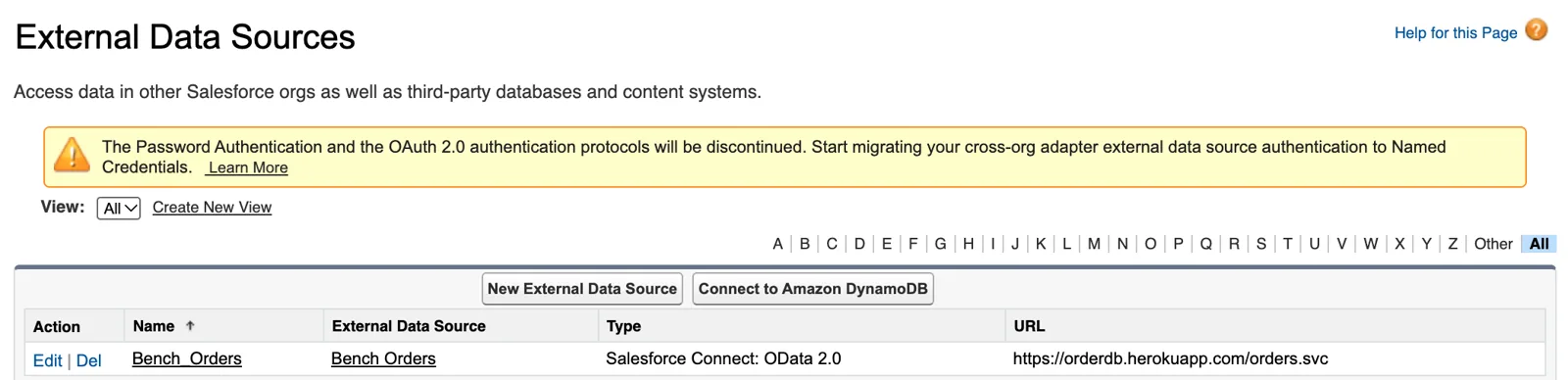
Salesforce’s own warning on the External Data Sources page (Salesforce, Setup in a Developer Edition org, screenshot, November 2026). Full size
This is often my first choice: one primary org with a virtualized view into the others. The records stay where they belong, with the org that owns them. Nothing is copied, so nothing has to be reconciled. Users get the view they asked for.
It works well for one or two connections. It doesn’t scale to every org seeing every other org, because the connections grow with every pair: five orgs that all want to see each other need twenty. I told that story, five business lines that wanted to see each other’s cases and opportunities, in the Integration Architect course: Several Patterns, One Solution. The answer there was to send every org’s changes to one shared database and give each org one connection back to it. That’s no longer “connect.” It’s a small version of the next two patterns.
Integrate: facts move between orgs
Section titled “Integrate: facts move between orgs”Sometimes seeing isn’t enough. A change in one org has to reach the other, or something that happens in one org has to start work in the other. Now we’re talking about integration: APIs, events, middleware, synchronization. Chapter 9 taught the data questions behind any arrow between systems, and they don’t change when both ends are Salesforce.
The question I ask most here is: which facts actually need to move, and which org is the authority for each one? Two orgs that both have an Account object don’t automatically share one idea of a customer. Two Product objects don’t automatically mean one product catalog. The temptation is to synchronize whole objects because they have the same name. Resist it. Establish who owns each fact first, the way chapter 9 set keys and write ownership, then move only what the process across the boundary needs.
A recovery org is an integration too, the most demanding one: everything critical has to move, all the time, and you have to prove it did. That’s the 5-of-30 lesson.
Unify: one view of the data, without one CRM org
Section titled “Unify: one view of the data, without one CRM org”Sometimes the business doesn’t need the CRM records merged. It needs one view across the orgs: one customer profile, one set of insights. That’s what Data 360 and Data Cloud One are for. One org is the home org, where the Data 360 tenant is managed, and the other orgs connect to it as companion orgs. The home org shares the data spaces it chooses with each companion, and the companion’s users and features (Flow, related lists, segments) can use that data where it sits (Data Cloud One (opens in a new tab) and Data 360 Features on Companion Orgs (opens in a new tab), Salesforce Help, checked 2026-11-28).
So unified data doesn’t require one CRM org. That’s a real change from a few years ago, and it’s a good option. But here’s what I tell people about it: the orgs don’t suddenly share one security model. Data 360 has its own access model, data spaces and its own policies, and your CRM sharing rules don’t come with the data. Who can see the unified profile, from which org, is a design you make on purpose. Two more facts to check early, both dated: an org can be a companion of only one Data 360, so a company you acquire that already runs its own Data 360 can’t simply join yours; and connecting orgs changes where data is processed, which Salesforce says could have legal implications, so a companion in another country is a conversation with your legal team before it’s a connection (Data 360 Architecture Strategy and Data 360 Limits and Guidelines, Salesforce Help, checked 2026-11-08 and 2026-11-14). The Data 360 Architect course covers the home org and its companions in depth; chapter 15 of this course gives the data architect’s overview.
Consolidate: two orgs become one
Section titled “Consolidate: two orgs become one”And sometimes the right long-term answer really is one org. The businesses have converged, the processes are becoming common, the customers overlap, and people work across both. Then consolidation may be the architecture. But consolidation isn’t “export org B, import it into org A, done.” The data is the easier half.
The Limits Add Up
Section titled “The Limits Add Up”This is the lesson I’ve learned doing org consolidations. Each org on its own is within limits. The two together can go over.
Org A is healthy. Its main object has a lot of custom fields, plenty of automation, a large Apex footprint, many permission sets, years of configuration. Org B is healthy too, with its own fields, automation, code, permissions and integrations. Both are within Salesforce’s limits. That tells you nothing about the org you get by putting them together. Fields add up. Automation adds up. Code, integrations, permission sets and technical debt add up. And duplicate ideas, two fields that mean the same thing under different names, add up too.
So before the migration starts, one or both orgs have to remove things: unused fields, old automation, duplicate concepts. Often the consolidation program becomes a cleanup program before a single record moves. Plan for it, and do the math on the combined org, against the same headroom you’d want for any design, not on each org separately.
Two orgs that each fit can be too big together. Clean up before anything moves.
I had one of these. A business was merging its North American org with its EMEA org. On one important object, each org on its own was already very close to the limit on lookup relationships. Added together, they went over it. So we went field by field: for each lookup, how full was it, how many records actually had a value? Then we took that to the business, and negotiated, field by field, which org would give up which fields. It was a very challenging process, and none of it was moving data. It was deciding what the combined org could hold.
The Data Doesn’t Just Add Up Either
Section titled “The Data Doesn’t Just Add Up Either”Both orgs have an Account. You can’t stack the two tables. What is a customer in org A? In org B? Same legal entity? Same hierarchy, same duplicate rules, same identifiers, same lifecycle, same owner? If the same customer appears in both, is it one enterprise customer, two regional customers, a parent and a subsidiary, or a duplicate? No data loader answers that. It’s master data again: matching, merging and survivorship, with a deadline.
That’s why I try to avoid migrating data between orgs when the business only needs to see it. A migration blends the data, and once it’s blended you own every disagreement the two orgs had about identity, ownership, security, duplicates and meaning. Sometimes blending is exactly what the business wants: if the companies are becoming one operation, you’ll need it. But if people only need visibility across the boundary, migration solves a problem you didn’t have and creates several you now do. So the question I ask is:
Do we need one copy of the data, or one view of the data?
Those are very different requirements, and they lead to different patterns: one copy is consolidate; one view is connect or unify.
Splitting Is Just as Hard
Section titled “Splitting Is Just as Hard”It happens in reverse too. A business unit is sold, or a division becomes its own company, and one org has to become two. It sounds easier: copy their records into a new org. But what belongs to whom? Shared customers. Historical cases. Contracts, files, consent, integration history, audit records. What about a customer who did business with both? What about records one company must keep for years and the other must no longer see?
I’ve done splits, and the effort is in the coordination between the orgs. Unlike an ordinary migration, both sides usually have to keep running the whole time: the old org serving the business that stays, the new org taking over for the business that leaves, and a cutover where the data boundary, the legal boundary and the people all have to agree on the same day.
Whatever You Choose, Identity Carries It
Section titled “Whatever You Choose, Identity Carries It”Whether you connect, integrate, unify or consolidate, one question comes up every time: is this the same thing? Record IDs won’t answer it. Each org has its own. You need a key both sides agree on: a customer number, a legal-entity ID, a partner code, a product code, a serial number. That’s the identity work from chapter 6, and cross-org work shows very quickly whether it was done. If the enterprise can’t say that two records are the same customer, then cross-org reporting, integration and unification all get harder, whichever pattern you picked.
Patterns Can Live Together
Section titled “Patterns Can Live Together”You don’t choose one pattern for the whole enterprise. A company might unify customer data across five orgs today, integrate a few events between two of them, connect a primary org to another for the occasional detail, and plan to consolidate two of them next year. Each crossing gets the pattern that fits its reason. And sometimes the best design leaves the orgs exactly where they are and makes the enterprise feel connected anyway.
Steve Trucking has one org, and nothing in its brief calls for a second. But at the end of the course, in Checkpoint 3, it buys a carrier that arrives with its own org. That’s where you’ll work through these choices yourself, so I’m deliberately not solving it here.
What an Architect Decides Here
Section titled “What an Architect Decides Here”- Why each org boundary exists (regulation, business-unit autonomy, an acquisition, recovery), and so what’s allowed to cross it.
- For each crossing: connect, integrate, unify or consolidate, and whether the need is one copy of the data or one view of it.
- Which org is the authority for each shared fact, and which key both sides use to say “this is the same thing.”
- For a consolidation: whether the combined org stays within limits with headroom, and what has to be cleaned up in each org before anything moves.
- Who may see unified or connected data from each org, people and agents, designed on purpose rather than inherited from CRM sharing.
Beyond the exam: what AI changes. An agent in one org that can reach across the boundary, through a connection, an integration or a shared data space, reads faster and wider than any person. A unified identity isn’t permission to see every record behind it. Decide what an agent may reach across each boundary from its job, not from everything you could technically connect.
Explore
Section titled “Explore”- Earlier in this course: chapter 4, Org Strategy Is a Landscape Decision; chapter 6, Matching, Merging and Survivorship; chapter 9, Before the Arrow and Keys and Write Ownership; this chapter, module 1, Copy, Virtualize or Federate.
- Integration Architect course, chapter 7: Several Patterns, One Solution (five orgs that wanted to see each other).
- Salesforce Architects, Well-Architected, checked 2026-11-28: Reliability (opens in a new tab), Disaster Recovery patterns (opens in a new tab), Resource and Cost Optimization (opens in a new tab), Trust (opens in a new tab) and Trust: Data Protection patterns (opens in a new tab).
- Salesforce Winter ‘27 release notes: Salesforce Connect Cross-Org Adapter Legacy Authentication Is Being Retired (opens in a new tab) (release update, retired in Spring ‘27), checked 2026-11-28.
- Salesforce Help: General Limits for Salesforce Connect (opens in a new tab) (checked 2026-11-28); Data Cloud One (opens in a new tab), Data 360 Features on Companion Orgs (opens in a new tab) and Data 360 Architecture Strategy (opens in a new tab) (checked 2026-11-28); Data 360 Limits and Guidelines (opens in a new tab) (checked 2026-11-28).
- Salesforce Developers blog, Enterprise Architecture: Single-org versus Multi-org Strategy (opens in a new tab) (2014; older, but still the standard way to frame the org strategy against the operating model).