Salesforce Connect and Mashups in Practice
Ta treść nie jest jeszcze dostępna w Twoim języku.
The question this module answers: Once I decide to virtualize, how does the data actually behave on the page?
In module 1, Redrock’s auditors questioned deliveries from more than a year ago. Those deliveries had already left the org: after 13 months, completed deliveries go to an archive in Snowflake. We didn’t copy them back. The coordinator opens the distribution center’s account, under Redrock, and the archived deliveries are there, fetched from Snowflake through Salesforce Connect.
That was the decision. This module is about what happens after it. An external object can look a lot like a custom object, and that’s its strength. It’s also where architects get into trouble, because something that looks like Salesforce data doesn’t always behave like Salesforce data. In chapter 3 I said it looks like a duck and walks like a duck, but it’s not a duck. Here we find out exactly where it stops being one.
The Page Is Part of the Integration
Section titled “The Page Is Part of the Integration”Look at the distribution center’s account page from the coordinator’s side. The account. Its contacts. Its open Cases. Its archived deliveries. One page, and it feels natural.
Architecturally, those sections behave very differently. The account, the contacts and the Cases are in the org. The archived deliveries aren’t. When that related list loads, Salesforce reaches across the network to Snowflake, waits for the answer, and shows it. In class I put it this way: with an external object, you’re only seeing it when you touch it. Nothing is kept. Every time the coordinator opens the page, that part of the page is an integration call.
If Snowflake answers quickly, nobody notices. If it’s slow or down, the page has a hole in it, which is module 1’s point that every virtual read is a dependency, with Salesforce’s guidance on timeouts and a cache. Here’s what that means in practice: the page design becomes part of your integration architecture. Which related lists call out, how many, and what each shows when the answer doesn’t come, are integration decisions made in the page layout.
One page. Most of it is local. One related list is a live call to another system.
Scope It to the Parent
Section titled “Scope It to the Parent”The Snowflake archive holds millions of deliveries. I never want a Salesforce page asking for “archived deliveries.” I want it asking for this distribution center’s archived deliveries. The account gives the context, and the context narrows the question before it leaves Salesforce. Now Snowflake has a reasonable job.
This is why I like external objects that hang off a parent. The coordinator isn’t browsing the archive; they’re working an account, and Salesforce fetches what’s relevant to it. The parent isn’t only a convenience for the page. It’s part of the performance design.
Salesforce’s limits point the same way. A query can join external objects and other objects at most four times, and Salesforce notes that this “can affect reports and dashboards.” Data comes back in pages of at most 2,000 rows (General Limits for Salesforce Connect (opens in a new tab), Salesforce Help, checked 2026-11-28). A narrow question stays well inside both.
Three Ways to Relate It
Section titled “Three Ways to Relate It”So how does an archived delivery know which account it belongs to? I’ve taught this live in class with Salesforce’s own Salesforce Connect trail: orders and order details from an outside system, each an external object (an __x), related to Account and to each other, “two external objects deep.” Steve Trucking needs the same shape. External objects have three kinds of relationship, and each one solves a different problem (External Object Relationships (opens in a new tab), Salesforce Help, checked 2026-11-28).
Here’s one of the trail’s orders, opened in Salesforce. It looks like any record, with a Details tab and a Related tab, but nothing on it is stored in the org. Salesforce fetched it from the order service when the page opened.
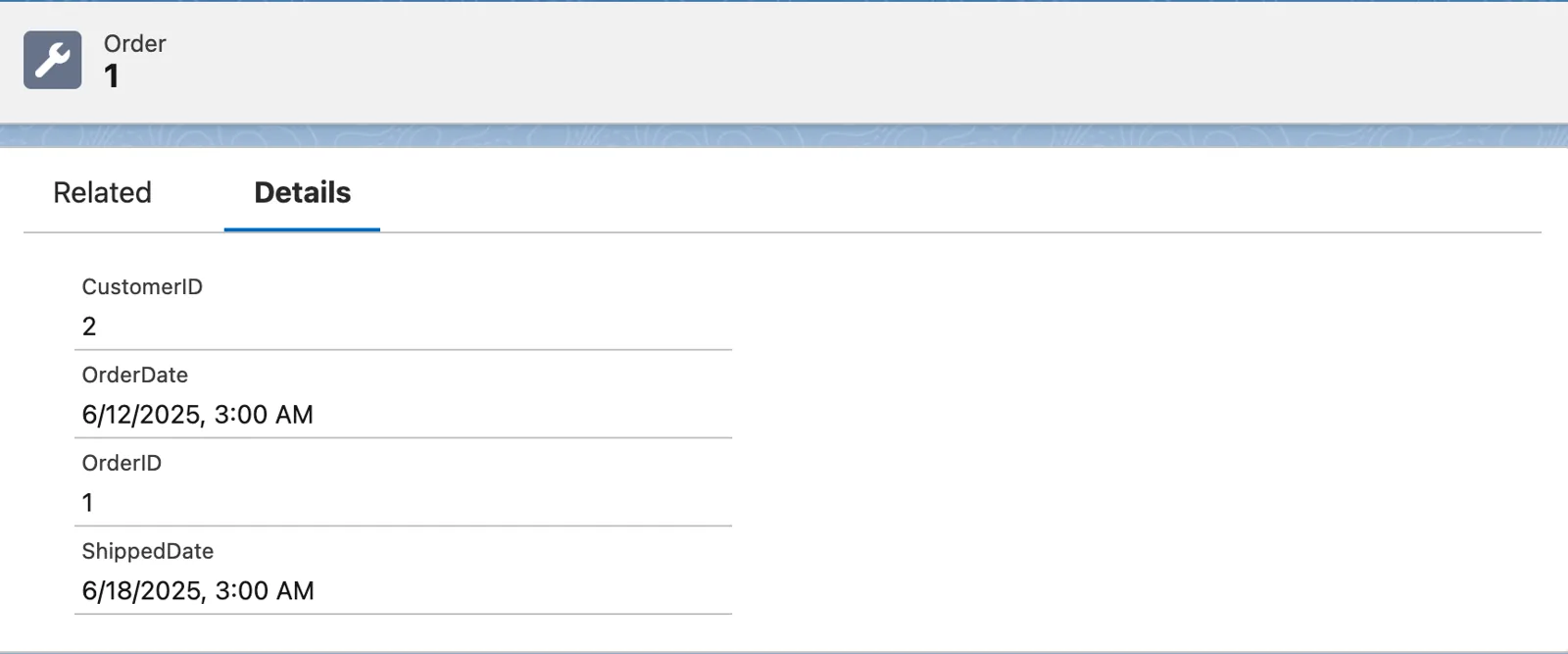
An external object’s record, read live from the trail’s order service (Salesforce, a Developer Edition org, screenshot, November 2026; the dates are the sample service’s). Full size
Lookup. The ordinary lookup matches on the 18-character Salesforce record ID. I think of it as the direct lookup: the child is the external object, the parent is a standard or custom object in Salesforce, and the outside data holds the parent’s Salesforce record ID itself. Salesforce’s Help simply calls it a lookup. It works when the outside data actually holds Salesforce IDs. Snowflake’s archive could have kept each account’s ID when the deliveries left the org. But outside systems rarely know Salesforce IDs, and they shouldn’t have to. An ID belongs to one org; merge the records, or migrate them to another org, and it no longer points where you think.
Indirect lookup. This is the one I reach for. The child is the external object, the parent is a standard or custom object in Salesforce, and they match on a field you choose on the parent: a custom field marked External ID and Unique. Steve Trucking’s distribution center accounts carry their code, DC_Code__c, as exactly that, and the archive keeps the code on every delivery. So the archived delivery finds its account by the code both sides already know. When I teach the trail, I say: do not miss this step. If the parent’s field isn’t a unique External ID with the values filled in, nothing relates.
External lookup. Now the parent is outside too. Each delivery’s status history sits in Snowflake as well: picked, loaded, out for delivery, delivered, at about eight changes a delivery. Make those events a second external object, and relate each event to its archived delivery. The parent is an external object, so this is an external lookup, and it matches on the parent’s External ID standard field: here, the partner key, the same Partner_Delivery_Key__c the delivery had in the org. Account, archived deliveries, their status events: two external objects deep.
Pick the relationship by where the parent lives and what both sides already know.
One more rule from the same page: external lookups and indirect lookups to external objects with composite keys aren’t supported. If the outside system identifies a row by two columns together, give it one key before you design the relationship.
Test knowledge. Know the three relationships for external objects: a lookup (a direct lookup) matches the 18-character Salesforce record ID held in the outside data; an indirect lookup relates an external child to a standard or custom parent through a custom field marked External ID and Unique; an external lookup relates a child to an external parent through the parent’s External ID standard field. Expect a scenario where the outside system doesn’t hold Salesforce IDs.
A Relationship Doesn’t Move the Data
Section titled “A Relationship Doesn’t Move the Data”This is worth saying plainly. The indirect lookup made the archived deliveries easy to reach from the account. It didn’t copy them into Salesforce. The related list makes them feel native. They aren’t local. A developer can query them with SOQL. The dependency on Snowflake is still there.
The abstraction is valuable. Just don’t confuse it with the physical architecture. A relationship can cross the boundary. The boundary is still there.
Where It Stops Behaving Like a Custom Object
Section titled “Where It Stops Behaving Like a Custom Object”“External objects are custom objects whose rows live somewhere else.” That’s close enough to understand the idea. It isn’t close enough to design with. Here’s where the difference shows up.
Relationships. An external object has only the three relationships above. There’s no master-detail, so there’s nothing for a roll-up summary to roll up, and no parent controlling the child’s sharing.
Reports. Reports work, with conditions. A report “performs a request callout for each external object in the report,” it fetches up to 20,000 records for the primary object, and on a large source “aggregate values likely reflect only a subset of your data.” Cross filters, buckets, historical trend reporting and row-level formulas aren’t supported (Salesforce Connect Support for Reports (opens in a new tab), Salesforce Help, checked 2026-11-28). So “how many deliveries did Redrock’s Phoenix distribution center have last year?” is a question for Snowflake, not for a Salesforce report on the archive.
Automation. Module 1 has the current picture: a flow can now read and write external objects, if you commit your own records first and reach the outside system in a separate transaction, and External Change Data Capture lets Salesforce hear about an outside change within minutes for the OData 4.0 and 4.01 adapters. What’s still missing: approval processes and workflow rules aren’t available for external objects (Salesforce Connect Support for Flows and Processes (opens in a new tab), Salesforce Help, checked 2026-11-28), and Steve Trucking’s archive uses the SQL adapter, so it hears about nothing. That’s fine for an archive. Nothing in it should change.
None of that makes external objects weak. It makes them different, and the difference feeds back into module 1’s decision. If the process depends on something an external object can’t do, an approval, an exact roll-up, a trigger when the data changes, that’s evidence that some of the data belongs in Salesforce after all. Remember the dispute Case: it copies only what it acts on.
The Adapter Decides
Section titled “The Adapter Decides”“We’re using Salesforce Connect” is where an architecture review starts, not where it ends. The adapter decides how Salesforce talks to the source, and Salesforce offers several (Choose Which Salesforce Connect Adapter to Use (opens in a new tab), Salesforce Help, checked 2026-11-28):
- Cross-org, for data in another Salesforce org (module 3 comes back to it).
- OData 2.0, 4.0 and 4.01, for systems that publish an OData service, such as SAP or Microsoft systems.
- A custom adapter in Apex, when nothing else fits.
- Amazon DynamoDB, and the SQL adapter for Snowflake and Amazon Athena: Steve Trucking’s archive uses this one, as chapter 7 showed.
Each one has its own costs and limits. Module 1 showed how “no callout limits” moves the limit to the other side: Snowflake’s bill for the SQL adapter, the other org’s API allowance for cross-org, the outside system’s capacity for OData.
Now a hard truth, in Salesforce’s own words. The reports page says something different about OData: report callouts through OData 2.0 and 4.0 are limited to “20,000 OData callouts per hour for Enterprise, Performance, and Unlimited editions,” while OData 4.01 has no callout limits (Salesforce Connect Support for Reports (opens in a new tab), checked 2026-11-28). Both pages said this on the same day. Which one applies to your design? Test it, and ask Salesforce if your reports depend on it. That’s the larger lesson: don’t design around a limit you remember. Check the current page for the adapter you’re actually using, and test the access pattern at the volume you expect.
So for every external object, ask:
- Which adapter?
- What can it do: read, write, the filters your page needs?
- What does each call cost, and who pays?
- What happens at the volume we expect, including reports?
Reading Is One Decision, Writing Is Another
Section titled “Reading Is One Decision, Writing Is Another”Salesforce Connect lets users “view, search, and modify data that’s stored outside your Salesforce org” (Access External Data With Salesforce Connect (opens in a new tab), Salesforce Help, checked 2026-11-28). Some adapters and sources accept writes. That doesn’t mean the design should.
Go back to the question chapter 9 asked of every arrow: which system owns this fact, and which system is allowed to change it? The archive is the record of what happened. Nobody at Steve Trucking should edit a 14-month-old delivery from a related list. Steve Trucking’s archived deliveries are read-only, on purpose.
When a write does make sense, the questions come back: validation, which side’s rules run, what happens when the write fails halfway, who’s allowed, and whether the Salesforce screen implies a guarantee the other system doesn’t give. Virtualization doesn’t make the ownership question go away. It makes it easier to forget.
Salesforce Connect or a Component?
Section titled “Salesforce Connect or a Component?”There’s another way to show outside data without keeping it. Build a Lightning web component that calls the other system through a Named Credential, shows the answer on the page, and keeps nothing. It’s virtualization too, without the external object. Chapter 3 did the math on the two. The component needs no extra license, but someone has to build it and keep it running. Salesforce Connect is “an extra cost in: Enterprise, Performance, and Unlimited Editions” (External Object Relationships (opens in a new tab), checked 2026-11-28), but it’s point and click: your admins can set it up and maintain it.
There’s also a difference in reach. An external object goes more places than a component: list views, related lists, search, reports and dashboards (with the conditions above), flows and the APIs. A component shows what it was built to show, where it was put. For Redrock’s auditors, the archived deliveries belong on the account, in a list the coordinator can search and filter, so Steve Trucking uses Salesforce Connect.
When the Better Integration Is the Screen
Section titled “When the Better Integration Is the Screen”So far we’ve made outside data behave as part of Salesforce. Sometimes that’s the wrong goal. Sometimes the user doesn’t need Salesforce to understand the other system’s data at all. They need to use the other system’s capability, inside their Salesforce work.
Take FleetLink. It sends about 200,000 truck positions a day. Chapter 9 copied only the latest position into the org, and the rest stays in FleetLink. Now the coordinator wants to see a truck’s route for today on a map. Should those readings become an external object? No. The coordinator doesn’t want a list of coordinates. They want a map. That’s a screen to bring in, not a data model to virtualize.
That’s the idea behind a mashup: the user’s screen combines capabilities from more than one system, and the data stays where it lives. In class I describe the oldest form: an inline frame, where a web page inside Salesforce shows another site, and the browser calls that other site itself. The first question is always security: what is that frame allowed to do, and could it be used to attack the page around it? Module 1 quoted Salesforce’s own verdict on mashups: they “are limited to short interactions and small amounts of data” (Using Mashups (opens in a new tab), checked 2026-11-28). A map of one truck’s day is exactly that.
How you build the screen today:
- A Lightning web component is where I start. It looks and behaves like Salesforce, and you decide exactly what the user sees. For FleetLink, a component on the truck’s page calls FleetLink for today’s route and draws it. No external object, no copy.
- React is now a Salesforce option too. Salesforce Multi-Framework lets you build React apps natively on Salesforce. Salesforce announced it as generally available in July 2026, “production-ready” and available on Hyperforce orgs from the Summer ‘26 release (Build with React on Salesforce: Multi-Framework Is Now GA (opens in a new tab), Salesforce Developers Blog, checked 2026-11-28). That doesn’t replace LWC. It gives a team with React skills and React assets another native choice.
- Canvas is legacy, not dead. Canvas brought outside applications into Salesforce for years, and Salesforce now lists it under Legacy Components (Canvas App (opens in a new tab), Lightning Component Reference, checked 2026-11-28). I wouldn’t start new work with it. But an existing Canvas app that’s stable, supported, secure and doing its job isn’t a migration project just because the word “legacy” appeared. Don’t modernize only to make the diagram look newer.
Name the job first. The job picks the mechanism.
Identify the Job First
Section titled “Identify the Job First”When the business says “we need the ERP in Salesforce,” I want to know what they mean. Reports in Salesforce? Automation driven by its data? A few values on the account? A complete transaction users work in? One specialized screen in the middle of their work?
Each of those leads somewhere different: copy it, virtualize it, federate it, build a component, or bring in the screen. Don’t turn every requirement into data movement. Don’t turn every requirement into a mashup either. Identify the job first.
Agents Don’t Stop at Ten Rows
Section titled “Agents Don’t Stop at Ten Rows”Module 1 showed how agents change the load, and why no agent at Steve Trucking reads the Snowflake archive. On the page there’s one more trap. A screen built for a person limits itself: the related list shows ten rows, the map asks for one truck, the coordinator clicks one delivery. Give an agent the same capability as a tool, and those limits are gone. Say a dispatch agent gets FleetLink’s route lookup. If the tool can ask for every truck’s day, it may. So when a capability built for a person becomes an agent’s tool, review it again: how narrow the question is, the most it can return, and how often it can be called. A page that’s safe for a coordinator isn’t automatically safe for an agent.
Trust but Verify the Page
Section titled “Trust but Verify the Page”When I design virtualized data or a mashup, I test the whole experience, not just “did the connection work?”
- How long does the distribution center’s account page take to load, with the archived deliveries on it?
- What does the coordinator see when Snowflake is slow? When it’s down?
- Can the coordinator tell “no archived deliveries” from “the archive didn’t answer”? Those are very different facts, and an empty list looks the same for both.
- What query is actually sent, and can Snowflake answer it efficiently?
- What does it cost when every coordinator opens the page at 8 a.m.?
- Does the access behave the way we think it does for each kind of user?
- And what happens when an agent uses the same source?
Trust but verify. A successful demo proves that the connection works. It doesn’t prove that the architecture works.
What an Architect Decides Here
Section titled “What an Architect Decides Here”- How each external object is scoped to a parent, so the page asks for this account’s data and not the whole source.
- Which relationship connects each external object: lookup, indirect lookup or external lookup, and which unique key both sides already share.
- Which platform capabilities the process needs (roll-ups, approvals, reports, automation when the data changes) and whether an external object can provide them, or part of the data has to be copied.
- Which adapter is in use, what it can do, what each call costs and who pays.
- Whether the outside data is read-only, or Salesforce is allowed to change the system that owns it.
- Whether the job is data in Salesforce or a capability on the screen: an external object, a component, or a mashup.
- For a screen: LWC first, React through Multi-Framework where it fits, and an existing Canvas app judged on how it works, not on its label.
- How the page behaves when the source is slow or down, and whether users can tell an empty answer from no answer.
- What changes when an agent, not a person, uses the same capability.
Make the Boundary Feel Natural, Not Invisible
Section titled “Make the Boundary Feel Natural, Not Invisible”Virtualization works best when the user doesn’t have to care where every record lives. The coordinator opens the account, sees the archived deliveries, opens the route map, and gets on with the dispute. They shouldn’t need to know which parts came from the org, from Snowflake or from FleetLink.
The architect can never forget. Those choices decide how fast the page is, whether it works when another system is down, what it costs, who can change what, and what an agent can do with it. External objects, relationships across the boundary, components and mashups are all ways to make a boundary feel natural.
Make the experience feel integrated. Design the system knowing it isn’t one system.
Explore
Section titled “Explore”- Earlier in the course: chapter 3, Where Data Lives (external objects, the license math); chapter 7, Archiving and Purging (where the archive can live); this chapter, module 1, Copy, Virtualize or Federate.
- Salesforce Help: External Object Relationships (opens in a new tab), General Limits for Salesforce Connect (opens in a new tab), Salesforce Connect Support for Reports (opens in a new tab), Salesforce Connect Support for Flows and Processes (opens in a new tab), Salesforce Platform Features Supported by Salesforce Connect (opens in a new tab), Choose Which Salesforce Connect Adapter to Use (opens in a new tab) and Access External Data With Salesforce Connect (opens in a new tab), checked 2026-11-28.
- Salesforce Developers, Best Practices for Deployments with Large Data Volumes: Using Mashups (opens in a new tab), checked 2026-11-28.
- Salesforce Developers: Build with React on Salesforce: Multi-Framework Is Now GA (opens in a new tab) (Salesforce Developers Blog, July 2026) and Canvas App (opens in a new tab) (Lightning Component Reference, Legacy Components), checked 2026-11-28.
- Hands-on: Trailhead, Quick Start: Salesforce Connect (opens in a new tab), the orders and order details example from class, with its steps “Create an Indirect Lookup Relationship” and “Create an External Lookup Relationship”, checked 2026-11-28.