
JSON Jamboree: مواجهة بين إلغاء التسلسل الثابت والديناميكي في استدعاءات Apex الخارجية
مقدمة:
مرحبًا! أنا Steve Simpson، معماري تقني معتمد من Salesforce (Salesforce Certified Technical Architect) ومدرّب. في هذه المقالة سنستكشف تقنيات مختلفة لتحليل JSON عند إجراء استدعاءات Apex الخارجية (callouts) في Salesforce. سنناقش تحليل JSON الثابت، وتحليل JSON الديناميكي، ونهجًا هجينًا يوفر المرونة وسهولة الاستخدام.
القسم 1: تحليل JSON الثابت بإلغاء تسلسل في سطر واحد
عندما تتعامل مع بنى JSON بسيطة لا تتغير كثيرًا، يمكنك إنشاء صنف Apex يطابق بنية JSON تمامًا. يتيح لك هذا النهج استخدام سطر واحد من الشيفرة لإلغاء تسلسل سلسلة JSON إلى مصفوفة. وهذه الطريقة قوية وفعّالة لبنى JSON الثابتة.
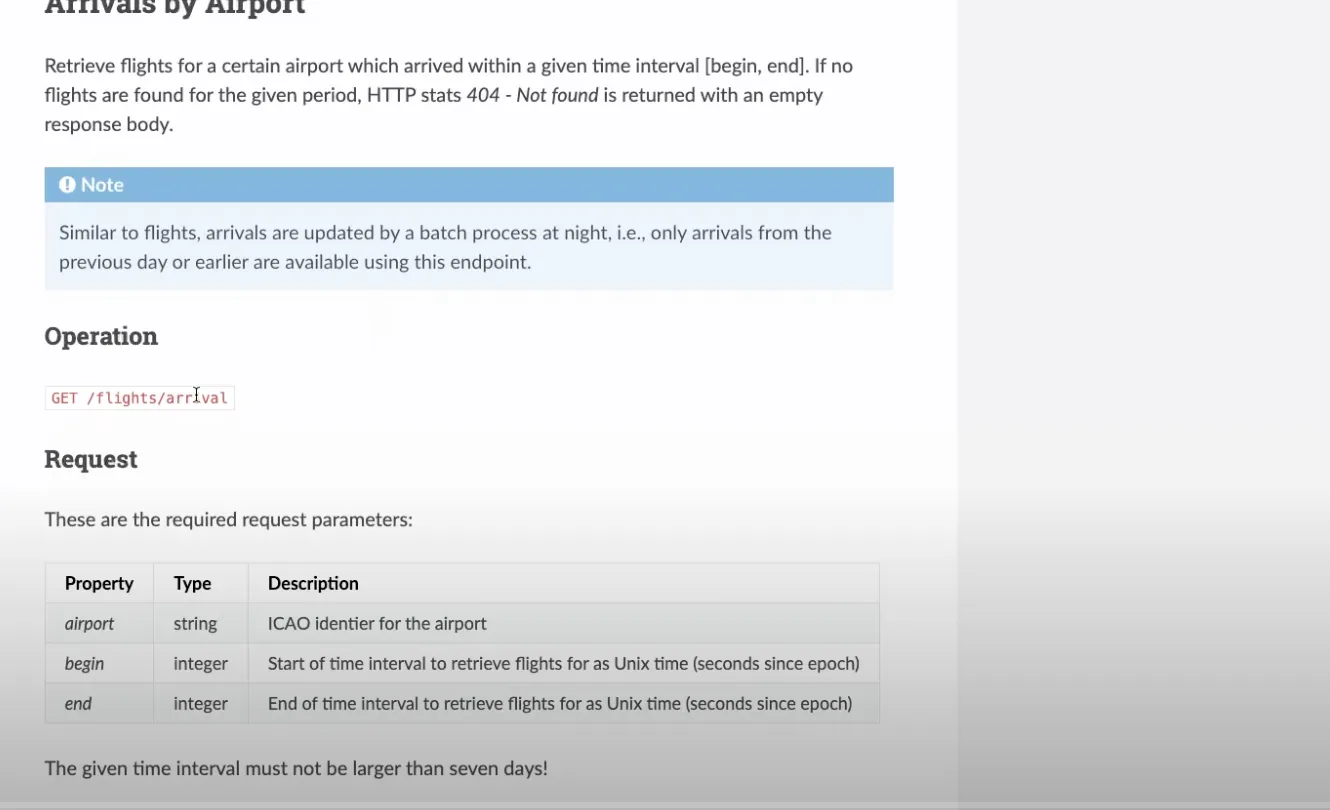
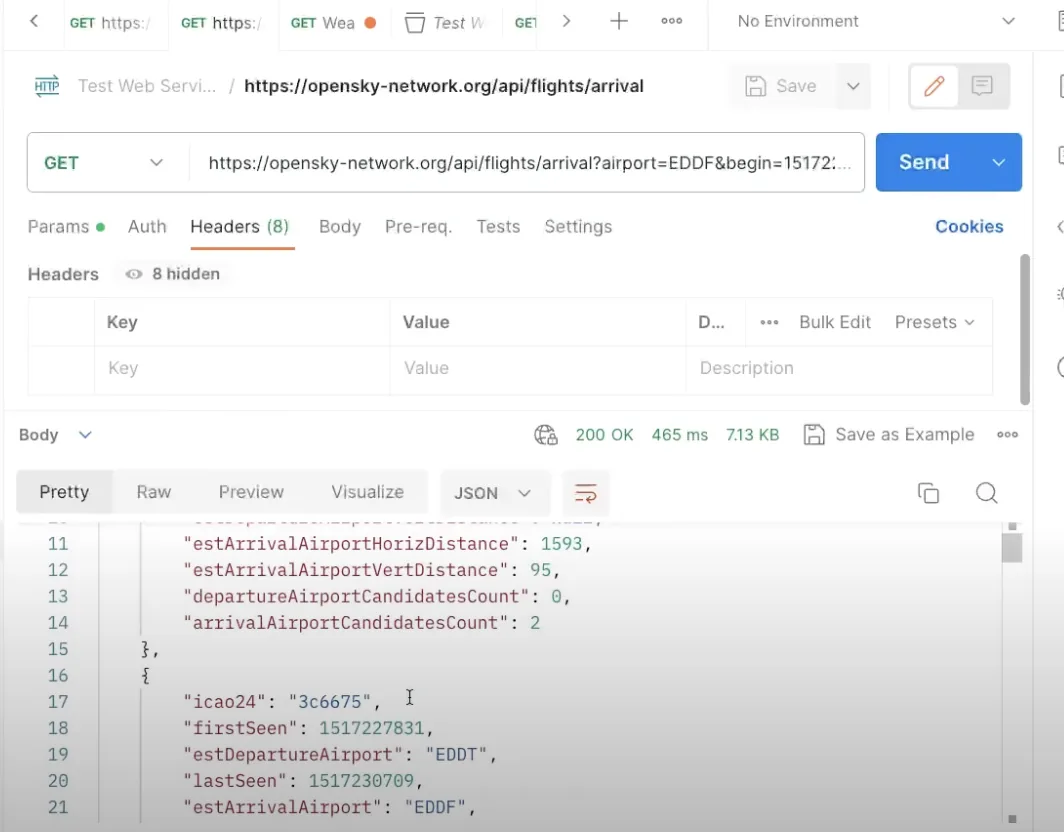
public class OS_FlightStatusModel{ public String icao24 {get;set;} public Integer firstSeen {get;set;} public String estDepartureAirport {get;set;} public Integer lastSeen {get;set;} public String estArrivalAirport {get;set;} public String callsign {get;set;} public Integer estDepartureAirportHorizDistance {get;set;} public Integer estDepartureAirportVertDistance {get;set;} public Integer estArrivalAirportHorizDistance {get;set;} public Integer estArrivalAirportVertDistance {get;set;} public Integer departureAirportCandidatesCount {get;set;} public Integer arrivalAirportCandidatesCount {get;set;} //---Use the JSON Deserialize public static List<OS_FlightStatusModel> parse(String json) { return (List<OS_FlightStatusModel>) System.JSON.deserialize(json, List<OS_FlightStatusModel>.class); }}باستخدام الصنف أعلاه، يمكنك تحليل JSON بسهولة بسطر واحد من الشيفرة:
//---Get the Flight Request private static List<OS_FlightStatusModel> getFlightRequest(String requestURL) {//---Return structureList<OS_FlightStatusModel> retList = new List<OS_FlightStatusModel>();//---Make the requestHttpResponse resp = getRequest( requestURL);//---Check for SuccessInteger respStatusCode = resp.getStatusCode();if (respStatusCode == 200) {//---Read the PayloadString payload = resp.getBody();debug('Payload: ' + payload);//---Parse the payloadretList = OS_FlightStatusModel.parse(payload);if (retList != null) {System.debug('Found ' + retList.size() + ' records');for( OS_FlightStatusModel mRow : retList) {debug('Row: ' + mRow); } } }else {//---Handle an errordebug('Response Status Code: ' + respStatusCode); }return retList; }القسم 2: تحليل JSON الديناميكي
بالنسبة لبنى JSON الأكثر تعقيدًا، مثل المصفوفات أو الكائنات المتداخلة، قد تحتاج إلى تحليل JSON الديناميكي. يتطلب هذا النهج أسطرًا أكثر من الشيفرة وتنقّلًا دقيقًا بين رموز JSON (tokens). ومع أنه قد يبدو أكثر تعقيدًا، فإن تحليل JSON الديناميكي ضروري عند التعامل مع بنى JSON متقدمة.
مثال:
/***************************************************************************************** @Name OS_StateModelParser* @Author Steve Simpson - steve@stevetecharc.com* @Date 2023** @Description Parser for reading State Models from JSON***************************************************************************************** Version Developer Date Description*----------------------------------------------------------------------------------------* 1.0 Steve Simpson 2023 Initial Creation****************************************************************************************/public with sharing class OS_StateModelParser extends OS_BaseParser{private OS_StateResponseModel responseModel {get; set;}//--Parse the payload into the OS_StateResponseModelpublic OS_StateResponseModel parse(String json) {//---Setup the return valueresponseModel = new OS_StateResponseModel();responseModel.States = new List<OS_StateModel>();try {parseBody(json); }catch (Exception ex) {debug( 'Exception: ' + ex.getMessage() + ' ' + ex.getStackTraceString());debugJSON(json); }return responseModel; }//---Parse the body of the JSONprivate void parseBody(String json) {//---Set the default Page Sizeif (PageSize == 0) PageSize = DEFAULT_PAGE_SIZE;Boolean hasTokenTime = false;Boolean hasTokenStates = false;JSONParser parser = System.JSON.createParser(json);//---Read Token by Tokenwhile (parser.nextToken() != System.JSONToken.END_OBJECT) {//---Read the current Token, check its field nameif (parser.getCurrentToken() == System.JSONToken.FIELD_NAME) {String text = parser.getText();debug( 'Json Token: ' + text);//---If the next token has a value, then write it, this handles null valuesif (parser.nextToken() != System.JSONToken.VALUE_NULL) {//---Read the timeif (text == 'time') {responseModel.ResponseTime = parser.getIntegerValue();hasTokenTime = true; }//---Read the statesif (text == 'states') {responseModel.States = parseStateList(parser);hasTokenStates = true; } } }//---If have both tags, then break out of loopif (hasTokenStates && hasTokenTime) break; } }//---Parse the Statesprivate List<OS_StateModel> parseStateList(JSONParser parser) {CurrentRecord = 0;//---Build the return listList<OS_StateModel> retList = new List<OS_StateModel>();//---Go to the next token if neededif (parser.getCurrentToken() == null) parser.nextToken();//---Iterate over the itemswhile (parser.nextToken() != System.JSONToken.END_ARRAY) {CurrentRecord++; //---Track the current recordString logLine = 'Rec: ' + CurrentRecord + ': ';if (CurrentRecord > getMaxRecord()) {//---If past the max record, then break out of loopdebug(logLine + 'End of page');break; }else if (CurrentRecord >= getFirstRecordToProcess()) {//---Build a new State RowOS_StateModel sModel = new OS_StateModel();parseStateItem(parser, sModel);retList.add(sModel);debug(logLine + 'State: ' + sModel); }else {//---Pass in null model to trigger token advancement without reading valuesparseStateItem(parser, null);debug(logLine + 'Skipped'); } }return retList; }//---Parse the Statesprivate void parseStateItem(JSONParser parser, OS_StateModel sModel) {//---Go to the next token if neededif (parser.getCurrentToken() == null) parser.nextToken();Integer position = 0;while (parser.nextToken() != System.JSONToken.END_ARRAY) {if (sModel != null && parser.getCurrentToken() != System.JSONToken.VALUE_NULL) {if (position == 0) sModel.icao24 = parser.getText();if (position == 1) sModel.callsign = parser.getText();if (position == 2) sModel.origin_country = parser.getText();if (position == 3) sModel.time_position = parser.getIntegerValue();if (position == 4) sModel.last_contact = parser.getIntegerValue();if (position == 5) sModel.longitude = parser.getDoubleValue();if (position == 6) sModel.latitude = parser.getDoubleValue();if (position == 7) sModel.baro_altitude = parser.getDoubleValue();if (position == 8) sModel.on_ground = parser.getBooleanValue();if (position == 9) sModel.velocity = parser.getDoubleValue();if (position == 10) sModel.true_track = parser.getDoubleValue();if (position == 11) sModel.vertical_rate = parser.getDoubleValue();if (position == 12) {//---Sensors, sub Array, should be null }if (position == 13) sModel.geo_altitude = parser.getDoubleValue();if (position == 14) sModel.squawk = parser.getText();if (position == 15) sModel.spi = parser.getBooleanValue();if (position == 16) sModel.position_source = parser.getIntegerValue();if (position == 17) sModel.category = parser.getIntegerValue(); }position++;//System.debug('Position ' + position); } }}القسم 3: الربط الديناميكي باستخدام Custom Metadata
إذا كنت تحتاج إلى مرونة أكبر، ففكّر في الربط الديناميكي باستخدام Custom Metadata. يتيح لك هذا النهج ربط حقول JSON بحقول SObject ديناميكيًا دون تغيير الشيفرة. ومع الربط الديناميكي يمكنك إضافة الحقول أو إزالتها أثناء العمل، مما يوفر مرونة كبيرة في بيئات الإنتاج.
مثال:
أنشئ Custom Metadata تربط حقول JSON بأسماء API لحقول SObject ومواضعها وأنواع بياناتها.
حمّل Custom Metadata واستخدمها لتعيين القيم في حقول SObject ديناميكيًا.
/***************************************************************************************** @Name OS_StateSObjectModelParser* @Author Steve Simpson - steve@stevetecharc.com* @Date 2023** @Description Parser for reading State Models from JSON***************************************************************************************** Version Developer Date Description*----------------------------------------------------------------------------------------* 1.0 Steve Simpson 2023 Initial Creation****************************************************************************************/public with sharing class OS_StateSObjectModelParser extends OS_BaseParser{private OS_StateSObjectResponseModel responseModel {get; set;}private List<OS_StateMap__mdt> mapList {get;set;}//--Parse the payload into the OS_StateResponseModelpublic OS_StateSObjectResponseModel parse(String json) {mapList = OS_StateMap__mdt.getAll().values();//---Setup the return valueresponseModel = new OS_StateSObjectResponseModel();responseModel.States = new List<OS_State__c>();try {parseBody(json); }catch (Exception ex) {debug( 'Exception: ' + ex.getMessage() + ' ' + ex.getStackTraceString());debugJSON(json); }return responseModel; }//---Parse the body of the JSONprivate void parseBody(String json) {//---Set the default Page Sizeif (PageSize == 0) PageSize = DEFAULT_PAGE_SIZE;Boolean hasTokenTime = false;Boolean hasTokenStates = false;JSONParser parser = System.JSON.createParser(json);//---Read Token by Tokenwhile (parser.nextToken() != System.JSONToken.END_OBJECT) {//---Read the current Token, check its field nameif (parser.getCurrentToken() == System.JSONToken.FIELD_NAME) {String text = parser.getText();debug( 'Json Token: ' + text);//---If the next token has a value, then write it, this handles null valuesif (parser.nextToken() != System.JSONToken.VALUE_NULL) {//---Read the timeif (text == 'time') {responseModel.ResponseTime = parser.getIntegerValue();hasTokenTime = true; }//---Read the statesif (text == 'states') {responseModel.States = parseStateList(parser);hasTokenStates = true; } } }//---If have both tags, then break out of loopif (hasTokenStates && hasTokenTime) break; } }//---Parse the Statesprivate List<OS_State__c> parseStateList(JSONParser parser) {CurrentRecord = 0;//---Build the return listList<OS_State__c> retList = new List<OS_State__c>();//---Go to the next token if neededif (parser.getCurrentToken() == null) parser.nextToken();//---Iterate over the itemswhile (parser.nextToken() != System.JSONToken.END_ARRAY) {CurrentRecord++; //---Track the current recordString logLine = 'Rec: ' + CurrentRecord + ': ';if (CurrentRecord > getMaxRecord()) {//---If past the max record, then break out of loopdebug(logLine + 'End of page');break; }else if (CurrentRecord >= getFirstRecordToProcess()) {//---Build a new State RowOS_State__c osState = new OS_State__c();parseStateItem(parser, osState);retList.add(osState);debug(logLine + 'State: ' + osState); }else {//---Pass in null model to trigger token advancement without reading valuesparseStateItem(parser, null);debug(logLine + 'Skipped'); } }return retList; }//---Parse the Statesprivate void parseStateItem(JSONParser parser, OS_State__c osState) {//---Go to the next token if neededif (parser.getCurrentToken() == null) parser.nextToken();Integer position = 0;while (parser.nextToken() != System.JSONToken.END_ARRAY) {if (osState != null && parser.getCurrentToken() != System.JSONToken.VALUE_NULL) {OS_StateMap__mdt curMap = null;for(OS_StateMap__mdt mapRow : mapList) {if (mapRow.Position__c == position) {curMap = mapRow;break; } }if (curMap != null) {String apiName = curMap.API_Name__c;if (curMap.Data_Type__c == 'Text') {osState.put(apiName, parser.getText()); }if (curMap.Data_Type__c == 'Integer') {osState.put(apiName, parser.getIntegerValue()); }if (curMap.Data_Type__c == 'Double') {osState.put(apiName, parser.getDoubleValue()); }if (curMap.Data_Type__c == 'Boolean') {osState.put(apiName, parser.getBooleanValue()); } } }position++;//System.debug('Position ' + position); } }}الخلاصة:
في استدعاءات Apex الخارجية في Salesforce، يمكنك الاختيار بين تقنيات متنوعة لتحليل JSON بحسب احتياجاتك. فلـ JSON البسيطة الثابتة، استخدم التحليل الثابت مع إلغاء التسلسل في سطر واحد. وللبنى الأكثر تعقيدًا، فكّر في تحليل JSON الديناميكي. ولأقصى قدر من المرونة، استخدم الربط الديناميكي مع Custom Metadata. لكل نهج حالات استخدامه، فاختر الأنسب لمتطلبات مشروعك.
برمجة ممتعة!
تابعنا
لمزيد من الأفكار والنصائح، تابعنا هنا على www.SteveTechArc.com وعلى قناة @SteveTechArc (opens in a new tab) على YouTube. اشترك وعمّق فهمك لـ Salesforce وكيف يمكنك دمجها مع أنظمة أخرى.
نساعد في تغيير العالم بمشاركة معلومات التكامل مع زملائنا المعماريين ومع من هم في رحلتهم نحو أن يصبحوا معماريين!
نص مكتوب بمساعدة الذكاء الاصطناعي
STA 1.6