
JSON Şenliği: Apex Dış Çağrıları İçin Sabit ve Dinamik Seri Durumdan Çıkarma Karşılaşması
Giriş:
Merhaba! Ben Steve Simpson; bir Salesforce Certified Technical Architect ve eğitmenim. Bu blogda Salesforce’ta Apex dış çağrıları yaparken JSON ayrıştırmanın farklı tekniklerini keşfedeceğiz. Sabit JSON ayrıştırmayı, dinamik JSON ayrıştırmayı ve esneklik ile kullanım kolaylığı sunan karma bir yaklaşımı tartışacağız.
1. Kısım: Tek Satırlık Seri Durumdan Çıkarmayla Sabit JSON Ayrıştırma
Sık değişmeyen basit JSON yapılarıyla uğraşırken JSON yapısıyla tam olarak eşleşen bir Apex sınıfı oluşturabilirsiniz. Bu yaklaşım, JSON dizesini tek bir kod satırıyla bir diziye dönüştürmenizi sağlar. Bu yöntem durağan JSON yapıları için güçlü ve verimlidir.
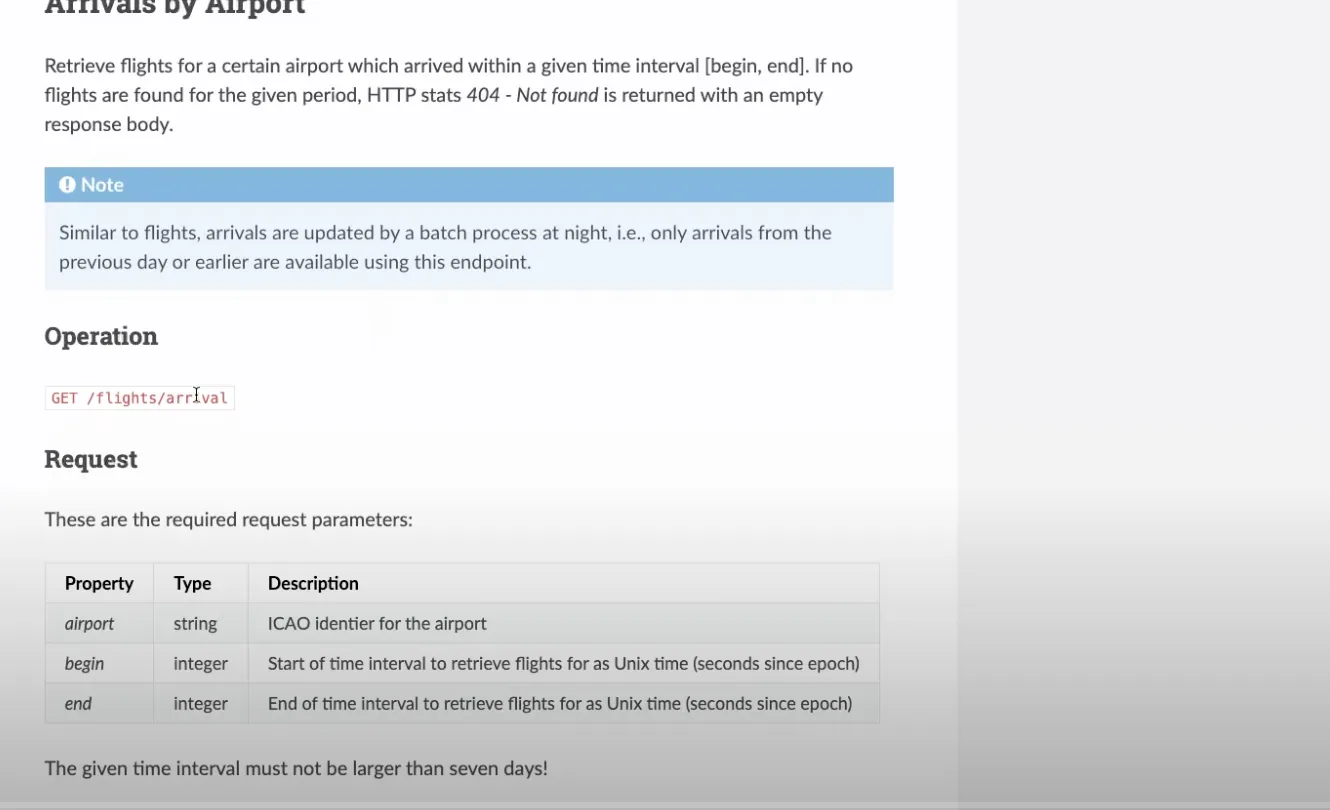
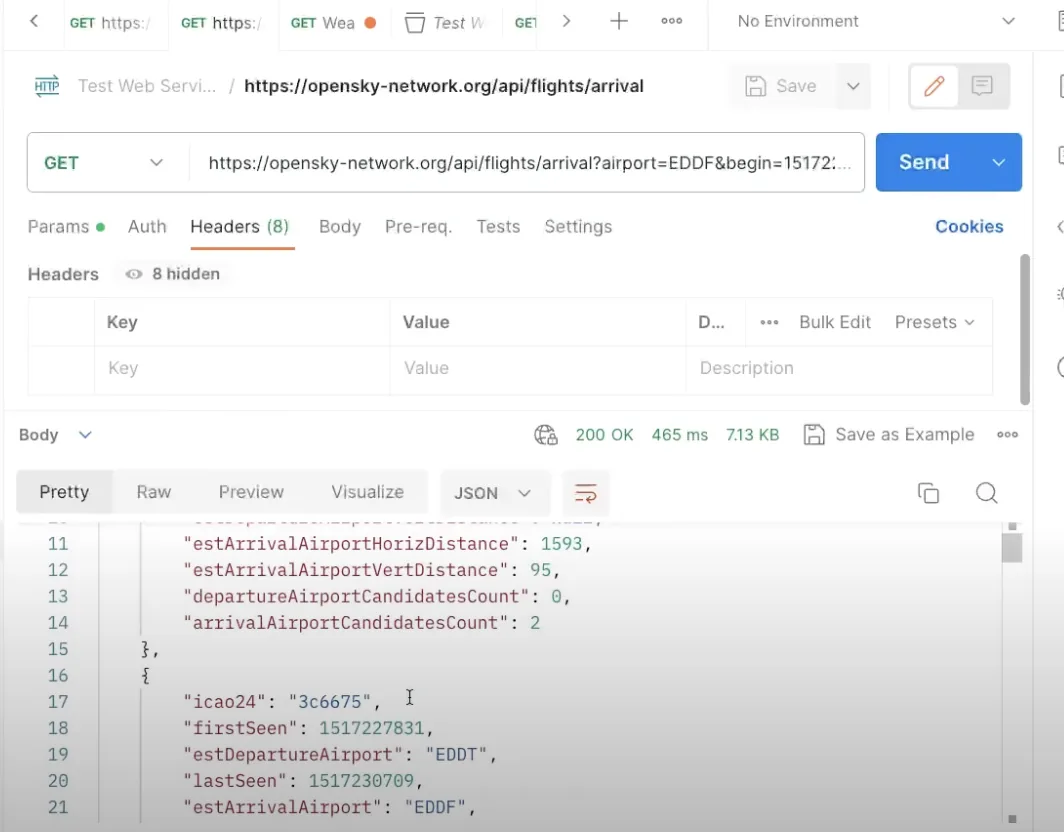
public class OS_FlightStatusModel{ public String icao24 {get;set;} public Integer firstSeen {get;set;} public String estDepartureAirport {get;set;} public Integer lastSeen {get;set;} public String estArrivalAirport {get;set;} public String callsign {get;set;} public Integer estDepartureAirportHorizDistance {get;set;} public Integer estDepartureAirportVertDistance {get;set;} public Integer estArrivalAirportHorizDistance {get;set;} public Integer estArrivalAirportVertDistance {get;set;} public Integer departureAirportCandidatesCount {get;set;} public Integer arrivalAirportCandidatesCount {get;set;} //---Use the JSON Deserialize public static List<OS_FlightStatusModel> parse(String json) { return (List<OS_FlightStatusModel>) System.JSON.deserialize(json, List<OS_FlightStatusModel>.class); }}Yukarıdaki sınıfla JSON’u tek bir kod satırıyla kolayca ayrıştırabilirsiniz:
//---Get the Flight Request private static List<OS_FlightStatusModel> getFlightRequest(String requestURL) {//---Return structureList<OS_FlightStatusModel> retList = new List<OS_FlightStatusModel>();//---Make the requestHttpResponse resp = getRequest( requestURL);//---Check for SuccessInteger respStatusCode = resp.getStatusCode();if (respStatusCode == 200) {//---Read the PayloadString payload = resp.getBody();debug('Payload: ' + payload);//---Parse the payloadretList = OS_FlightStatusModel.parse(payload);if (retList != null) {System.debug('Found ' + retList.size() + ' records');for( OS_FlightStatusModel mRow : retList) {debug('Row: ' + mRow); } } }else {//---Handle an errordebug('Response Status Code: ' + respStatusCode); }return retList; }2. Kısım: Dinamik JSON Ayrıştırma
Diziler ya da iç içe nesneler gibi daha karmaşık JSON yapıları için dinamik JSON ayrıştırma kullanmanız gerekebilir. Bu yaklaşım daha fazla kod satırı ve JSON belirteçleri arasında dikkatli gezinme gerektirir. Daha karmaşık görünse de gelişmiş JSON yapılarıyla uğraşırken dinamik JSON ayrıştırma gereklidir.
Örnek:
/***************************************************************************************** @Name OS_StateModelParser* @Author Steve Simpson - steve@stevetecharc.com* @Date 2023** @Description Parser for reading State Models from JSON***************************************************************************************** Version Developer Date Description*----------------------------------------------------------------------------------------* 1.0 Steve Simpson 2023 Initial Creation****************************************************************************************/public with sharing class OS_StateModelParser extends OS_BaseParser{private OS_StateResponseModel responseModel {get; set;}//--Parse the payload into the OS_StateResponseModelpublic OS_StateResponseModel parse(String json) {//---Setup the return valueresponseModel = new OS_StateResponseModel();responseModel.States = new List<OS_StateModel>();try {parseBody(json); }catch (Exception ex) {debug( 'Exception: ' + ex.getMessage() + ' ' + ex.getStackTraceString());debugJSON(json); }return responseModel; }//---Parse the body of the JSONprivate void parseBody(String json) {//---Set the default Page Sizeif (PageSize == 0) PageSize = DEFAULT_PAGE_SIZE;Boolean hasTokenTime = false;Boolean hasTokenStates = false;JSONParser parser = System.JSON.createParser(json);//---Read Token by Tokenwhile (parser.nextToken() != System.JSONToken.END_OBJECT) {//---Read the current Token, check its field nameif (parser.getCurrentToken() == System.JSONToken.FIELD_NAME) {String text = parser.getText();debug( 'Json Token: ' + text);//---If the next token has a value, then write it, this handles null valuesif (parser.nextToken() != System.JSONToken.VALUE_NULL) {//---Read the timeif (text == 'time') {responseModel.ResponseTime = parser.getIntegerValue();hasTokenTime = true; }//---Read the statesif (text == 'states') {responseModel.States = parseStateList(parser);hasTokenStates = true; } } }//---If have both tags, then break out of loopif (hasTokenStates && hasTokenTime) break; } }//---Parse the Statesprivate List<OS_StateModel> parseStateList(JSONParser parser) {CurrentRecord = 0;//---Build the return listList<OS_StateModel> retList = new List<OS_StateModel>();//---Go to the next token if neededif (parser.getCurrentToken() == null) parser.nextToken();//---Iterate over the itemswhile (parser.nextToken() != System.JSONToken.END_ARRAY) {CurrentRecord++; //---Track the current recordString logLine = 'Rec: ' + CurrentRecord + ': ';if (CurrentRecord > getMaxRecord()) {//---If past the max record, then break out of loopdebug(logLine + 'End of page');break; }else if (CurrentRecord >= getFirstRecordToProcess()) {//---Build a new State RowOS_StateModel sModel = new OS_StateModel();parseStateItem(parser, sModel);retList.add(sModel);debug(logLine + 'State: ' + sModel); }else {//---Pass in null model to trigger token advancement without reading valuesparseStateItem(parser, null);debug(logLine + 'Skipped'); } }return retList; }//---Parse the Statesprivate void parseStateItem(JSONParser parser, OS_StateModel sModel) {//---Go to the next token if neededif (parser.getCurrentToken() == null) parser.nextToken();Integer position = 0;while (parser.nextToken() != System.JSONToken.END_ARRAY) {if (sModel != null && parser.getCurrentToken() != System.JSONToken.VALUE_NULL) {if (position == 0) sModel.icao24 = parser.getText();if (position == 1) sModel.callsign = parser.getText();if (position == 2) sModel.origin_country = parser.getText();if (position == 3) sModel.time_position = parser.getIntegerValue();if (position == 4) sModel.last_contact = parser.getIntegerValue();if (position == 5) sModel.longitude = parser.getDoubleValue();if (position == 6) sModel.latitude = parser.getDoubleValue();if (position == 7) sModel.baro_altitude = parser.getDoubleValue();if (position == 8) sModel.on_ground = parser.getBooleanValue();if (position == 9) sModel.velocity = parser.getDoubleValue();if (position == 10) sModel.true_track = parser.getDoubleValue();if (position == 11) sModel.vertical_rate = parser.getDoubleValue();if (position == 12) {//---Sensors, sub Array, should be null }if (position == 13) sModel.geo_altitude = parser.getDoubleValue();if (position == 14) sModel.squawk = parser.getText();if (position == 15) sModel.spi = parser.getBooleanValue();if (position == 16) sModel.position_source = parser.getIntegerValue();if (position == 17) sModel.category = parser.getIntegerValue(); }position++;//System.debug('Position ' + position); } }}3. Kısım: Özel Meta Veriyle Dinamik Eşleme
Daha da fazla esnekliğe ihtiyacınız varsa özel meta veriyle dinamik eşleme kullanmayı düşünün. Bu yaklaşım, kodu değiştirmeden JSON alanlarını SObject alanlarına dinamik olarak eşlemenizi sağlar. Dinamik eşlemeyle alanları anında ekleyip kaldırabilirsiniz; bu da canlı ortamlarda büyük esneklik sunar.
Örnek:
JSON alanlarını SObject API adlarına, konumlara ve veri türlerine eşleyen özel meta veri oluşturun.
Özel meta veriyi yükleyin ve SObject alanlarına dinamik olarak değer atamak için kullanın.
/***************************************************************************************** @Name OS_StateSObjectModelParser* @Author Steve Simpson - steve@stevetecharc.com* @Date 2023** @Description Parser for reading State Models from JSON***************************************************************************************** Version Developer Date Description*----------------------------------------------------------------------------------------* 1.0 Steve Simpson 2023 Initial Creation****************************************************************************************/public with sharing class OS_StateSObjectModelParser extends OS_BaseParser{private OS_StateSObjectResponseModel responseModel {get; set;}private List<OS_StateMap__mdt> mapList {get;set;}//--Parse the payload into the OS_StateResponseModelpublic OS_StateSObjectResponseModel parse(String json) {mapList = OS_StateMap__mdt.getAll().values();//---Setup the return valueresponseModel = new OS_StateSObjectResponseModel();responseModel.States = new List<OS_State__c>();try {parseBody(json); }catch (Exception ex) {debug( 'Exception: ' + ex.getMessage() + ' ' + ex.getStackTraceString());debugJSON(json); }return responseModel; }//---Parse the body of the JSONprivate void parseBody(String json) {//---Set the default Page Sizeif (PageSize == 0) PageSize = DEFAULT_PAGE_SIZE;Boolean hasTokenTime = false;Boolean hasTokenStates = false;JSONParser parser = System.JSON.createParser(json);//---Read Token by Tokenwhile (parser.nextToken() != System.JSONToken.END_OBJECT) {//---Read the current Token, check its field nameif (parser.getCurrentToken() == System.JSONToken.FIELD_NAME) {String text = parser.getText();debug( 'Json Token: ' + text);//---If the next token has a value, then write it, this handles null valuesif (parser.nextToken() != System.JSONToken.VALUE_NULL) {//---Read the timeif (text == 'time') {responseModel.ResponseTime = parser.getIntegerValue();hasTokenTime = true; }//---Read the statesif (text == 'states') {responseModel.States = parseStateList(parser);hasTokenStates = true; } } }//---If have both tags, then break out of loopif (hasTokenStates && hasTokenTime) break; } }//---Parse the Statesprivate List<OS_State__c> parseStateList(JSONParser parser) {CurrentRecord = 0;//---Build the return listList<OS_State__c> retList = new List<OS_State__c>();//---Go to the next token if neededif (parser.getCurrentToken() == null) parser.nextToken();//---Iterate over the itemswhile (parser.nextToken() != System.JSONToken.END_ARRAY) {CurrentRecord++; //---Track the current recordString logLine = 'Rec: ' + CurrentRecord + ': ';if (CurrentRecord > getMaxRecord()) {//---If past the max record, then break out of loopdebug(logLine + 'End of page');break; }else if (CurrentRecord >= getFirstRecordToProcess()) {//---Build a new State RowOS_State__c osState = new OS_State__c();parseStateItem(parser, osState);retList.add(osState);debug(logLine + 'State: ' + osState); }else {//---Pass in null model to trigger token advancement without reading valuesparseStateItem(parser, null);debug(logLine + 'Skipped'); } }return retList; }//---Parse the Statesprivate void parseStateItem(JSONParser parser, OS_State__c osState) {//---Go to the next token if neededif (parser.getCurrentToken() == null) parser.nextToken();Integer position = 0;while (parser.nextToken() != System.JSONToken.END_ARRAY) {if (osState != null && parser.getCurrentToken() != System.JSONToken.VALUE_NULL) {OS_StateMap__mdt curMap = null;for(OS_StateMap__mdt mapRow : mapList) {if (mapRow.Position__c == position) {curMap = mapRow;break; } }if (curMap != null) {String apiName = curMap.API_Name__c;if (curMap.Data_Type__c == 'Text') {osState.put(apiName, parser.getText()); }if (curMap.Data_Type__c == 'Integer') {osState.put(apiName, parser.getIntegerValue()); }if (curMap.Data_Type__c == 'Double') {osState.put(apiName, parser.getDoubleValue()); }if (curMap.Data_Type__c == 'Boolean') {osState.put(apiName, parser.getBooleanValue()); } } }position++;//System.debug('Position ' + position); } }}Sonuç:
Salesforce Apex dış çağrılarında ihtiyaçlarınıza bağlı olarak çeşitli JSON ayrıştırma teknikleri arasından seçim yapabilirsiniz. Basit, durağan JSON için tek satırlık seri durumdan çıkarmayla sabit JSON ayrıştırmayı kullanın. Daha karmaşık yapılar için dinamik JSON ayrıştırmayı düşünün. En yüksek esneklik için de özel meta veriyle dinamik eşlemeyi kullanın. Her yaklaşımın kendi kullanım alanları var; bu yüzden proje gereksinimlerinize en uygun olanı seçin.
İyi kodlamalar!
Takipte Kalın
Daha fazla içgörü ve ipucu için burada, www.SteveTechArc.com’da ve @SteveTechArc (opens in a new tab) YouTube kanalında takipte kalın. Abone olun ve Salesforce’u ve onu diğer sistemlerle nasıl entegre edebileceğinizi daha iyi anlayın.
Entegrasyon bilgilerini mimar meslektaşlarımla ve mimarlık yolculuğundakilerle paylaşarak dünyayı değiştirmeye yardım ediyorum!
Döküm yapay zekâ yardımıyla hazırlandı
STA 1.6