
JSON-Jamboree: feste gegen dynamische Deserialisierung bei Apex-Callouts
Einführung:
Hallo! Ich bin Steve Simpson, Salesforce Certified Technical Architect und Trainer. In diesem Beitrag sehen wir uns verschiedene Techniken an, um JSON bei Apex-Callouts in Salesforce zu parsen: festes JSON-Parsing, dynamisches JSON-Parsing und einen hybriden Ansatz, der Flexibilität und einfache Handhabung verbindet.
Abschnitt 1: festes JSON-Parsing mit einzeiliger Deserialisierung
Bei einfachen JSON-Strukturen, die sich selten ändern, können Sie eine Apex-Klasse anlegen, die genau der JSON-Struktur entspricht. So lässt sich der JSON-String mit einer einzigen Codezeile in ein Array deserialisieren. Für statische JSON-Strukturen ist das eine leistungsstarke und effiziente Methode.
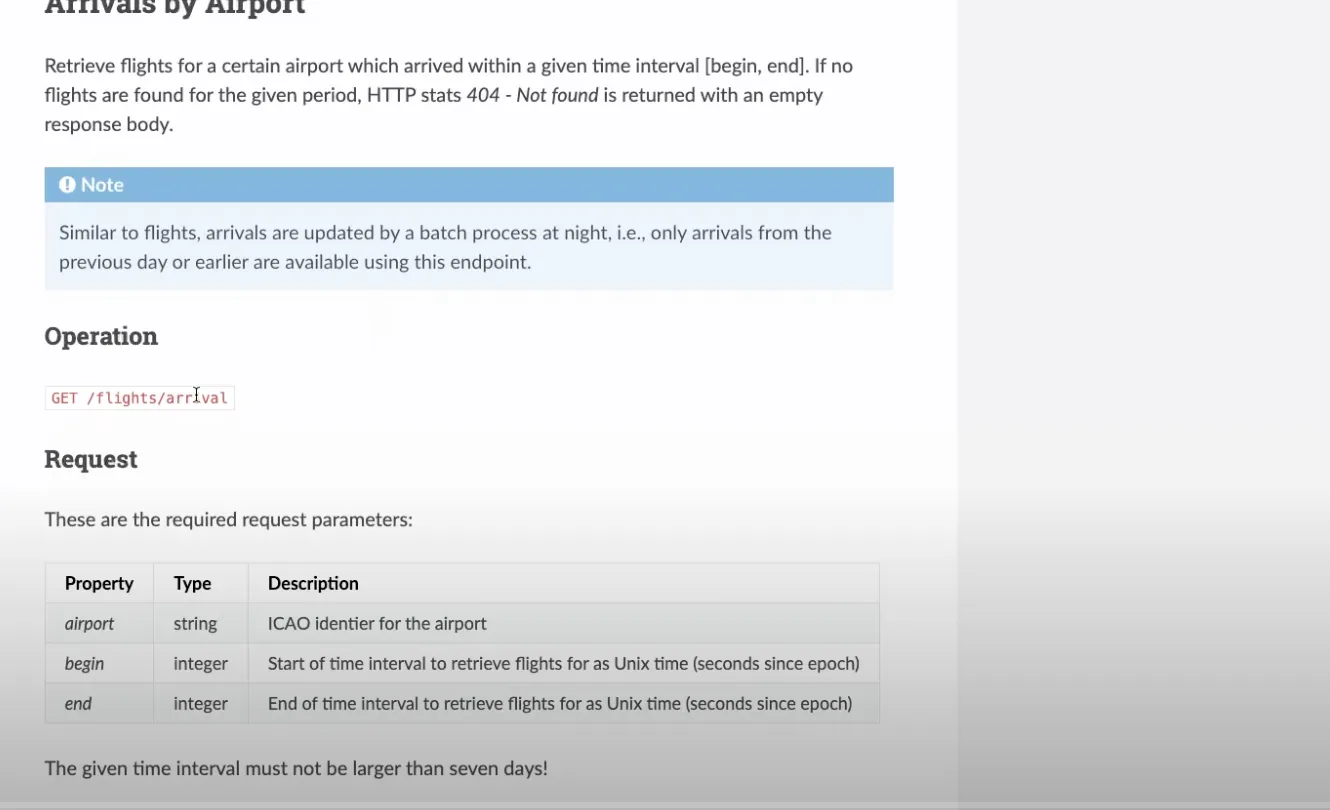
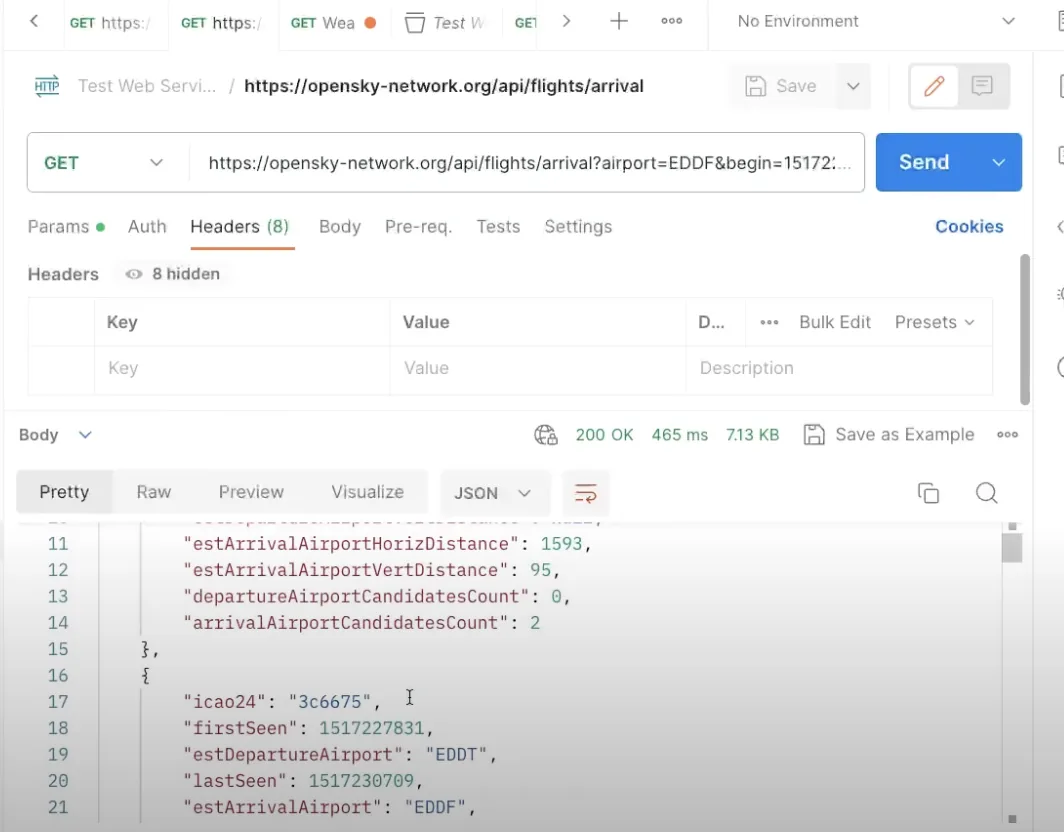
public class OS_FlightStatusModel{ public String icao24 {get;set;} public Integer firstSeen {get;set;} public String estDepartureAirport {get;set;} public Integer lastSeen {get;set;} public String estArrivalAirport {get;set;} public String callsign {get;set;} public Integer estDepartureAirportHorizDistance {get;set;} public Integer estDepartureAirportVertDistance {get;set;} public Integer estArrivalAirportHorizDistance {get;set;} public Integer estArrivalAirportVertDistance {get;set;} public Integer departureAirportCandidatesCount {get;set;} public Integer arrivalAirportCandidatesCount {get;set;} //---Use the JSON Deserialize public static List<OS_FlightStatusModel> parse(String json) { return (List<OS_FlightStatusModel>) System.JSON.deserialize(json, List<OS_FlightStatusModel>.class); }}Mit der obigen Klasse können Sie das JSON ganz einfach mit einer einzigen Codezeile parsen:
//---Get the Flight Request private static List<OS_FlightStatusModel> getFlightRequest(String requestURL) {//---Return structureList<OS_FlightStatusModel> retList = new List<OS_FlightStatusModel>();//---Make the requestHttpResponse resp = getRequest( requestURL);//---Check for SuccessInteger respStatusCode = resp.getStatusCode();if (respStatusCode == 200) {//---Read the PayloadString payload = resp.getBody();debug('Payload: ' + payload);//---Parse the payloadretList = OS_FlightStatusModel.parse(payload);if (retList != null) {System.debug('Found ' + retList.size() + ' records');for( OS_FlightStatusModel mRow : retList) {debug('Row: ' + mRow); } } }else {//---Handle an errordebug('Response Status Code: ' + respStatusCode); }return retList; }Abschnitt 2: dynamisches JSON-Parsing
Für komplexere JSON-Strukturen wie Arrays oder verschachtelte Objekte brauchen Sie womöglich dynamisches Parsing. Dieser Ansatz erfordert mehr Codezeilen und ein sorgfältiges Durchlaufen der JSON-Tokens. Er mag komplizierter wirken, ist bei anspruchsvollen JSON-Strukturen aber nötig.
Beispiel:
/***************************************************************************************** @Name OS_StateModelParser* @Author Steve Simpson - steve@stevetecharc.com* @Date 2023** @Description Parser for reading State Models from JSON***************************************************************************************** Version Developer Date Description*----------------------------------------------------------------------------------------* 1.0 Steve Simpson 2023 Initial Creation****************************************************************************************/public with sharing class OS_StateModelParser extends OS_BaseParser{private OS_StateResponseModel responseModel {get; set;}//--Parse the payload into the OS_StateResponseModelpublic OS_StateResponseModel parse(String json) {//---Setup the return valueresponseModel = new OS_StateResponseModel();responseModel.States = new List<OS_StateModel>();try {parseBody(json); }catch (Exception ex) {debug( 'Exception: ' + ex.getMessage() + ' ' + ex.getStackTraceString());debugJSON(json); }return responseModel; }//---Parse the body of the JSONprivate void parseBody(String json) {//---Set the default Page Sizeif (PageSize == 0) PageSize = DEFAULT_PAGE_SIZE;Boolean hasTokenTime = false;Boolean hasTokenStates = false;JSONParser parser = System.JSON.createParser(json);//---Read Token by Tokenwhile (parser.nextToken() != System.JSONToken.END_OBJECT) {//---Read the current Token, check its field nameif (parser.getCurrentToken() == System.JSONToken.FIELD_NAME) {String text = parser.getText();debug( 'Json Token: ' + text);//---If the next token has a value, then write it, this handles null valuesif (parser.nextToken() != System.JSONToken.VALUE_NULL) {//---Read the timeif (text == 'time') {responseModel.ResponseTime = parser.getIntegerValue();hasTokenTime = true; }//---Read the statesif (text == 'states') {responseModel.States = parseStateList(parser);hasTokenStates = true; } } }//---If have both tags, then break out of loopif (hasTokenStates && hasTokenTime) break; } }//---Parse the Statesprivate List<OS_StateModel> parseStateList(JSONParser parser) {CurrentRecord = 0;//---Build the return listList<OS_StateModel> retList = new List<OS_StateModel>();//---Go to the next token if neededif (parser.getCurrentToken() == null) parser.nextToken();//---Iterate over the itemswhile (parser.nextToken() != System.JSONToken.END_ARRAY) {CurrentRecord++; //---Track the current recordString logLine = 'Rec: ' + CurrentRecord + ': ';if (CurrentRecord > getMaxRecord()) {//---If past the max record, then break out of loopdebug(logLine + 'End of page');break; }else if (CurrentRecord >= getFirstRecordToProcess()) {//---Build a new State RowOS_StateModel sModel = new OS_StateModel();parseStateItem(parser, sModel);retList.add(sModel);debug(logLine + 'State: ' + sModel); }else {//---Pass in null model to trigger token advancement without reading valuesparseStateItem(parser, null);debug(logLine + 'Skipped'); } }return retList; }//---Parse the Statesprivate void parseStateItem(JSONParser parser, OS_StateModel sModel) {//---Go to the next token if neededif (parser.getCurrentToken() == null) parser.nextToken();Integer position = 0;while (parser.nextToken() != System.JSONToken.END_ARRAY) {if (sModel != null && parser.getCurrentToken() != System.JSONToken.VALUE_NULL) {if (position == 0) sModel.icao24 = parser.getText();if (position == 1) sModel.callsign = parser.getText();if (position == 2) sModel.origin_country = parser.getText();if (position == 3) sModel.time_position = parser.getIntegerValue();if (position == 4) sModel.last_contact = parser.getIntegerValue();if (position == 5) sModel.longitude = parser.getDoubleValue();if (position == 6) sModel.latitude = parser.getDoubleValue();if (position == 7) sModel.baro_altitude = parser.getDoubleValue();if (position == 8) sModel.on_ground = parser.getBooleanValue();if (position == 9) sModel.velocity = parser.getDoubleValue();if (position == 10) sModel.true_track = parser.getDoubleValue();if (position == 11) sModel.vertical_rate = parser.getDoubleValue();if (position == 12) {//---Sensors, sub Array, should be null }if (position == 13) sModel.geo_altitude = parser.getDoubleValue();if (position == 14) sModel.squawk = parser.getText();if (position == 15) sModel.spi = parser.getBooleanValue();if (position == 16) sModel.position_source = parser.getIntegerValue();if (position == 17) sModel.category = parser.getIntegerValue(); }position++;//System.debug('Position ' + position); } }}Abschnitt 3: dynamisches Mapping mit benutzerdefinierten Metadaten
Wenn Sie noch mehr Flexibilität brauchen, erwägen Sie dynamisches Mapping mit benutzerdefinierten Metadaten. So lassen sich JSON-Felder dynamisch auf SObject-Felder abbilden, ohne den Code zu ändern. Mit dynamischem Mapping können Sie Felder im laufenden Betrieb hinzufügen oder entfernen, was in Produktionsumgebungen grosse Flexibilität bietet.
Beispiel:
Legen Sie benutzerdefinierte Metadaten an, die JSON-Felder auf SObject-API-Namen, Positionen und Datentypen abbilden.
Laden Sie die benutzerdefinierten Metadaten und nutzen Sie sie, um SObject-Feldern dynamisch Werte zuzuweisen.
/***************************************************************************************** @Name OS_StateSObjectModelParser* @Author Steve Simpson - steve@stevetecharc.com* @Date 2023** @Description Parser for reading State Models from JSON***************************************************************************************** Version Developer Date Description*----------------------------------------------------------------------------------------* 1.0 Steve Simpson 2023 Initial Creation****************************************************************************************/public with sharing class OS_StateSObjectModelParser extends OS_BaseParser{private OS_StateSObjectResponseModel responseModel {get; set;}private List<OS_StateMap__mdt> mapList {get;set;}//--Parse the payload into the OS_StateResponseModelpublic OS_StateSObjectResponseModel parse(String json) {mapList = OS_StateMap__mdt.getAll().values();//---Setup the return valueresponseModel = new OS_StateSObjectResponseModel();responseModel.States = new List<OS_State__c>();try {parseBody(json); }catch (Exception ex) {debug( 'Exception: ' + ex.getMessage() + ' ' + ex.getStackTraceString());debugJSON(json); }return responseModel; }//---Parse the body of the JSONprivate void parseBody(String json) {//---Set the default Page Sizeif (PageSize == 0) PageSize = DEFAULT_PAGE_SIZE;Boolean hasTokenTime = false;Boolean hasTokenStates = false;JSONParser parser = System.JSON.createParser(json);//---Read Token by Tokenwhile (parser.nextToken() != System.JSONToken.END_OBJECT) {//---Read the current Token, check its field nameif (parser.getCurrentToken() == System.JSONToken.FIELD_NAME) {String text = parser.getText();debug( 'Json Token: ' + text);//---If the next token has a value, then write it, this handles null valuesif (parser.nextToken() != System.JSONToken.VALUE_NULL) {//---Read the timeif (text == 'time') {responseModel.ResponseTime = parser.getIntegerValue();hasTokenTime = true; }//---Read the statesif (text == 'states') {responseModel.States = parseStateList(parser);hasTokenStates = true; } } }//---If have both tags, then break out of loopif (hasTokenStates && hasTokenTime) break; } }//---Parse the Statesprivate List<OS_State__c> parseStateList(JSONParser parser) {CurrentRecord = 0;//---Build the return listList<OS_State__c> retList = new List<OS_State__c>();//---Go to the next token if neededif (parser.getCurrentToken() == null) parser.nextToken();//---Iterate over the itemswhile (parser.nextToken() != System.JSONToken.END_ARRAY) {CurrentRecord++; //---Track the current recordString logLine = 'Rec: ' + CurrentRecord + ': ';if (CurrentRecord > getMaxRecord()) {//---If past the max record, then break out of loopdebug(logLine + 'End of page');break; }else if (CurrentRecord >= getFirstRecordToProcess()) {//---Build a new State RowOS_State__c osState = new OS_State__c();parseStateItem(parser, osState);retList.add(osState);debug(logLine + 'State: ' + osState); }else {//---Pass in null model to trigger token advancement without reading valuesparseStateItem(parser, null);debug(logLine + 'Skipped'); } }return retList; }//---Parse the Statesprivate void parseStateItem(JSONParser parser, OS_State__c osState) {//---Go to the next token if neededif (parser.getCurrentToken() == null) parser.nextToken();Integer position = 0;while (parser.nextToken() != System.JSONToken.END_ARRAY) {if (osState != null && parser.getCurrentToken() != System.JSONToken.VALUE_NULL) {OS_StateMap__mdt curMap = null;for(OS_StateMap__mdt mapRow : mapList) {if (mapRow.Position__c == position) {curMap = mapRow;break; } }if (curMap != null) {String apiName = curMap.API_Name__c;if (curMap.Data_Type__c == 'Text') {osState.put(apiName, parser.getText()); }if (curMap.Data_Type__c == 'Integer') {osState.put(apiName, parser.getIntegerValue()); }if (curMap.Data_Type__c == 'Double') {osState.put(apiName, parser.getDoubleValue()); }if (curMap.Data_Type__c == 'Boolean') {osState.put(apiName, parser.getBooleanValue()); } } }position++;//System.debug('Position ' + position); } }}Fazit:
Bei Apex-Callouts in Salesforce können Sie je nach Bedarf zwischen verschiedenen JSON-Parsing-Techniken wählen. Für einfaches, statisches JSON nutzen Sie festes Parsing mit einzeiliger Deserialisierung. Für komplexere Strukturen kommt dynamisches Parsing infrage. Und für maximale Flexibilität verwenden Sie dynamisches Mapping mit benutzerdefinierten Metadaten. Jeder Ansatz hat seine Einsatzfälle, wählen Sie also den, der am besten zu Ihrem Projekt passt.
Viel Spass beim Programmieren!
Bleiben Sie dran
Weitere Einblicke und Tipps gibt es hier auf www.SteveTechArc.com und auf dem YouTube-Kanal @SteveTechArc (opens in a new tab). Abonnieren Sie und vertiefen Sie Ihr Verständnis von Salesforce und davon, wie Sie es mit anderen Systemen integrieren.
Die Welt ein Stück verändern, indem ich Wissen über Integration mit anderen Architekt:innen und allen auf dem Weg dorthin teile!
Transkript mit Unterstützung von KI
STA 1.6