
JSON 잼버리: Apex 콜아웃을 위한 고정 대 동적 역직렬화 대결
소개:
안녕하세요! Salesforce 공인 테크니컬 아키텍트이자 강사인 Steve Simpson입니다. 이 블로그에서는 Salesforce에서 Apex 콜아웃을 할 때 JSON을 구문 분석하는 여러 기법을 살펴봅니다. 고정 JSON 구문 분석, 동적 JSON 구문 분석, 그리고 유연성과 사용 편의성을 함께 주는 하이브리드 방식을 이야기합니다.
섹션 1: 한 줄 역직렬화를 이용한 고정 JSON 구문 분석
자주 바뀌지 않는 단순한 JSON 구조를 다룰 때는 JSON 구조와 정확히 일치하는 Apex 클래스를 만들 수 있습니다. 이 방법은 코드 한 줄로 JSON 문자열을 배열로 역직렬화할 수 있게 해 줍니다. 정적인 JSON 구조에는 강력하고 효율적인 방법입니다.
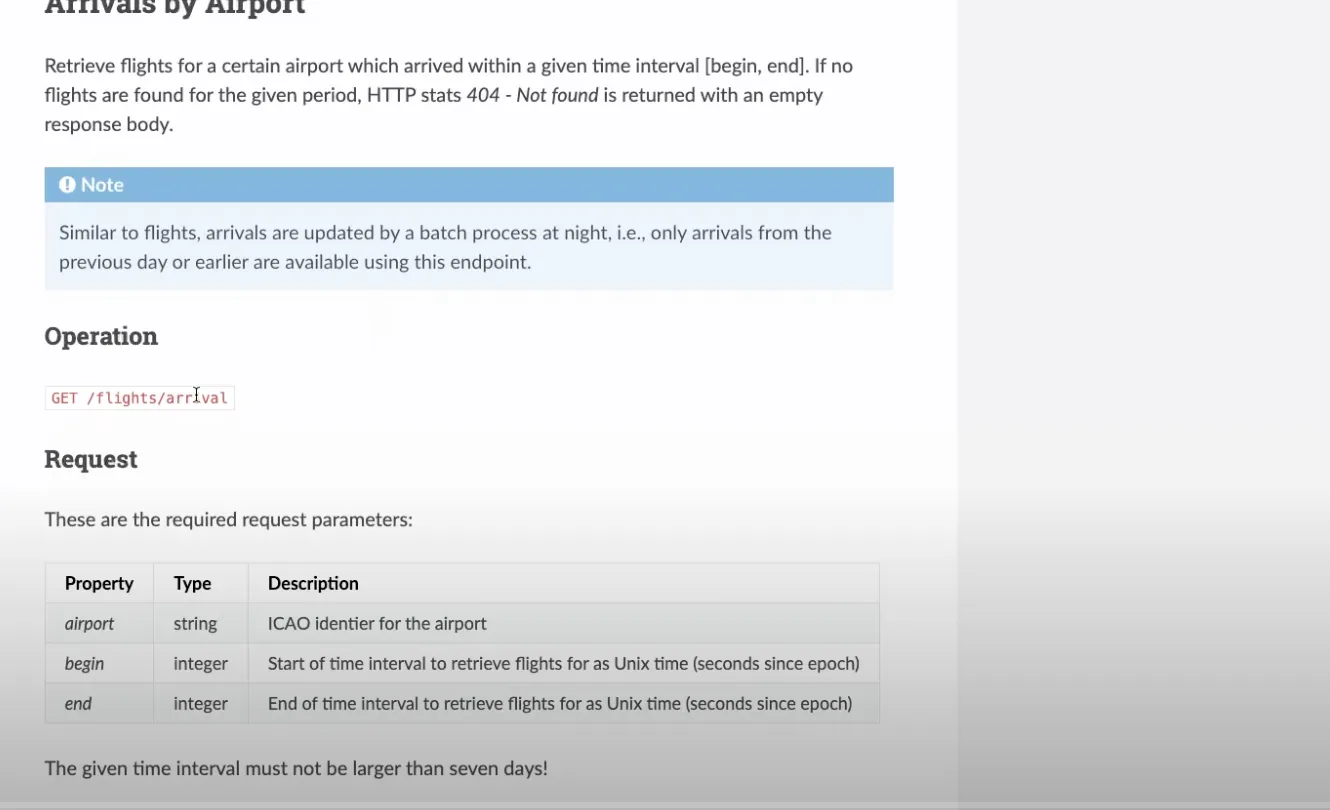
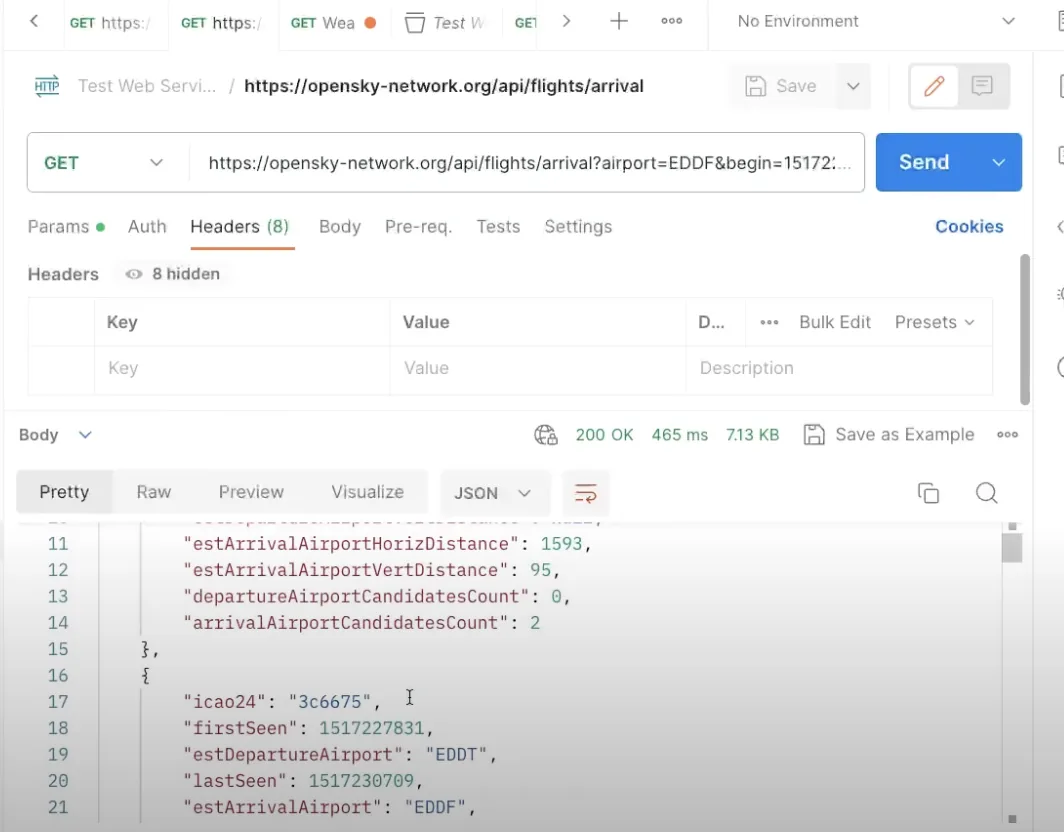
public class OS_FlightStatusModel{ public String icao24 {get;set;} public Integer firstSeen {get;set;} public String estDepartureAirport {get;set;} public Integer lastSeen {get;set;} public String estArrivalAirport {get;set;} public String callsign {get;set;} public Integer estDepartureAirportHorizDistance {get;set;} public Integer estDepartureAirportVertDistance {get;set;} public Integer estArrivalAirportHorizDistance {get;set;} public Integer estArrivalAirportVertDistance {get;set;} public Integer departureAirportCandidatesCount {get;set;} public Integer arrivalAirportCandidatesCount {get;set;} //---Use the JSON Deserialize public static List<OS_FlightStatusModel> parse(String json) { return (List<OS_FlightStatusModel>) System.JSON.deserialize(json, List<OS_FlightStatusModel>.class); }}위 클래스가 있으면 코드 한 줄로 JSON을 쉽게 구문 분석할 수 있습니다.
//---Get the Flight Request private static List<OS_FlightStatusModel> getFlightRequest(String requestURL) {//---Return structureList<OS_FlightStatusModel> retList = new List<OS_FlightStatusModel>();//---Make the requestHttpResponse resp = getRequest( requestURL);//---Check for SuccessInteger respStatusCode = resp.getStatusCode();if (respStatusCode == 200) {//---Read the PayloadString payload = resp.getBody();debug('Payload: ' + payload);//---Parse the payloadretList = OS_FlightStatusModel.parse(payload);if (retList != null) {System.debug('Found ' + retList.size() + ' records');for( OS_FlightStatusModel mRow : retList) {debug('Row: ' + mRow); } } }else {//---Handle an errordebug('Response Status Code: ' + respStatusCode); }return retList; }섹션 2: 동적 JSON 구문 분석
배열이나 중첩 개체 같은 더 복잡한 JSON 구조에는 동적 JSON 구문 분석이 필요할 수 있습니다. 이 방법은 코드가 더 길고 JSON 토큰을 신중하게 따라가야 합니다. 더 복잡해 보일 수 있지만, 고급 JSON 구조를 다룰 때는 동적 JSON 구문 분석이 필요합니다.
예:
/***************************************************************************************** @Name OS_StateModelParser* @Author Steve Simpson - steve@stevetecharc.com* @Date 2023** @Description Parser for reading State Models from JSON***************************************************************************************** Version Developer Date Description*----------------------------------------------------------------------------------------* 1.0 Steve Simpson 2023 Initial Creation****************************************************************************************/public with sharing class OS_StateModelParser extends OS_BaseParser{private OS_StateResponseModel responseModel {get; set;}//--Parse the payload into the OS_StateResponseModelpublic OS_StateResponseModel parse(String json) {//---Setup the return valueresponseModel = new OS_StateResponseModel();responseModel.States = new List<OS_StateModel>();try {parseBody(json); }catch (Exception ex) {debug( 'Exception: ' + ex.getMessage() + ' ' + ex.getStackTraceString());debugJSON(json); }return responseModel; }//---Parse the body of the JSONprivate void parseBody(String json) {//---Set the default Page Sizeif (PageSize == 0) PageSize = DEFAULT_PAGE_SIZE;Boolean hasTokenTime = false;Boolean hasTokenStates = false;JSONParser parser = System.JSON.createParser(json);//---Read Token by Tokenwhile (parser.nextToken() != System.JSONToken.END_OBJECT) {//---Read the current Token, check its field nameif (parser.getCurrentToken() == System.JSONToken.FIELD_NAME) {String text = parser.getText();debug( 'Json Token: ' + text);//---If the next token has a value, then write it, this handles null valuesif (parser.nextToken() != System.JSONToken.VALUE_NULL) {//---Read the timeif (text == 'time') {responseModel.ResponseTime = parser.getIntegerValue();hasTokenTime = true; }//---Read the statesif (text == 'states') {responseModel.States = parseStateList(parser);hasTokenStates = true; } } }//---If have both tags, then break out of loopif (hasTokenStates && hasTokenTime) break; } }//---Parse the Statesprivate List<OS_StateModel> parseStateList(JSONParser parser) {CurrentRecord = 0;//---Build the return listList<OS_StateModel> retList = new List<OS_StateModel>();//---Go to the next token if neededif (parser.getCurrentToken() == null) parser.nextToken();//---Iterate over the itemswhile (parser.nextToken() != System.JSONToken.END_ARRAY) {CurrentRecord++; //---Track the current recordString logLine = 'Rec: ' + CurrentRecord + ': ';if (CurrentRecord > getMaxRecord()) {//---If past the max record, then break out of loopdebug(logLine + 'End of page');break; }else if (CurrentRecord >= getFirstRecordToProcess()) {//---Build a new State RowOS_StateModel sModel = new OS_StateModel();parseStateItem(parser, sModel);retList.add(sModel);debug(logLine + 'State: ' + sModel); }else {//---Pass in null model to trigger token advancement without reading valuesparseStateItem(parser, null);debug(logLine + 'Skipped'); } }return retList; }//---Parse the Statesprivate void parseStateItem(JSONParser parser, OS_StateModel sModel) {//---Go to the next token if neededif (parser.getCurrentToken() == null) parser.nextToken();Integer position = 0;while (parser.nextToken() != System.JSONToken.END_ARRAY) {if (sModel != null && parser.getCurrentToken() != System.JSONToken.VALUE_NULL) {if (position == 0) sModel.icao24 = parser.getText();if (position == 1) sModel.callsign = parser.getText();if (position == 2) sModel.origin_country = parser.getText();if (position == 3) sModel.time_position = parser.getIntegerValue();if (position == 4) sModel.last_contact = parser.getIntegerValue();if (position == 5) sModel.longitude = parser.getDoubleValue();if (position == 6) sModel.latitude = parser.getDoubleValue();if (position == 7) sModel.baro_altitude = parser.getDoubleValue();if (position == 8) sModel.on_ground = parser.getBooleanValue();if (position == 9) sModel.velocity = parser.getDoubleValue();if (position == 10) sModel.true_track = parser.getDoubleValue();if (position == 11) sModel.vertical_rate = parser.getDoubleValue();if (position == 12) {//---Sensors, sub Array, should be null }if (position == 13) sModel.geo_altitude = parser.getDoubleValue();if (position == 14) sModel.squawk = parser.getText();if (position == 15) sModel.spi = parser.getBooleanValue();if (position == 16) sModel.position_source = parser.getIntegerValue();if (position == 17) sModel.category = parser.getIntegerValue(); }position++;//System.debug('Position ' + position); } }}섹션 3: 사용자 정의 메타데이터를 이용한 동적 매핑
더 많은 유연성이 필요하다면 사용자 정의 메타데이터를 이용한 동적 매핑을 고려하십시오. 이 방법은 코드를 바꾸지 않고 JSON 필드를 SObject 필드에 동적으로 매핑할 수 있게 해 줍니다. 동적 매핑으로 필드를 즉석에서 추가하거나 제거할 수 있어 운영 환경에서 큰 유연성을 줍니다.
예:
JSON 필드를 SObject API 이름, 위치, 데이터 유형에 매핑하는 사용자 정의 메타데이터를 만듭니다.
사용자 정의 메타데이터를 불러와 SObject 필드에 값을 동적으로 할당하는 데 씁니다.
/***************************************************************************************** @Name OS_StateSObjectModelParser* @Author Steve Simpson - steve@stevetecharc.com* @Date 2023** @Description Parser for reading State Models from JSON***************************************************************************************** Version Developer Date Description*----------------------------------------------------------------------------------------* 1.0 Steve Simpson 2023 Initial Creation****************************************************************************************/public with sharing class OS_StateSObjectModelParser extends OS_BaseParser{private OS_StateSObjectResponseModel responseModel {get; set;}private List<OS_StateMap__mdt> mapList {get;set;}//--Parse the payload into the OS_StateResponseModelpublic OS_StateSObjectResponseModel parse(String json) {mapList = OS_StateMap__mdt.getAll().values();//---Setup the return valueresponseModel = new OS_StateSObjectResponseModel();responseModel.States = new List<OS_State__c>();try {parseBody(json); }catch (Exception ex) {debug( 'Exception: ' + ex.getMessage() + ' ' + ex.getStackTraceString());debugJSON(json); }return responseModel; }//---Parse the body of the JSONprivate void parseBody(String json) {//---Set the default Page Sizeif (PageSize == 0) PageSize = DEFAULT_PAGE_SIZE;Boolean hasTokenTime = false;Boolean hasTokenStates = false;JSONParser parser = System.JSON.createParser(json);//---Read Token by Tokenwhile (parser.nextToken() != System.JSONToken.END_OBJECT) {//---Read the current Token, check its field nameif (parser.getCurrentToken() == System.JSONToken.FIELD_NAME) {String text = parser.getText();debug( 'Json Token: ' + text);//---If the next token has a value, then write it, this handles null valuesif (parser.nextToken() != System.JSONToken.VALUE_NULL) {//---Read the timeif (text == 'time') {responseModel.ResponseTime = parser.getIntegerValue();hasTokenTime = true; }//---Read the statesif (text == 'states') {responseModel.States = parseStateList(parser);hasTokenStates = true; } } }//---If have both tags, then break out of loopif (hasTokenStates && hasTokenTime) break; } }//---Parse the Statesprivate List<OS_State__c> parseStateList(JSONParser parser) {CurrentRecord = 0;//---Build the return listList<OS_State__c> retList = new List<OS_State__c>();//---Go to the next token if neededif (parser.getCurrentToken() == null) parser.nextToken();//---Iterate over the itemswhile (parser.nextToken() != System.JSONToken.END_ARRAY) {CurrentRecord++; //---Track the current recordString logLine = 'Rec: ' + CurrentRecord + ': ';if (CurrentRecord > getMaxRecord()) {//---If past the max record, then break out of loopdebug(logLine + 'End of page');break; }else if (CurrentRecord >= getFirstRecordToProcess()) {//---Build a new State RowOS_State__c osState = new OS_State__c();parseStateItem(parser, osState);retList.add(osState);debug(logLine + 'State: ' + osState); }else {//---Pass in null model to trigger token advancement without reading valuesparseStateItem(parser, null);debug(logLine + 'Skipped'); } }return retList; }//---Parse the Statesprivate void parseStateItem(JSONParser parser, OS_State__c osState) {//---Go to the next token if neededif (parser.getCurrentToken() == null) parser.nextToken();Integer position = 0;while (parser.nextToken() != System.JSONToken.END_ARRAY) {if (osState != null && parser.getCurrentToken() != System.JSONToken.VALUE_NULL) {OS_StateMap__mdt curMap = null;for(OS_StateMap__mdt mapRow : mapList) {if (mapRow.Position__c == position) {curMap = mapRow;break; } }if (curMap != null) {String apiName = curMap.API_Name__c;if (curMap.Data_Type__c == 'Text') {osState.put(apiName, parser.getText()); }if (curMap.Data_Type__c == 'Integer') {osState.put(apiName, parser.getIntegerValue()); }if (curMap.Data_Type__c == 'Double') {osState.put(apiName, parser.getDoubleValue()); }if (curMap.Data_Type__c == 'Boolean') {osState.put(apiName, parser.getBooleanValue()); } } }position++;//System.debug('Position ' + position); } }}결론:
Salesforce Apex 콜아웃에서는 필요에 따라 여러 JSON 구문 분석 기법 중에서 고를 수 있습니다. 단순하고 정적인 JSON에는 한 줄 역직렬화를 이용한 고정 JSON 구문 분석을, 더 복잡한 구조에는 동적 JSON 구문 분석을, 최대한의 유연성이 필요하면 사용자 정의 메타데이터를 이용한 동적 매핑을 쓰십시오. 각 방법에는 쓰임새가 있으니 프로젝트 요구사항에 가장 잘 맞는 것을 고르십시오.
즐거운 코딩 되십시오!
계속 지켜봐 주세요
더 많은 통찰과 팁은 이곳 www.SteveTechArc.com과 YouTube 채널 @SteveTechArc (opens in a new tab)에서 확인하십시오. 구독하고 Salesforce와 그것을 다른 시스템과 통합하는 방법에 대한 이해를 넓히십시오.
동료 아키텍트와 아키텍트의 길을 걷는 분들에게 통합 지식을 나누며 세상을 바꾸는 데 힘을 보탭니다!
STA 1.6