
JSON Jamboree: Apex कॉलआउट के लिए फ़िक्स्ड बनाम डायनेमिक डीसीरियलाइज़ेशन का मुक़ाबला
परिचय:
नमस्ते! मैं Steve Simpson हूँ, एक Salesforce Certified Technical Architect और इंस्ट्रक्टर। इस ब्लॉग में हम Salesforce में Apex कॉलआउट (callouts) करते समय JSON पार्स करने की अलग-अलग तकनीकें देखेंगे। हम फ़िक्स्ड JSON पार्सिंग, डायनेमिक JSON पार्सिंग, और एक हाइब्रिड तरीक़े पर बात करेंगे जो लचीलापन और इस्तेमाल में आसानी देता है।
सेक्शन 1: एक लाइन के डीसीरियलाइज़ेशन से फ़िक्स्ड JSON पार्सिंग
जब आप ऐसे सीधे-सादे JSON स्ट्रक्चर से निपट रहे हों जो बार-बार नहीं बदलते, तो आप एक Apex क्लास बना सकते हैं जो JSON स्ट्रक्चर से हूबहू मेल खाती हो। इस तरीक़े से आप कोड की एक लाइन से JSON स्ट्रिंग को एक ऐरे में डीसीरियलाइज़ कर सकते हैं। स्थिर JSON स्ट्रक्चर के लिए यह तरीक़ा दमदार और कुशल है।
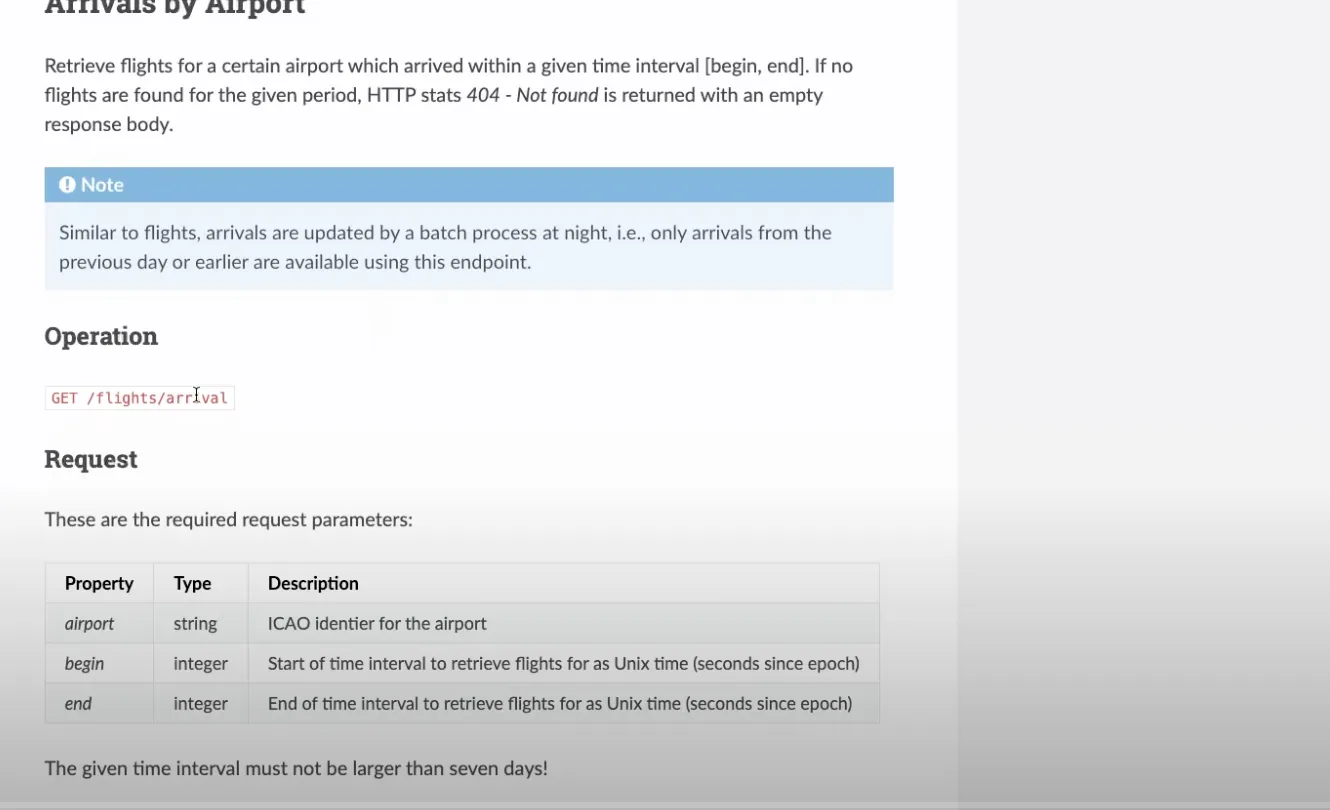
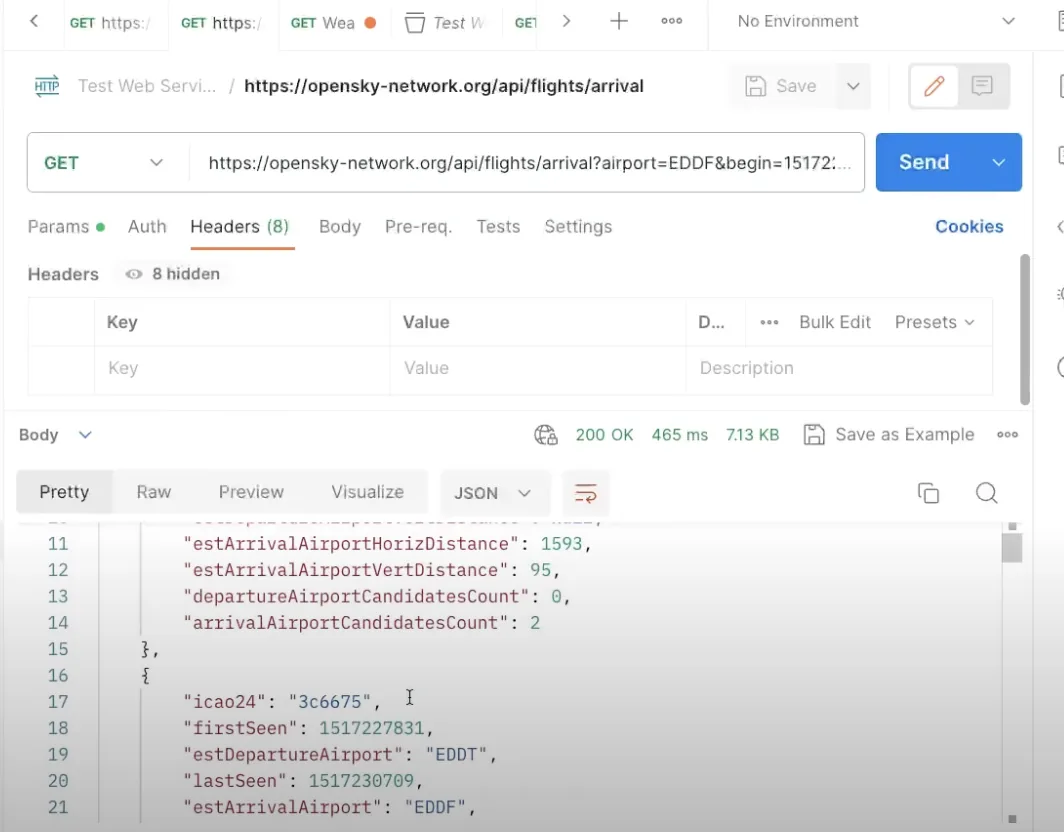
public class OS_FlightStatusModel{ public String icao24 {get;set;} public Integer firstSeen {get;set;} public String estDepartureAirport {get;set;} public Integer lastSeen {get;set;} public String estArrivalAirport {get;set;} public String callsign {get;set;} public Integer estDepartureAirportHorizDistance {get;set;} public Integer estDepartureAirportVertDistance {get;set;} public Integer estArrivalAirportHorizDistance {get;set;} public Integer estArrivalAirportVertDistance {get;set;} public Integer departureAirportCandidatesCount {get;set;} public Integer arrivalAirportCandidatesCount {get;set;} //---Use the JSON Deserialize public static List<OS_FlightStatusModel> parse(String json) { return (List<OS_FlightStatusModel>) System.JSON.deserialize(json, List<OS_FlightStatusModel>.class); }}ऊपर वाली क्लास से आप कोड की एक लाइन में आसानी से JSON पार्स कर सकते हैं:
//---Get the Flight Request private static List<OS_FlightStatusModel> getFlightRequest(String requestURL) {//---Return structureList<OS_FlightStatusModel> retList = new List<OS_FlightStatusModel>();//---Make the requestHttpResponse resp = getRequest( requestURL);//---Check for SuccessInteger respStatusCode = resp.getStatusCode();if (respStatusCode == 200) {//---Read the PayloadString payload = resp.getBody();debug('Payload: ' + payload);//---Parse the payloadretList = OS_FlightStatusModel.parse(payload);if (retList != null) {System.debug('Found ' + retList.size() + ' records');for( OS_FlightStatusModel mRow : retList) {debug('Row: ' + mRow); } } }else {//---Handle an errordebug('Response Status Code: ' + respStatusCode); }return retList; }सेक्शन 2: डायनेमिक JSON पार्सिंग
ज़्यादा जटिल JSON स्ट्रक्चर, जैसे ऐरे या नेस्टेड ऑब्जेक्ट, के लिए आपको डायनेमिक JSON पार्सिंग की ज़रूरत पड़ सकती है। इस तरीक़े में कोड की ज़्यादा लाइनें लगती हैं और JSON टोकन के बीच सावधानी से चलना पड़ता है। भले ही यह ज़्यादा जटिल लगे, एडवांस्ड JSON स्ट्रक्चर से निपटते समय डायनेमिक JSON पार्सिंग ज़रूरी है।
उदाहरण:
/***************************************************************************************** @Name OS_StateModelParser* @Author Steve Simpson - steve@stevetecharc.com* @Date 2023** @Description Parser for reading State Models from JSON***************************************************************************************** Version Developer Date Description*----------------------------------------------------------------------------------------* 1.0 Steve Simpson 2023 Initial Creation****************************************************************************************/public with sharing class OS_StateModelParser extends OS_BaseParser{private OS_StateResponseModel responseModel {get; set;}//--Parse the payload into the OS_StateResponseModelpublic OS_StateResponseModel parse(String json) {//---Setup the return valueresponseModel = new OS_StateResponseModel();responseModel.States = new List<OS_StateModel>();try {parseBody(json); }catch (Exception ex) {debug( 'Exception: ' + ex.getMessage() + ' ' + ex.getStackTraceString());debugJSON(json); }return responseModel; }//---Parse the body of the JSONprivate void parseBody(String json) {//---Set the default Page Sizeif (PageSize == 0) PageSize = DEFAULT_PAGE_SIZE;Boolean hasTokenTime = false;Boolean hasTokenStates = false;JSONParser parser = System.JSON.createParser(json);//---Read Token by Tokenwhile (parser.nextToken() != System.JSONToken.END_OBJECT) {//---Read the current Token, check its field nameif (parser.getCurrentToken() == System.JSONToken.FIELD_NAME) {String text = parser.getText();debug( 'Json Token: ' + text);//---If the next token has a value, then write it, this handles null valuesif (parser.nextToken() != System.JSONToken.VALUE_NULL) {//---Read the timeif (text == 'time') {responseModel.ResponseTime = parser.getIntegerValue();hasTokenTime = true; }//---Read the statesif (text == 'states') {responseModel.States = parseStateList(parser);hasTokenStates = true; } } }//---If have both tags, then break out of loopif (hasTokenStates && hasTokenTime) break; } }//---Parse the Statesprivate List<OS_StateModel> parseStateList(JSONParser parser) {CurrentRecord = 0;//---Build the return listList<OS_StateModel> retList = new List<OS_StateModel>();//---Go to the next token if neededif (parser.getCurrentToken() == null) parser.nextToken();//---Iterate over the itemswhile (parser.nextToken() != System.JSONToken.END_ARRAY) {CurrentRecord++; //---Track the current recordString logLine = 'Rec: ' + CurrentRecord + ': ';if (CurrentRecord > getMaxRecord()) {//---If past the max record, then break out of loopdebug(logLine + 'End of page');break; }else if (CurrentRecord >= getFirstRecordToProcess()) {//---Build a new State RowOS_StateModel sModel = new OS_StateModel();parseStateItem(parser, sModel);retList.add(sModel);debug(logLine + 'State: ' + sModel); }else {//---Pass in null model to trigger token advancement without reading valuesparseStateItem(parser, null);debug(logLine + 'Skipped'); } }return retList; }//---Parse the Statesprivate void parseStateItem(JSONParser parser, OS_StateModel sModel) {//---Go to the next token if neededif (parser.getCurrentToken() == null) parser.nextToken();Integer position = 0;while (parser.nextToken() != System.JSONToken.END_ARRAY) {if (sModel != null && parser.getCurrentToken() != System.JSONToken.VALUE_NULL) {if (position == 0) sModel.icao24 = parser.getText();if (position == 1) sModel.callsign = parser.getText();if (position == 2) sModel.origin_country = parser.getText();if (position == 3) sModel.time_position = parser.getIntegerValue();if (position == 4) sModel.last_contact = parser.getIntegerValue();if (position == 5) sModel.longitude = parser.getDoubleValue();if (position == 6) sModel.latitude = parser.getDoubleValue();if (position == 7) sModel.baro_altitude = parser.getDoubleValue();if (position == 8) sModel.on_ground = parser.getBooleanValue();if (position == 9) sModel.velocity = parser.getDoubleValue();if (position == 10) sModel.true_track = parser.getDoubleValue();if (position == 11) sModel.vertical_rate = parser.getDoubleValue();if (position == 12) {//---Sensors, sub Array, should be null }if (position == 13) sModel.geo_altitude = parser.getDoubleValue();if (position == 14) sModel.squawk = parser.getText();if (position == 15) sModel.spi = parser.getBooleanValue();if (position == 16) sModel.position_source = parser.getIntegerValue();if (position == 17) sModel.category = parser.getIntegerValue(); }position++;//System.debug('Position ' + position); } }}सेक्शन 3: Custom Metadata से डायनेमिक मैपिंग
अगर आपको और भी लचीलापन चाहिए, तो Custom Metadata के साथ डायनेमिक मैपिंग पर विचार करें। इस तरीक़े से आप कोड बदले बिना JSON फ़ील्ड को SObject फ़ील्ड से डायनेमिक रूप से मैप कर सकते हैं। डायनेमिक मैपिंग से आप चलते-चलते फ़ील्ड जोड़ या हटा सकते हैं, जो प्रोडक्शन एनवायरनमेंट में काफ़ी लचीलापन देता है।
उदाहरण:
ऐसा Custom Metadata बनाएँ जो JSON फ़ील्ड को SObject के API नाम, पोज़िशन और डेटा टाइप से मैप करे।
Custom Metadata लोड करें और उससे SObject फ़ील्ड में डायनेमिक रूप से वैल्यू असाइन करें।
/***************************************************************************************** @Name OS_StateSObjectModelParser* @Author Steve Simpson - steve@stevetecharc.com* @Date 2023** @Description Parser for reading State Models from JSON***************************************************************************************** Version Developer Date Description*----------------------------------------------------------------------------------------* 1.0 Steve Simpson 2023 Initial Creation****************************************************************************************/public with sharing class OS_StateSObjectModelParser extends OS_BaseParser{private OS_StateSObjectResponseModel responseModel {get; set;}private List<OS_StateMap__mdt> mapList {get;set;}//--Parse the payload into the OS_StateResponseModelpublic OS_StateSObjectResponseModel parse(String json) {mapList = OS_StateMap__mdt.getAll().values();//---Setup the return valueresponseModel = new OS_StateSObjectResponseModel();responseModel.States = new List<OS_State__c>();try {parseBody(json); }catch (Exception ex) {debug( 'Exception: ' + ex.getMessage() + ' ' + ex.getStackTraceString());debugJSON(json); }return responseModel; }//---Parse the body of the JSONprivate void parseBody(String json) {//---Set the default Page Sizeif (PageSize == 0) PageSize = DEFAULT_PAGE_SIZE;Boolean hasTokenTime = false;Boolean hasTokenStates = false;JSONParser parser = System.JSON.createParser(json);//---Read Token by Tokenwhile (parser.nextToken() != System.JSONToken.END_OBJECT) {//---Read the current Token, check its field nameif (parser.getCurrentToken() == System.JSONToken.FIELD_NAME) {String text = parser.getText();debug( 'Json Token: ' + text);//---If the next token has a value, then write it, this handles null valuesif (parser.nextToken() != System.JSONToken.VALUE_NULL) {//---Read the timeif (text == 'time') {responseModel.ResponseTime = parser.getIntegerValue();hasTokenTime = true; }//---Read the statesif (text == 'states') {responseModel.States = parseStateList(parser);hasTokenStates = true; } } }//---If have both tags, then break out of loopif (hasTokenStates && hasTokenTime) break; } }//---Parse the Statesprivate List<OS_State__c> parseStateList(JSONParser parser) {CurrentRecord = 0;//---Build the return listList<OS_State__c> retList = new List<OS_State__c>();//---Go to the next token if neededif (parser.getCurrentToken() == null) parser.nextToken();//---Iterate over the itemswhile (parser.nextToken() != System.JSONToken.END_ARRAY) {CurrentRecord++; //---Track the current recordString logLine = 'Rec: ' + CurrentRecord + ': ';if (CurrentRecord > getMaxRecord()) {//---If past the max record, then break out of loopdebug(logLine + 'End of page');break; }else if (CurrentRecord >= getFirstRecordToProcess()) {//---Build a new State RowOS_State__c osState = new OS_State__c();parseStateItem(parser, osState);retList.add(osState);debug(logLine + 'State: ' + osState); }else {//---Pass in null model to trigger token advancement without reading valuesparseStateItem(parser, null);debug(logLine + 'Skipped'); } }return retList; }//---Parse the Statesprivate void parseStateItem(JSONParser parser, OS_State__c osState) {//---Go to the next token if neededif (parser.getCurrentToken() == null) parser.nextToken();Integer position = 0;while (parser.nextToken() != System.JSONToken.END_ARRAY) {if (osState != null && parser.getCurrentToken() != System.JSONToken.VALUE_NULL) {OS_StateMap__mdt curMap = null;for(OS_StateMap__mdt mapRow : mapList) {if (mapRow.Position__c == position) {curMap = mapRow;break; } }if (curMap != null) {String apiName = curMap.API_Name__c;if (curMap.Data_Type__c == 'Text') {osState.put(apiName, parser.getText()); }if (curMap.Data_Type__c == 'Integer') {osState.put(apiName, parser.getIntegerValue()); }if (curMap.Data_Type__c == 'Double') {osState.put(apiName, parser.getDoubleValue()); }if (curMap.Data_Type__c == 'Boolean') {osState.put(apiName, parser.getBooleanValue()); } } }position++;//System.debug('Position ' + position); } }}निष्कर्ष:
Salesforce Apex कॉलआउट में आप अपनी ज़रूरत के हिसाब से JSON पार्सिंग की अलग-अलग तकनीकें चुन सकते हैं। सीधे-सादे, स्थिर JSON के लिए एक लाइन के डीसीरियलाइज़ेशन वाली फ़िक्स्ड पार्सिंग इस्तेमाल करें। ज़्यादा जटिल स्ट्रक्चर के लिए डायनेमिक JSON पार्सिंग पर विचार करें। और सबसे ज़्यादा लचीलेपन के लिए Custom Metadata के साथ डायनेमिक मैपिंग इस्तेमाल करें। हर तरीक़े के अपने इस्तेमाल हैं, इसलिए वह चुनें जो आपके प्रोजेक्ट की ज़रूरतों पर सबसे अच्छा बैठे।
हैप्पी कोडिंग!
जुड़े रहें
और जानकारी और टिप्स के लिए यहाँ www.SteveTechArc.com पर और @SteveTechArc (opens in a new tab) YouTube चैनल पर जुड़े रहें। सब्सक्राइब करें और Salesforce की, और उसे दूसरे सिस्टम से इंटीग्रेट करने के तरीक़ों की, अपनी समझ बढ़ाएँ।
साथी आर्किटेक्ट्स और आर्किटेक्ट बनने की यात्रा पर चल रहे लोगों के साथ इंटीग्रेशन की जानकारी बाँटकर दुनिया बदलने में मदद कर रहे हैं!
AI की मदद से तैयार ट्रांसक्रिप्ट
STA 1.6