
Before You Start
이 콘텐츠는 아직 번역되지 않았습니다.
Module 5 in the chapter Data 360 in One Picture, chapter 1 of the Data 360 Architect course. Each module stands on its own. Previous: What Data 360 Is, and Isn’t
The question this module answers: What do you need in place before you build anything in Data 360?
You can read about Data 360 for a long time. You’ll learn more in an hour of clicking. So before we get into a lot of the details, I want you set up and able to go. That takes four things: an org to practice in, a quick start on the setup, a first word on credits, and the data modeling you should already know.
An org to practice in
Section titled “An org to practice in”Practice somewhere that isn’t production. You’re going to create streams, map objects, run identity resolution and throw things away. You want a place where that costs nothing and breaks nothing.
There are three common places:
- A free Developer Edition org with Data 360. Salesforce’s Developer Edition has included Data 360 since March 2025, free (Salesforce Developers blog). It’s the simplest place to start if you’re learning on your own.
- A Trailhead playground for Trailhead’s Data 360 projects. These are made for the project and they expire. In Trailhead’s words, “If you don’t complete all units before your org expires, you lose access to your work and must start over.” Don’t build anything there you want to keep.
- A scratch org, if your team already builds with scratch orgs. Since late October 2026, a scratch org can have Data 360. In Salesforce’s words, “Data 360 usage in scratch orgs costs fewer credits than equivalent production usage,” and these scratch orgs “expire after 7 days by default.” Someone turns on Data 360 for scratch orgs in production first, and you need a Dev Hub. That’s a team’s tool more than a learner’s: good for trying a change and throwing it away (chapter 22).
- Your company’s org. Salesforce’s pricing page says: “Salesforce customers can provision Data 360 for free with a limited amount of storage and consumption credits.” If you go this way, use a sandbox, and read the credits section below first.
Do you need AWS? Not to start. Every file in Part 1 can come in by File Upload, straight from your computer (chapter 4, module 3). Later, for the Amazon S3 door, the way real files arrive, you’ll want an AWS account of your own. Make it one just for this course, separate from anything at work.
Find Data Cloud Setup
Section titled “Find Data Cloud Setup”Most of the setup in this course happens in Data 360’s own Setup, not the Setup you know from core. Click the gear icon at the top right. Below the usual Setup there’s a second entry, Data Cloud Setup, and it opens in a new tab.
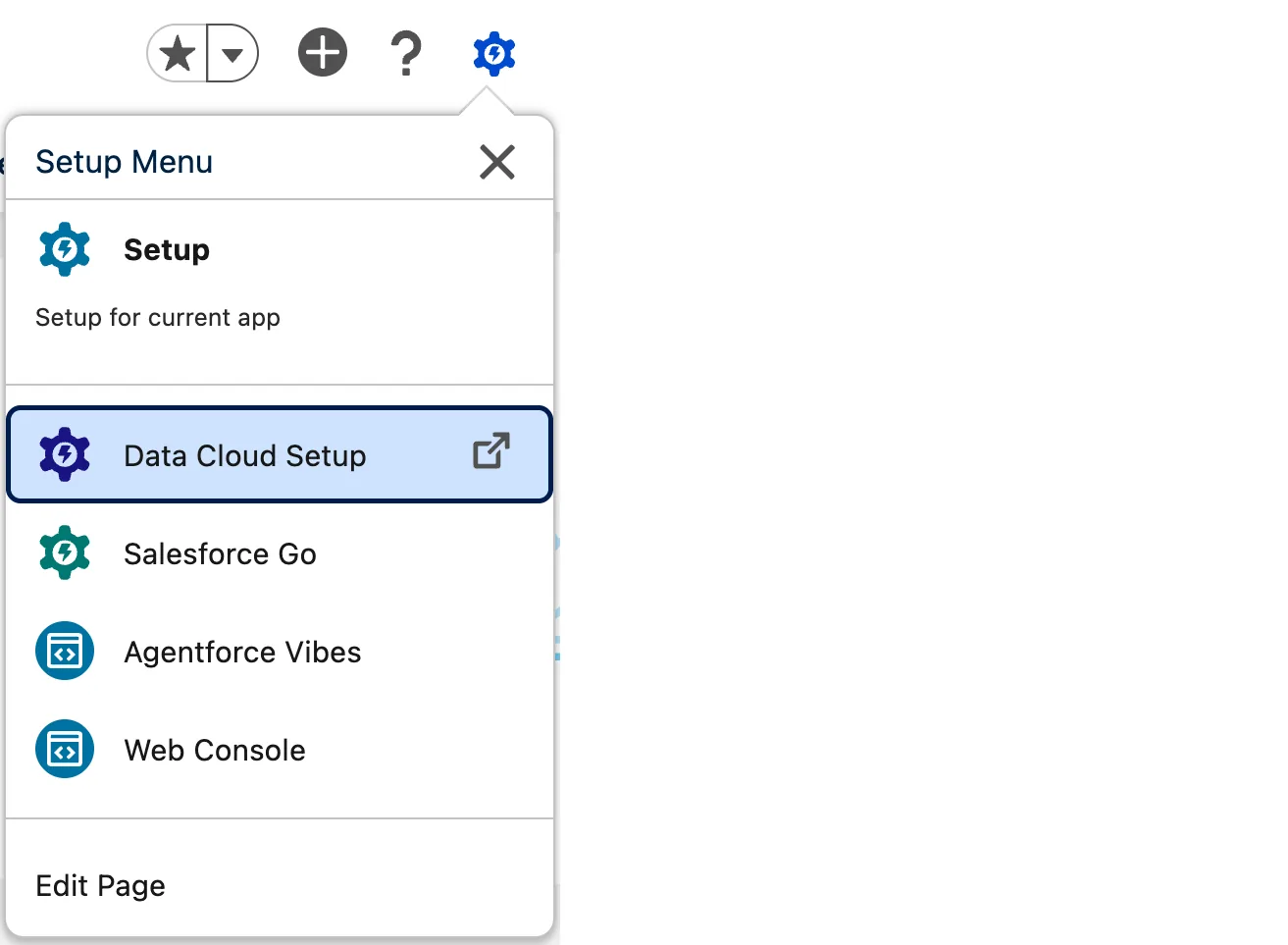
The Setup menu in a Developer Edition org (Salesforce Data 360 in a Developer Edition org, screenshot, November 2026).
Its menu on the left is the map you’ll come back to in almost every chapter: users and permission sets, data spaces, Feature Manager, and the connections to your Salesforce orgs and to other systems.
And you start with the access the course needs. In a new Developer Edition org I created, my own user already had the Data Cloud Architect permission set, assigned the day the org was made.
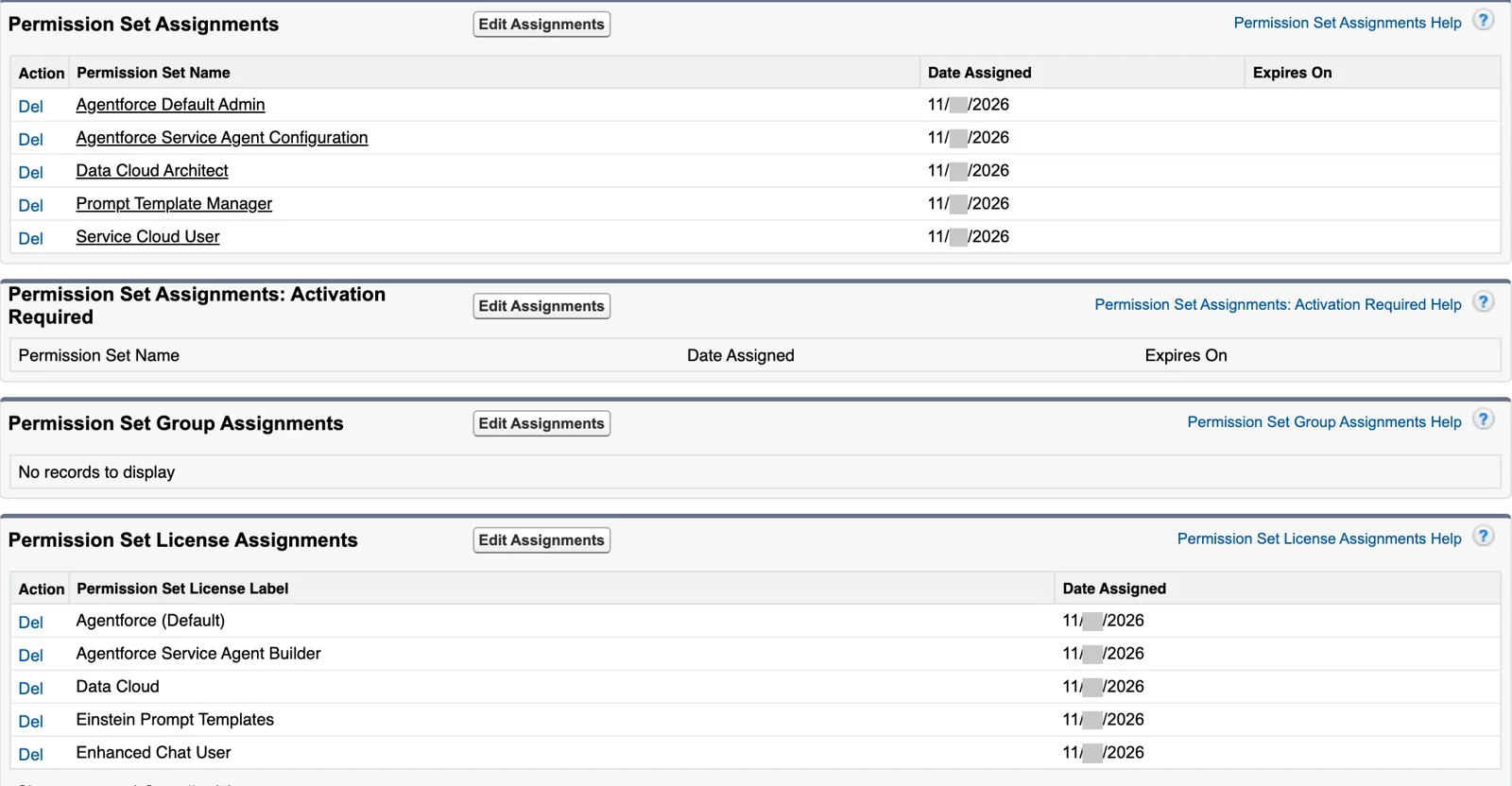
Data Cloud Architect, assigned when the org was made (Salesforce Data 360 in a Developer Edition org, screenshot, November 2026). Full size
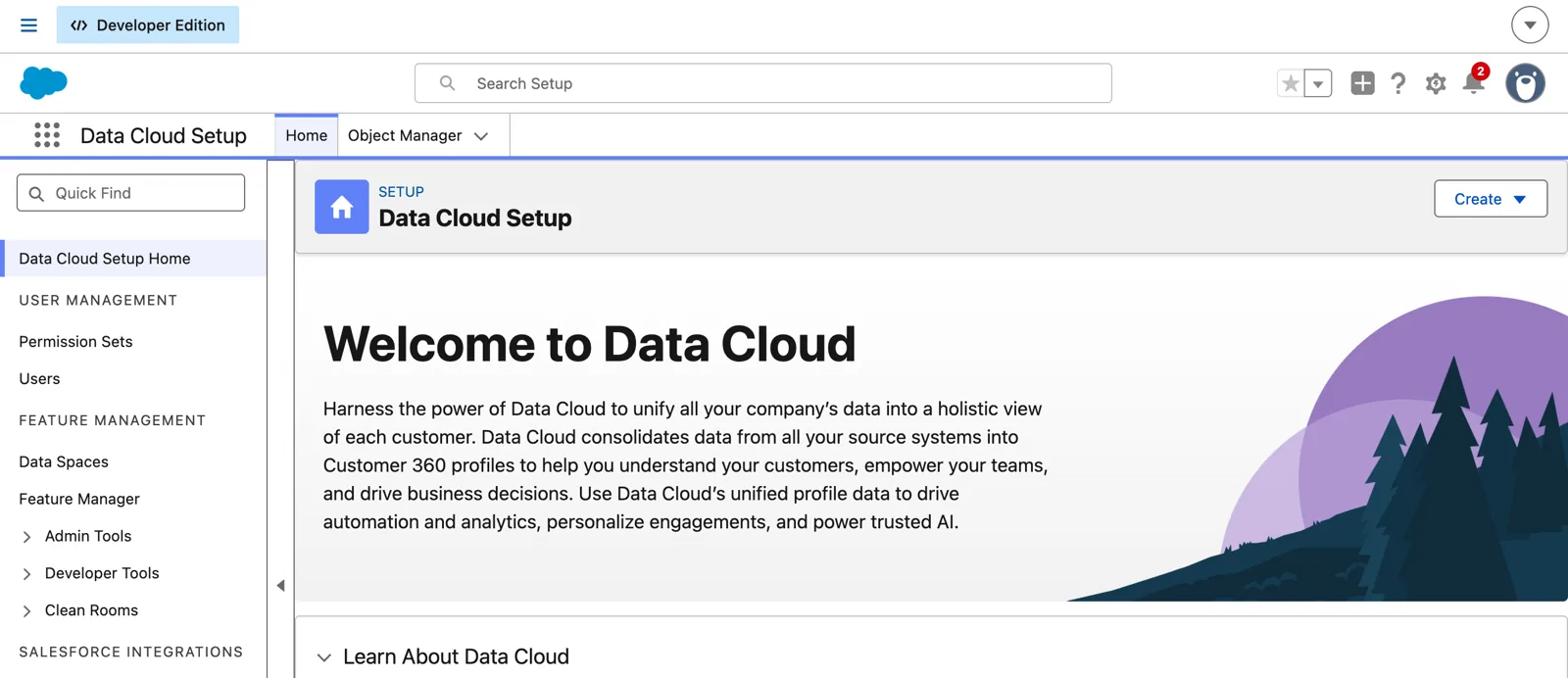
Data Cloud Setup’s home page in a Developer Edition org (Salesforce Data 360 in a Developer Edition org, screenshot, November 2026). Full size
Simple Start: the setup Salesforce does for you
Section titled “Simple Start: the setup Salesforce does for you”In module 1, the home org’s contacts came in through one of two doors. Setting up that door by hand means installing a data bundle, creating the data streams and mapping the objects to the data model. Salesforce now does that for you, with Simple Start.
Here’s what Salesforce’s Simple Start guide (last updated June 4, 2026) says it does:
- It syncs the metadata for CRM objects: it creates the data stream, the data lake objects, and the mappings to the data model objects. No bundle to install, and no mapping the standard objects by hand.
- It syncs metadata only, not data. In Salesforce’s words, “you won’t consume credits until the data stream is activated and usage-based processes are completed (like identity resolution or creating a data query).”
- The streams arrive inactive. When you’re ready, you go to Data Streams, select them and activate them. Then the data starts to flow.
And the limits, also in Salesforce’s words. Simple Start was planned for the June 2026 monthly release, for new orgs created after that release, where it’s on by default. At release it covered two objects, Account and Contact, and Salesforce notes “this is not a static list.” It “doesn’t support all standard objects or custom objects,” and it “isn’t available for companion orgs.”
Look at Account and Contact: that’s the core door from module 1. And in practice, a new org gets more than those two. In a Developer Edition org I created in November 2026, Data Streams already held 17 streams from the home org, all inactive, with no run yet: Account, Contact, Campaign, Event Relation, Period, Pricebook and others. Their lake objects were already mapped to 22 data model objects, Individual and the contact points among them, all marked Ready. So the airports and the pilots’ contacts really are a few clicks from Data 360: select the streams you need, and Activate.
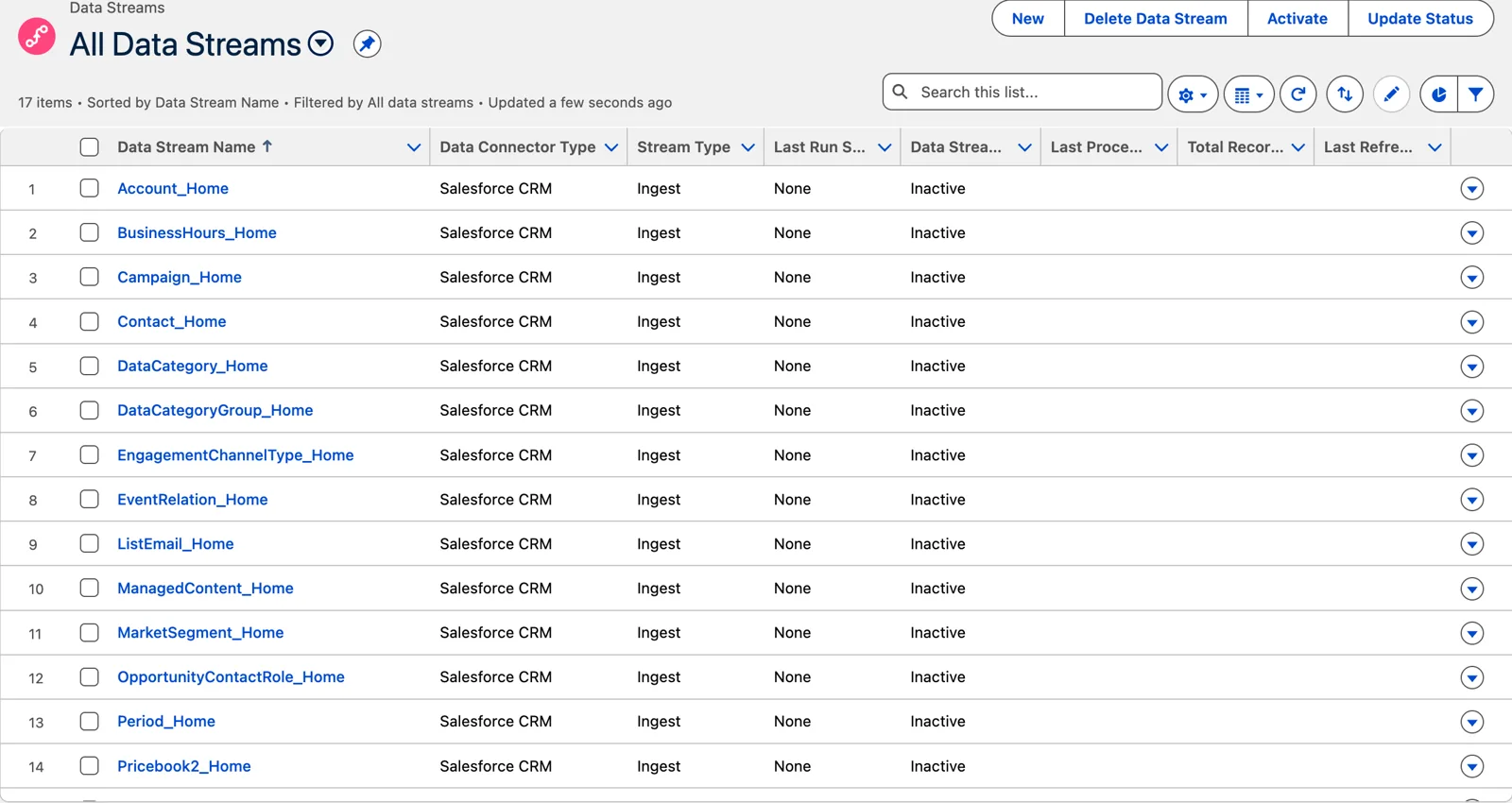
Simple Start’s streams in a new Developer Edition org, before anything was activated (Salesforce Data 360 in a Developer Edition org, screenshot, November 2026). Full size
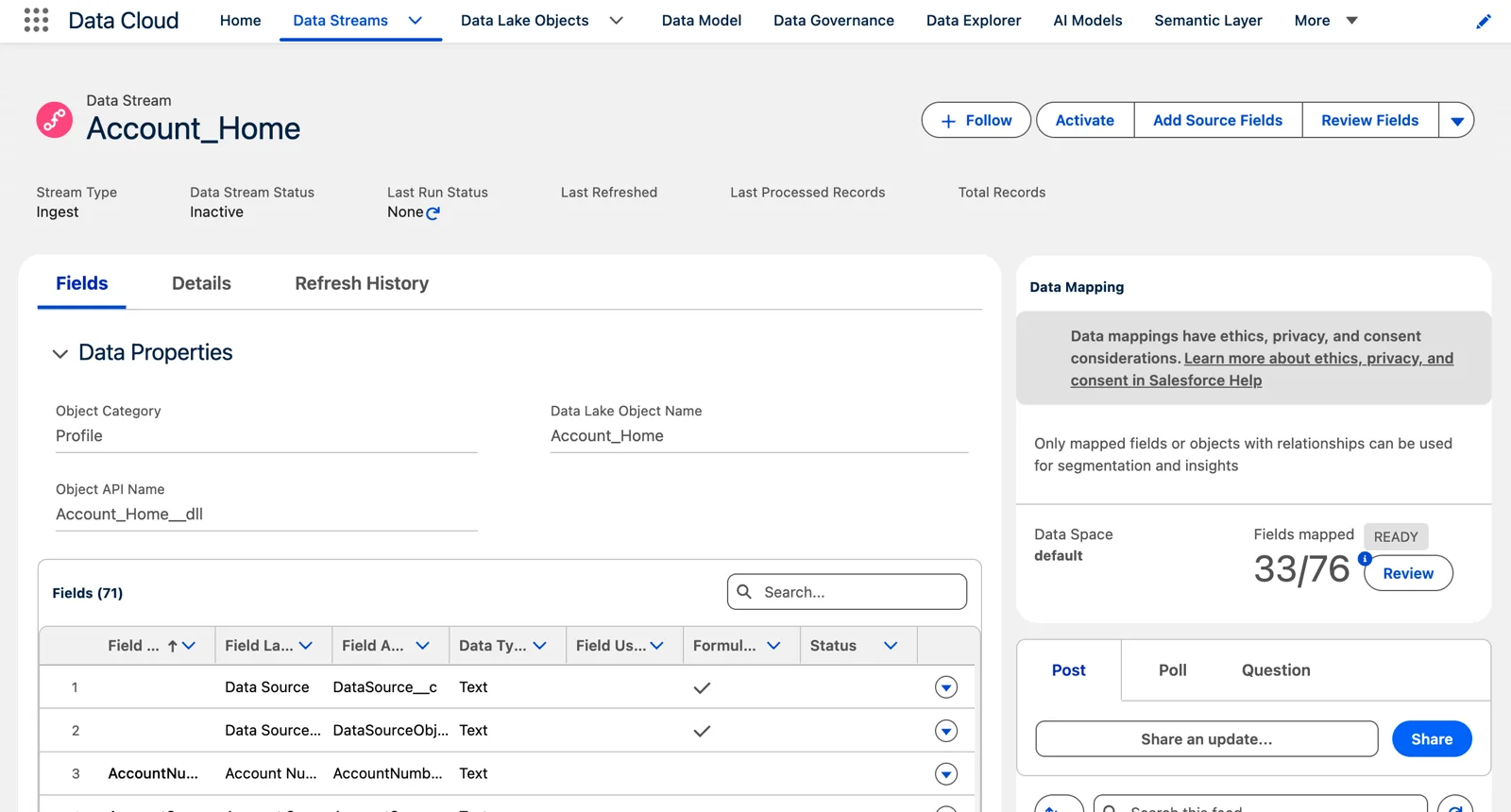
One of Simple Start’s streams, inactive, with its mappings already made (Salesforce Data 360 in a Developer Edition org, screenshot, November 2026). Full size
One more thing to know. Salesforce’s guide says the standard data lake objects Simple Start uses carry a “std” prefix; in my org they were named after the object and the connection’s alias instead (Account_Home, Contact_Home), so look for either. Some of their settings are fixed: the category, the event time, the API names and the primary key fields can’t be edited. That’s the trade for a setup you don’t have to build. When you need something different, you’ll build the stream yourself, which is chapter 5.
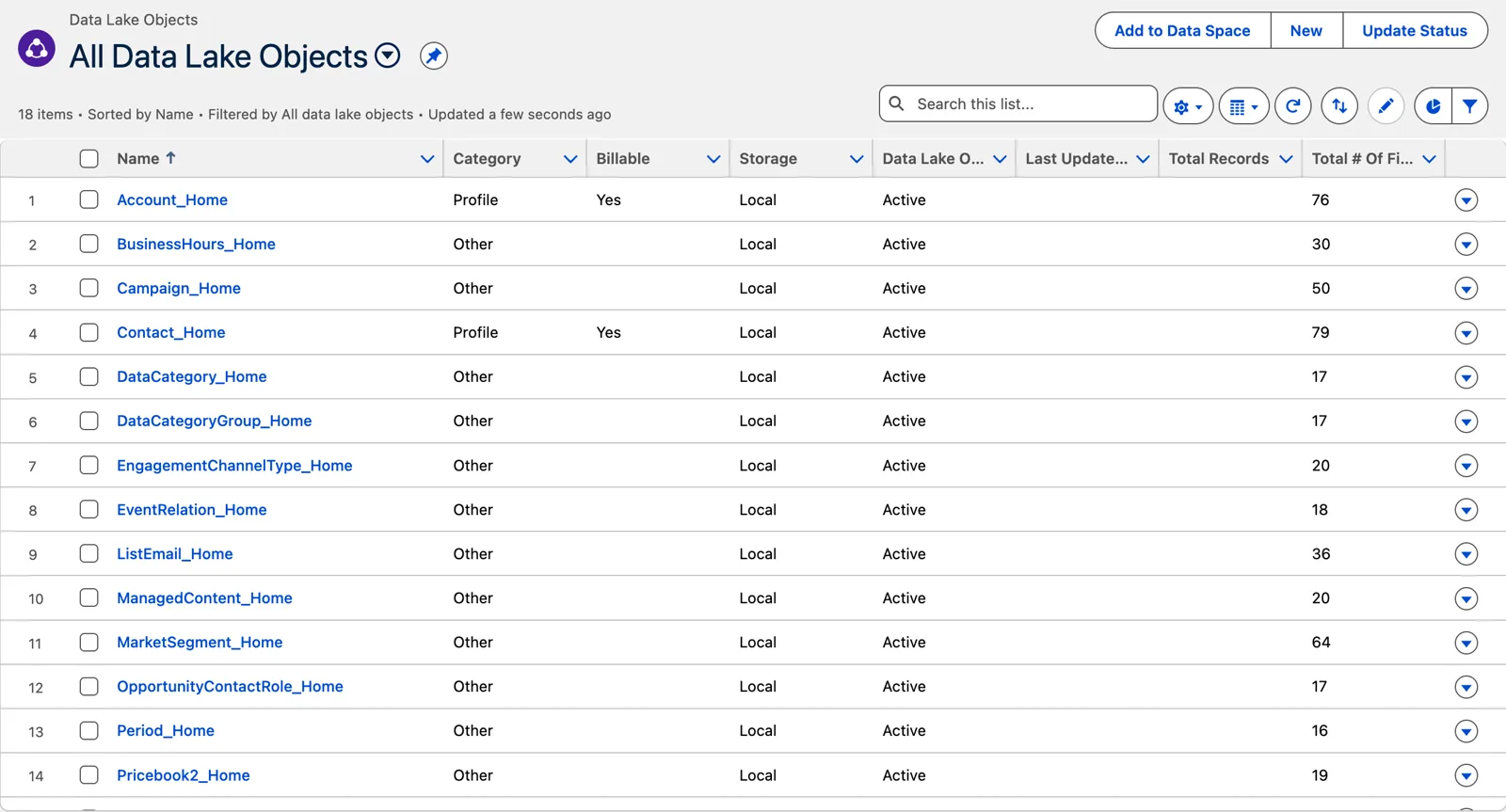
Simple Start’s lake objects, named for the object and the home org (Salesforce Data 360 in a Developer Edition org, screenshot, November 2026). Full size
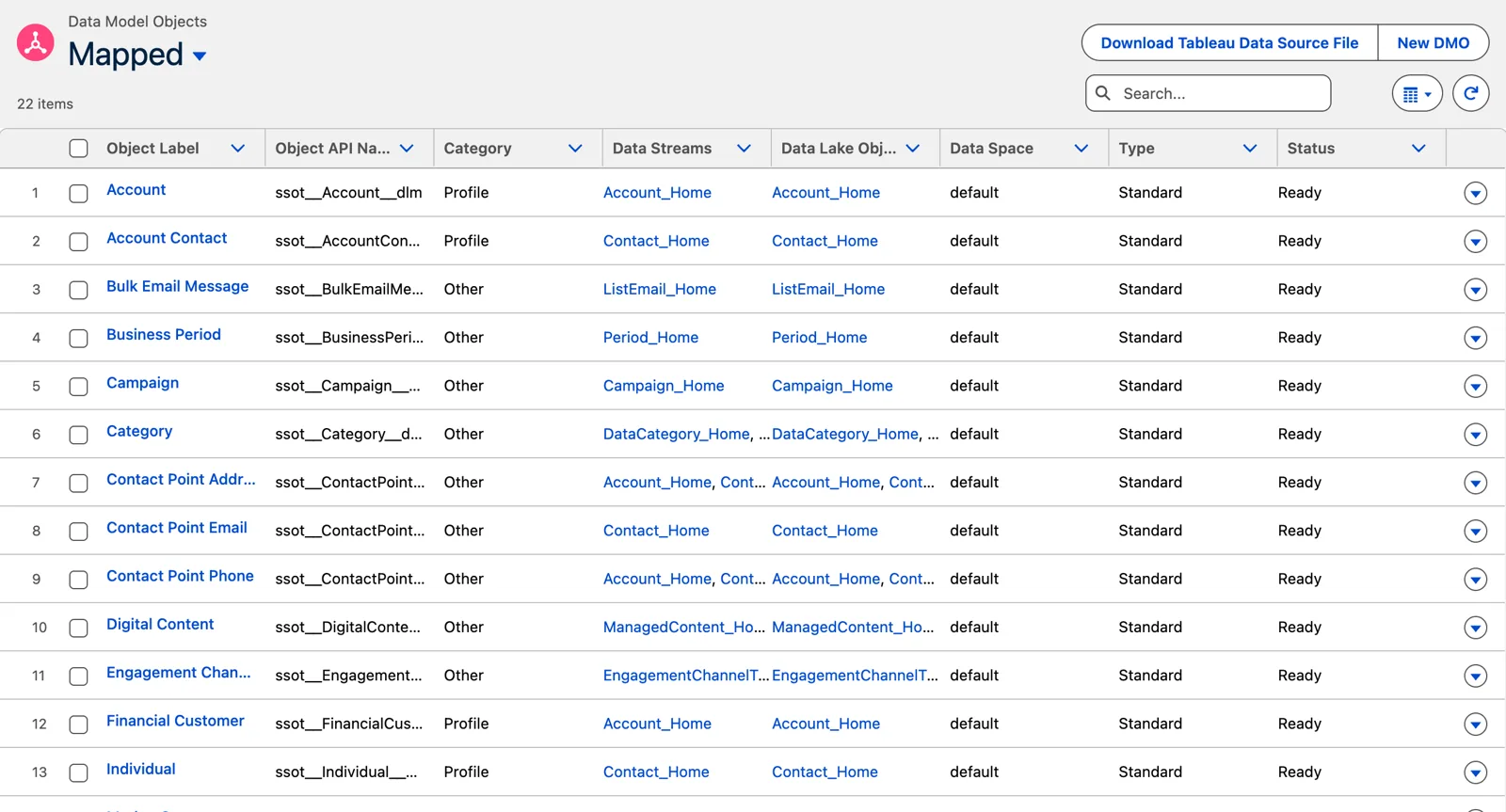
And its mappings to the data model, already made (Salesforce Data 360 in a Developer Edition org, screenshot, November 2026). Full size
Who can see the data in a new org
Section titled “Who can see the data in a new org”Here’s one that surprises people, and it’s a good lesson in checking your own org instead of assuming.
Salesforce’s architects describe Data 360 as secure by default: “every new Data 360 organization now begins in a ‘Deny All’ state, enforcing zero trust principles from the first deployment.” But when I created a new Developer Edition org in November 2026, the Data Governance tab already had one active policy, made by Salesforce’s automated process the day the org was created: the All Data Access policy, the one Salesforce’s Trailhead calls the Allow All policy.
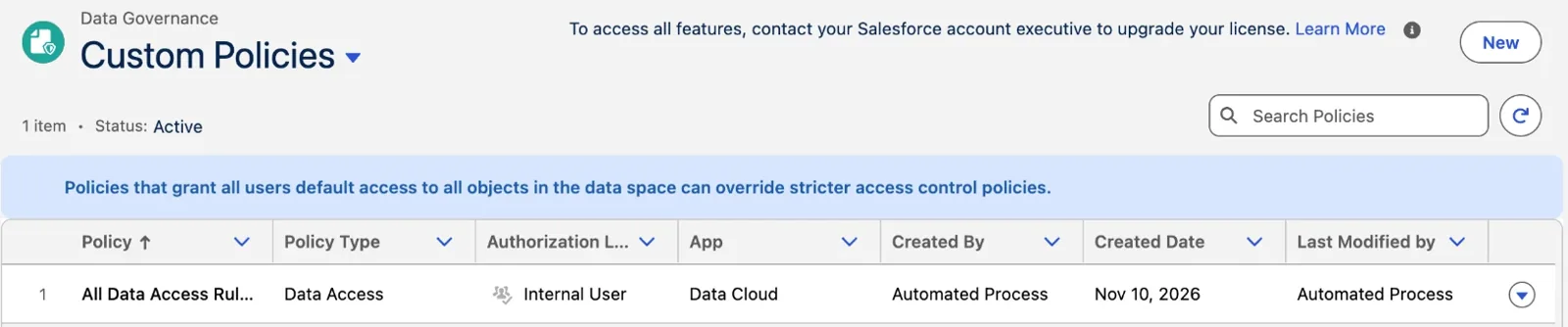
A new Developer Edition org’s policies, the day it was created (Salesforce Data 360 in a Developer Edition org, screenshot, November 2026). Full size
The page itself warns: “Policies that grant all users default access to all objects in the data space can override stricter access control policies.” Salesforce’s Trailhead says the same in its own words: “all new and existing Data 360 orgs start with a preactivated Allow All policy.” So two of Salesforce’s own sources disagree about new orgs, and the org settles it: this one started open. Yours may differ by edition or by date, so look. In the Data Cloud app, open Data Governance, then Policies.
What matters most is how that policy behaves. While it’s active, any narrower allow policy you write has no effect, “because the allow all policy already grants access. Only deny policies will be enforced.” In a practice org, that’s convenient: you’ll see your data right away. In a real project, it means everyone can see everything until someone plans the switch. Salesforce’s advice is to design and test the new policies first, then remove Allow All in a planned window, because deleting it without a plan “could instantly revoke all data access for every user.” Chapter 17 teaches the policies; for now, know which state your org is in.
A first word on credits
Section titled “A first word on credits”Data 360 is paid for as it’s used. The use is counted in credits, and you can see it in Digital Wallet. One thing to know from the first day: Salesforce sells those credits under two models, and they don’t count the same things.
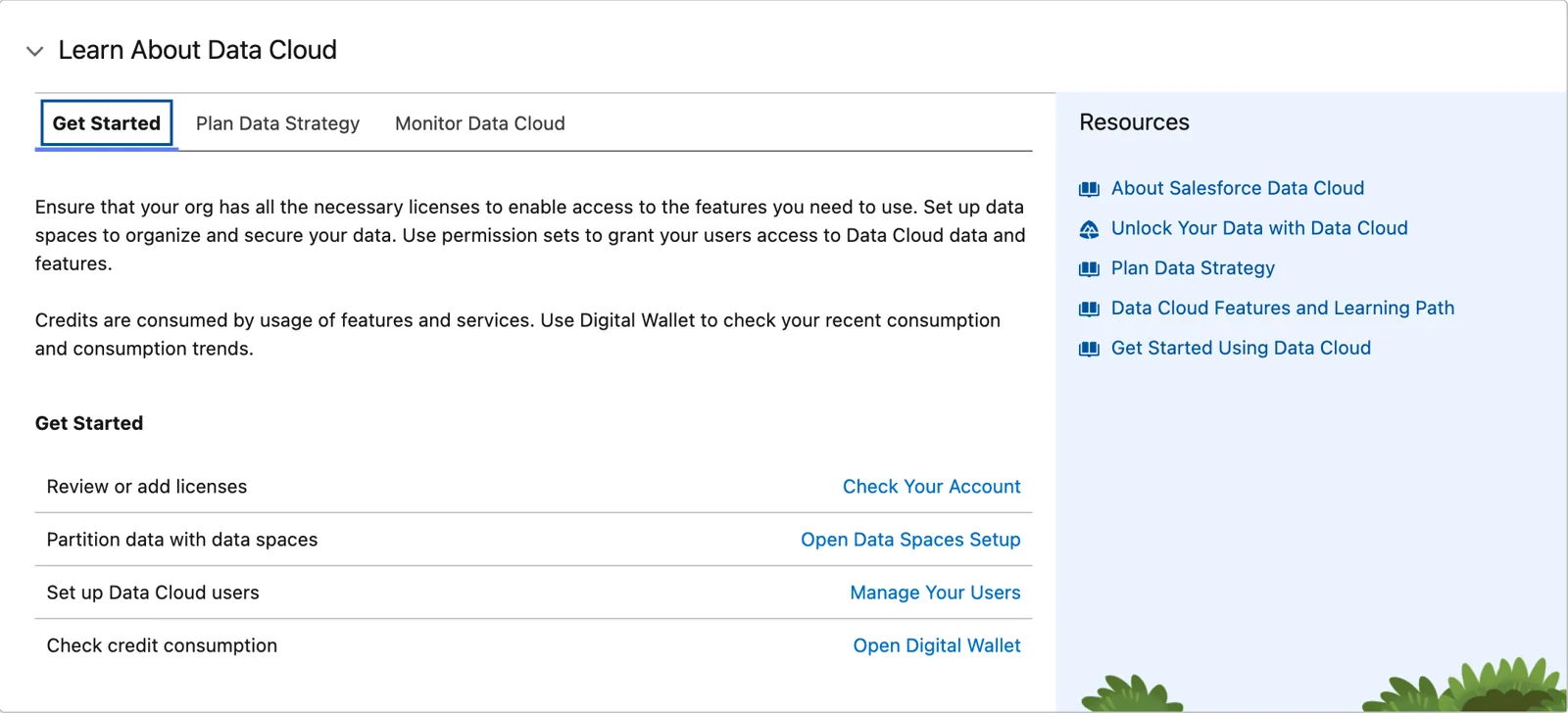
Salesforce’s own first steps, ending with Digital Wallet (Salesforce Data 360 in a Developer Edition org, screenshot, November 2026). Full size
- Flex Credits, the newer model. Salesforce’s pricing page puts it this way: “Bringing data into Data 360 is free—you pay when you actually use it to drive results.” Its rate card (dated 08.31.2026) has no usage type for batch ingestion at all.
- Data Services credits, the older model. Its rate card (last updated July 2025) bills batch ingestion from outside Salesforce at 2,000 credits per million rows.
Data from your own Salesforce org through the CRM connector costs no credits in either. So before you plan, find out which model your contract uses. Chapter 21 is all about credits. For now, three habits.
Don’t leave practice environments running. I don’t want my sandboxes constantly burning credits. In production you’d most likely run streams on a schedule; in a practice org, run them when you need them and stop. This matters more than you’d think, because a Data 360 sandbox uses the production org’s credits, not credits of its own (Salesforce Help, Data 360 in a Sandbox).
Watch it as you go. Track credit use across ingestion, queries and segmentation, from the first week, not at go-live.
Plan for it before go-live. The surprise I see is credits that nobody budgeted for, found at go-live. Every design choice in this course, from streaming to how often a segment runs, has a cost, and I’ll call it out as we go.
What you should already know
Section titled “What you should already know”This course builds on knowing the data model: normalization, data types, standard and custom objects. If those are new to you, or you’d like a refresher, I strongly suggest these chapters of the free Data Architect course first. They’re the background for both Salesforce core data and Data 360:
- Modeling Data for Meaning (chapter 2): entities, relationships, keys and normalization.
- Salesforce Data Architecture (chapter 3): standard and custom objects, fields and relationships on the platform.
- Understanding Enterprise Data (chapter 4): the systems around Salesforce and the kinds of data they hold.
- Data Quality and Governance (chapter 5): keeping bad data out, which matters more once data comes in from many sources.
- Beyond Relational (chapter 13): flat, semi-structured and unstructured data, for the chapters on files and search.
This course and the certification
Section titled “This course and the certification”Salesforce has a certification for this platform: the Salesforce Certified Data 360 Consultant (opens in a new tab) exam. This course is built to cover every objective on it. But the consultant exam is just a step on the road. As architects, we’re going to go beyond it, to a deeper understanding of the mechanisms underneath Data 360, what it can really do, and how to design with it.
So each chapter’s study guide has two parts: what the chapter covers for the consultant exam, and what it adds as an architect. The second part is usually the bigger one.
What an architect decides here
Section titled “What an architect decides here”- Where your team practices, and making sure no practice stream is left running on a schedule.
- Whether Simple Start fits your org: new org or existing, home org or companion, standard objects or custom ones.
- Who watches credit use, and from when: the first week, not go-live.
- Whether your org’s default Allow All policy is active, and who plans the switch to real access policies before anyone builds on it.
Explore
Section titled “Explore”All checked 2026-11-14.
- Flex Credits Rate Card (opens in a new tab), Salesforce, dated 08.31.2026 (checked 2026-11-14).
- Salesforce Customer Data Cloud Rate Card (opens in a new tab) (Data Services credits), Salesforce, last updated July 2025 (checked 2026-11-14).
- Data 360 Simple Start: An Overview Guide (opens in a new tab), Salesforce (PDF, last updated June 4, 2026).
- Data 360 Security Architecture (opens in a new tab), Salesforce Architects, checked 2026-11-14: secure by default, Deny All and Allow All.
- Build and Test Data 360 Configurations in Scratch Orgs (opens in a new tab), Salesforce release notes, Winter ‘27, checked 2026-11-14.
- Data 360 in a Sandbox (opens in a new tab), Salesforce Help.
- Data 360 Pricing (opens in a new tab), Salesforce: free provisioning and free batch ingestion.
- New in Salesforce Developer Edition (opens in a new tab), Salesforce Developers blog, April 2026: the Developer Edition with Agentforce and Data 360.
- Maximize Your Data 360 Credits (opens in a new tab), Trailhead.
- Salesforce Certified Data 360 Consultant Exam Guide (opens in a new tab), Salesforce Help, checked 2026-11-14: the exam’s objectives and weights.
- Manage the Day Zero Policy (opens in a new tab), Trailhead, checked 2026-11-14: the Allow All policy, why allow policies don’t work while it’s active, and a phased switch.