
Licenses as a Sharing Decision
Dette innholdet er ikke tilgjengelig på ditt språk.
Module 3 of 8 in the chapter External Users: Sites, Communities, Licenses and Roles, chapter 14 of Securing Salesforce: Sharing and Visibility. Each module stands on its own.
The question this module answers: Before you design any sharing for customers and partners, you buy them a license. How does that choice decide which sharing you can build, and what does it cost you to change it later?
When I get to licenses in class, I stop and say: this is a very important one. Teams pick the license in a pricing meeting and design the sharing months later. Then they find out the seat they bought can’t take part in the sharing they drew. The license isn’t only a price. It’s the first sharing decision you make for an outside user.
The seats
Section titled “The seats”I teach licenses as seats in a stadium. Everybody’s watching the same game, and the game is your company’s data. Way at the back, the seat in the corner with a bench, where you can barely see the field: that’s Customer Community, the cheap seats. Come down the stadium and you get Customer Community Plus, with soft cushions. Closer still, Partner Community. On the field, your own people, on internal licenses.
Chapter 5 used the stadium to show which of the 25 ways reach the back rows. Here are the same seats side by side, with what each one adds:
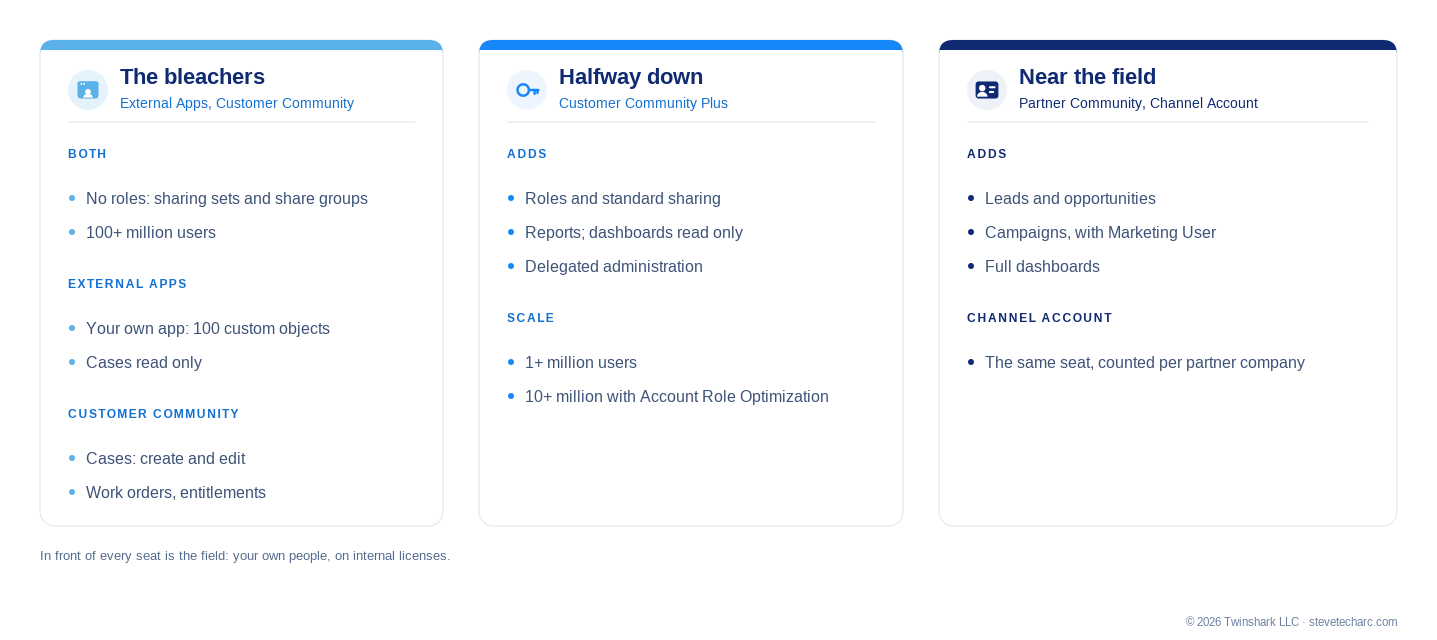
For sharing, three things change as you come down the stadium:
- The back rows have no role. Customer Community and External Apps users are high-volume users. They don’t see the share table, so sharing reaches them through sharing sets, and their own records go out through share groups. Chapter 15 takes both apart.
- Halfway down, you get roles and sharing. Customer Community Plus is, in my words, a rock solid license. The user gets a role under their account’s owner, so sharing rules, manual shares, Apex shares and the rest of the 25 ways can reach them. They can also run and create reports, and someone at the customer can be a super user (module 6).
- Near the field, you get the sales data. Partner Community adds leads, opportunities and campaigns, and full dashboards.
Every cell of Salesforce’s comparison grid, cut by the architect’s question, is on our reference page, Experience Cloud Licenses.
The minimum-seat questions
Section titled “The minimum-seat questions”In class I don’t ask students to memorize the grid. I ask the question the exam asks: what’s the minimum license for this requirement? Then you buy the cheapest seat that meets it, and no cheaper.
They need to run reports. What’s the minimum? Customer Community Plus. They need to work opportunities, register a deal, see price books? Partner Community. Twenty million customers? That drives you to the back rows, Customer Community, because the seats with roles don’t hold that many.
How many people fit in each seat
Section titled “How many people fit in each seat”The crowd size is part of the decision, because a role costs the platform work. Salesforce: high-volume users “don’t have roles, which eliminates performance issues associated with role hierarchy calculations” (About High-Volume Community or Site Users (opens in a new tab), Salesforce Help, checked 2026-11-26). The users per org, from Experience Cloud User Licenses (opens in a new tab) (Salesforce Help, checked 2026-11-26):
| Seat | Users per org |
|---|---|
| Customer Community, External Apps | 100+ million |
| Customer Community Plus, Partner Community, Channel Account | 1+ million |
| The same, with account role optimization | 10+ million |
So a customer base in the tens of millions points you to the back rows before you’ve asked any other question. Account role optimization is module 5.
Every org lists its seats on one page, Company Information. Here they are in a Partner Developer Edition org:
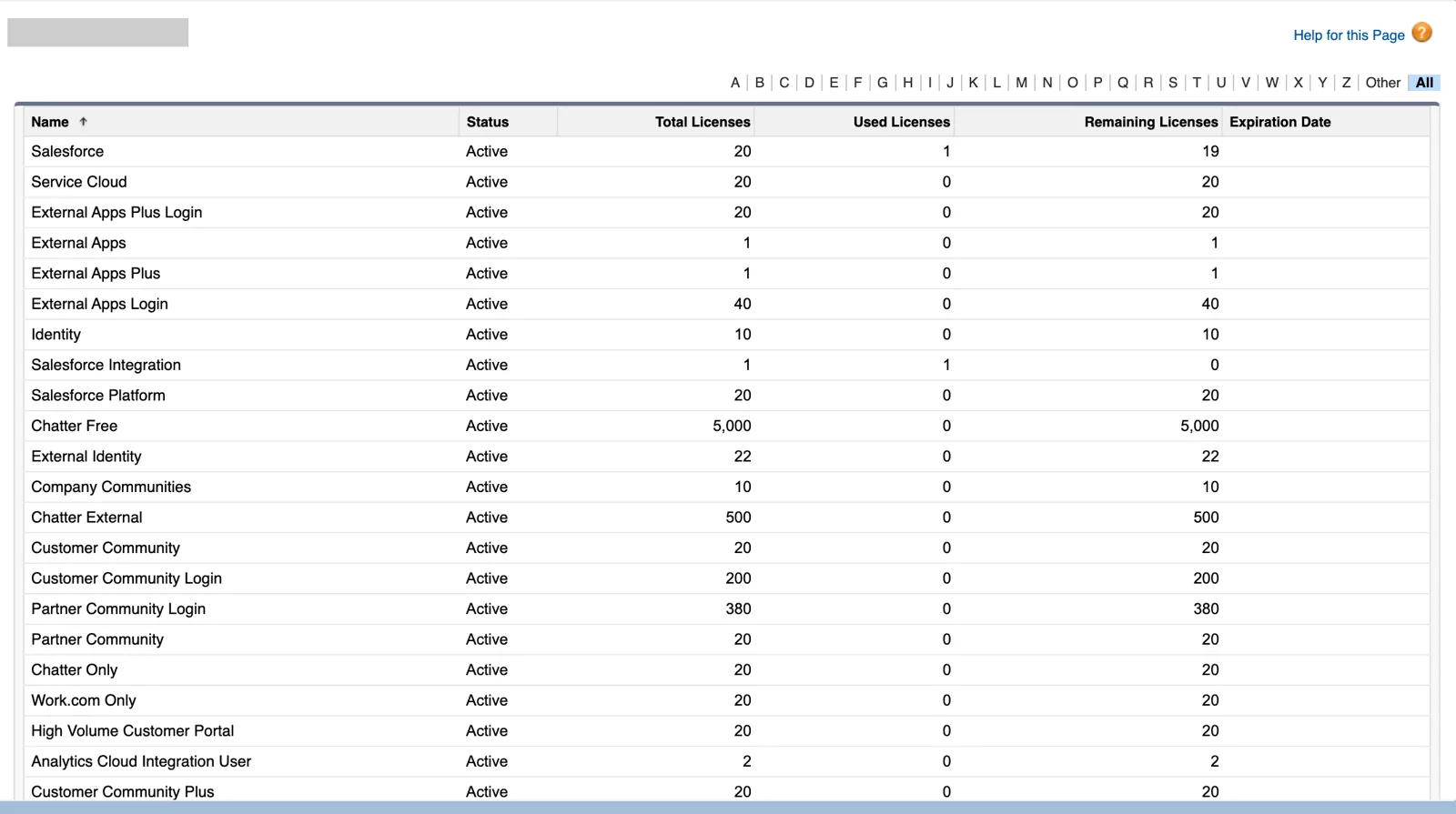
The stadium’s seats, as Salesforce lists them. The counts are this edition’s, not a production org’s (Salesforce, Setup in a Partner Developer Edition org, screenshot, November 2026). Full size
Two ways to pay
Section titled “Two ways to pay”Who can tell me the two ways these licenses are priced? You pay per named user, or you pay by the number of logins per month.
Salesforce calls them member-based and login-based licenses, and every seat comes both ways: Customer Community and Customer Community Login, Customer Community Plus and Customer Community Plus Login, and so on. A member-based license is assigned to one person, who can come in as often as they like. With a login-based license, “you first purchase a specific number of logins to be used every month,” and users “consume one login each time they log into a site. However, logging in multiple times during the same day still only consumes one login” (Experience Cloud User Licenses, same page). Salesforce calls that a daily unique login.
Do the math. Ten people who log in every day burn about 300 logins a month. Ten people who log in once a month burn ten. So:
- People who come often (a partner’s sales team, every day) cost less on member licenses.
- People who come rarely (a customer checking a case twice a year) cost less on login licenses.
A few details from the same page that matter for planning. For every monthly login you buy, Salesforce provisions 20 login licenses, so 1,000 monthly logins give you 20,000 users to assign. Overages are counted over the contract’s 12 months, and “entitlements roll over from month to month.” And you can watch usage in Setup, under Company Information, in the usage-based entitlements list.
You can buy both kinds. In my classes, I’ve taught keeping two identical profiles, one on each license, so moving a person from login to member when they start coming every day is a profile change.
Seats with no stadium at all: External Identity and contactless users
Section titled “Seats with no stadium at all: External Identity and contactless users”Some outside users don’t need any CRM data. They need to log in: to your app, your store, your mobile app. For them there’s the External Identity license. Salesforce: you can upgrade it “to a Community license to benefit from Experience Cloud features, including Cases, Contracts, Notes, Orders, and Tasks,” and it’s “included for free with all paid Community user licenses in Enterprise, Performance, and Unlimited Editions” (External Identity License Details (opens in a new tab), Salesforce Help, checked 2026-11-26).
On that license, a user doesn’t even need a contact. Salesforce calls these contactless users: “If you want to expand your customer base without depleting your community licenses, start them off as contactless users. Then upgrade them to a full community license when they can benefit from the added features.” The feature is “available only with the External Identity license,” and two limits matter for sharing: “Delegated admins can’t manage contactless users,” and you can’t use Login As with them (Manage Contactless Users (opens in a new tab), Salesforce Help, checked 2026-11-26).
For this course, that’s a seat outside the stadium: a login, a small profile, and no part in record sharing until you upgrade it. How these users sign up and log in is the identity side, and it’s covered in the Identity and Access course, chapter 14, Customers and Partners.
Changing seats later
Section titled “Changing seats later”Here’s the part teams miss. You can move people down the stadium, but not back up.
Salesforce: “In general, you can upgrade from most customer licenses to the Customer Community Plus or Partner Community licenses,” including Customer Community and External Identity (Experience Cloud Licenses Eligible for Upgrades (opens in a new tab), Salesforce Help, checked 2026-11-26). And then the sentence I want every architect to read twice: “An upgrade to a license that requires a role is irreversible.”
When you upgrade, the user gets a role. If their account has no roles yet, Salesforce creates them and puts the user in the lowest one (Upgrade Experience Cloud User Licenses (opens in a new tab), Salesforce Help, checked 2026-11-26). That’s a new role in your hierarchy for that account, and a new set of rows for the sharing engine to keep, for good. Two more considerations from the eligibility page:
- Some permissions don’t come along. “The Modify All Records and View All Records permissions aren’t available with Customer Community Plus or Partner Community licenses.” Salesforce’s warning: “explore what permissions are affected before you upgrade a user’s license.”
- The seats with roles are slower to fill. “Self-registration with a Customer Community license is twice as fast as self-registration using a Customer Community Plus license.” For big registration days, Salesforce points to micro-batching.
So start people in the cheapest seat that meets the requirement, and move them down when a real requirement says so, knowing they won’t move back.
Test knowledge. Know the minimum license for a requirement: reports, roles and standard sharing, and delegated administration first come with Customer Community Plus; leads, opportunities and campaigns first come with Partner Community; tens of millions of users point to Customer Community or External Apps, which have no roles. Know member-based and login-based licenses, and that a login counts once a day. Know that an upgrade to a license with a role can’t be reversed. A likely area, not a known question.
What an architect decides here
Section titled “What an architect decides here”- For each kind of outside user, the cheapest seat that meets their requirements, before the sharing is designed.
- How many of them there will be, and whether that number rules out the seats with roles, or needs account role optimization.
- Member or login licenses for each group, from how often they’ll come, and whether to buy both.
- Who starts on External Identity, as contactless users, and what would trigger their upgrade.
- When to upgrade a group to a seat with a role, knowing it’s permanent, and what roles it will add to the hierarchy.
Beyond the exam: what AI changes. When an agent helps a logged-in customer on your site, it works within what that customer’s seat can reach. That’s the right design: the license and the sharing still decide the answer. The trap is the request to upgrade a whole group of customers so the agent “can do more.” That’s the irreversible upgrade, made for a feature. Ask first what the agent needs to read, and whether a narrower design gives it that without moving anyone down the stadium. Chapter 20 covers agents.
Explore
Section titled “Explore”- Experience Cloud Licenses, our reference page: every seat and every cell of Salesforce’s grid
- Experience Cloud User Licenses (opens in a new tab), Salesforce Help (checked 2026-11-26)
- About High-Volume Community or Site Users (opens in a new tab), Salesforce Help (checked 2026-11-26)
- Experience Cloud Licenses Eligible for Upgrades (opens in a new tab), Salesforce Help (checked 2026-11-26)
- Upgrade Experience Cloud User Licenses (opens in a new tab), Salesforce Help (checked 2026-11-26)
- External Identity License Details (opens in a new tab), Salesforce Help (checked 2026-11-26)
- Manage Contactless Users (opens in a new tab), Salesforce Help (checked 2026-11-26)