
Security Center, Health Check, and a Plan Someone Reads
Dette innholdet er ikke tilgjengelig på ditt språk.
Module 6 of 6 in the chapter Monitoring: Real-Time Events, Log Files and Transaction Security, chapter 19 of Securing Salesforce: Sharing and Visibility. Each module stands on its own.
The question this module answers: You’ve turned monitoring on. Who reads it, what do they do, and how do you know it works before you need it?
“Yes, you bought it”
Section titled ““Yes, you bought it””Here’s how I end this part of the class. I tell architects I wouldn’t worry about event monitoring as much day to day. That’s more for the ongoing. But if we’re on the front line of support, this is where someone’s going to say, “Hey, we’ve turned on monitoring.” And we say, “Yes, you bought it. We’ve turned it on, but we need to test for it.”
That’s the whole chapter in two sentences. The first module told the story of a client who paid for event monitoring and sent the logs nowhere. Buying it isn’t monitoring. Turning it on isn’t monitoring. Monitoring is when the right event reaches a person who knows what to do with it.
So the architect’s job here isn’t to watch the screens. Operations runs it. The architect designs it: where each event goes, who reads it, what counts as too much, what happens next, and how you test it ahead of time. Then you hand that design over as a plan someone can read.
Two Salesforce tools help with the “is everything still set right?” part of that plan. Then the plan itself.
One org: Health Check
Section titled “One org: Health Check”Health Check compares an org’s security settings with a baseline and gives a score, and since 15 April 2026 it sends System Administrators a weekly alert when the score goes down. The shared Front Door course covers it (Health Check: is the door still set well?).
One thing to know for this course: Health Check’s checks are security settings, such as passwords, sessions and login rules, not your sharing model’s defaults and rules. A perfect score tells you nothing about whether the org-wide default for cases is Public Read/Write. That’s module 5’s Setup Audit Trail, and the access reviews in chapter 13.
Here’s a lab org’s score, and Salesforce’s own note about where the history lives:
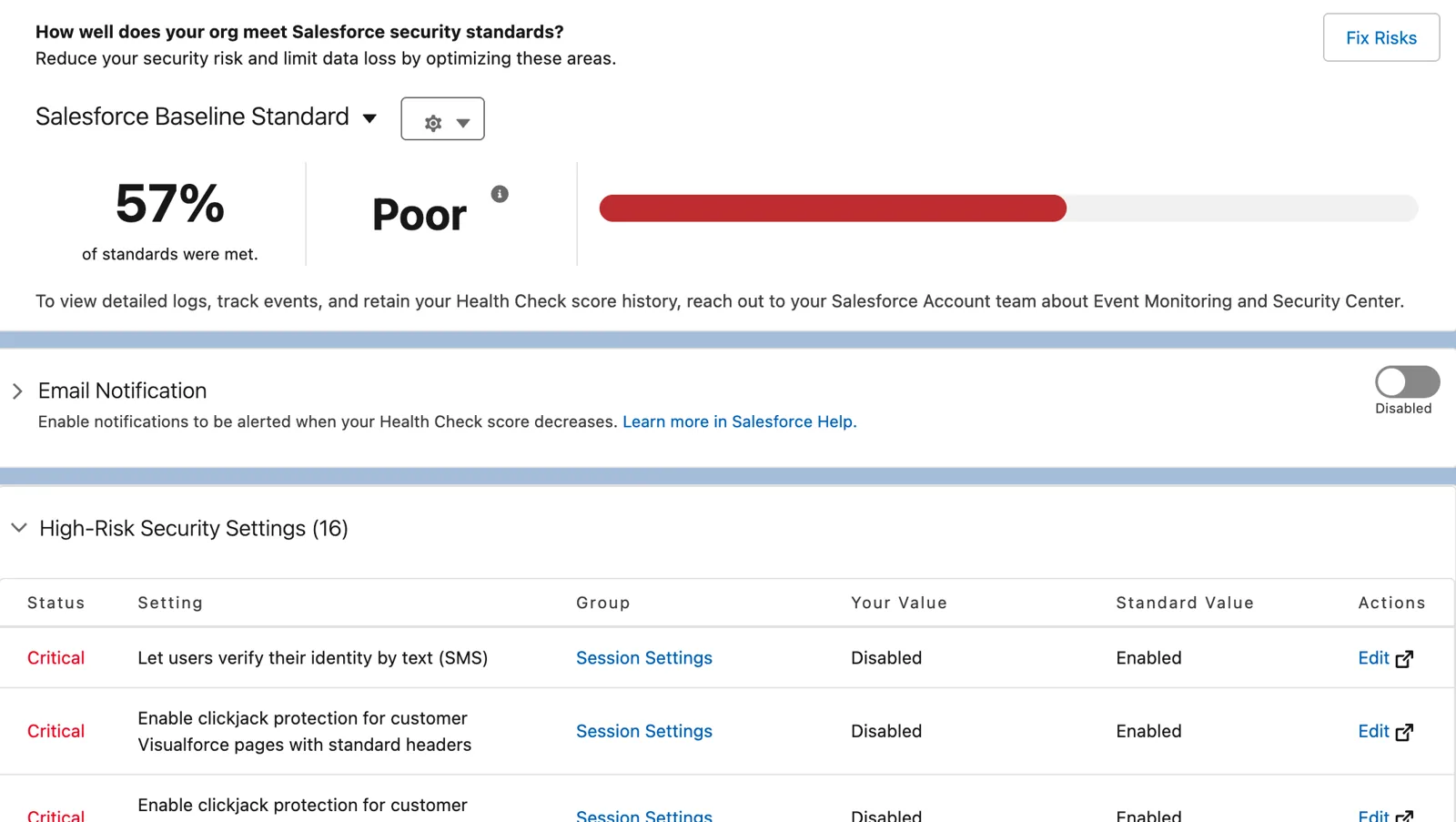
A score, the settings behind it, and where the history isn’t kept. A lab org’s score, not a production one’s (Salesforce, Setup in a Partner Developer Edition org, screenshot, November 2026). Full size
Many orgs: Security Center
Section titled “Many orgs: Security Center”When a company has many orgs, checking each one doesn’t scale. “The Security Center app offers a single view of your security, privacy, and governance posture across all of your Salesforce orgs and tenants,” with “health check scores, access settings, and user and login metrics in one easy-to-read interface” (Take Charge of Your Security Goals with Security Center (opens in a new tab), Salesforce Help, checked 2026-11-26).
What to know about it, from the same page, as of 2026-11-23:
- The license. “Available in: Enterprise and Unlimited Editions with the Security Center add-on license,” and “available for free in: Developer Edition,” where you can try it.
- Alerts. “Alerts notify you by email or in the Salesforce app when a setting in your Security Center tenant exceeds a threshold that you set.”
- Six months. “Security Center stores data for 6 months.” Like every record in this chapter, it has a clock.
- Protect it. “Because Security Center surfaces sensitive information, we recommend that you enable multi-factor authentication for all Security Center users.” The tool that shows you every weakness is itself worth protecting.
The admin nobody uses
Section titled “The admin nobody uses”Here’s the metric I’d turn on first. In November 2026, Salesforce added Inactive Privileged Users: it “tracks users with the System Administrator profile who either haven’t logged in for more than 90 days or have never logged in.” Salesforce’s advice: “Review these accounts to decide whether to remove or reduce these users’ access. Set up an alert to get notified when a user account hits the inactive threshold” (Monitor Inactive Privileged User Accounts in Security Center (opens in a new tab), Salesforce Winter ‘27 release notes, checked 2026-11-26). It needs the Security Center license.
Why does a sharing architect care? Because a System Administrator sees everything. You can design the most careful sharing model in the world, and an admin account that nobody has used since the last project still walks past all of it. If someone takes that account, nobody notices, because nobody was using it.
Read the definition carefully, though: users “with the System Administrator profile.” Someone with View All Data from a permission set isn’t counted. For them, use module 4’s alert on critical permission changes, and the access summaries from chapter 3.
A plan someone reads
Section titled “A plan someone reads”Now the plan. It’s one row per question you want answered, and every row has the same columns. Here are the columns, and some example rows drawn from this chapter.
| The question | Where the event comes from | Where it goes | Who reads it | What’s too much | What they do |
|---|---|---|---|---|---|
| Who changed the sharing setup? | Setup Audit Trail (module 5) | Downloaded before 180 days, kept with the audit records | Platform owner | Any change to org-wide defaults or sharing rules outside a release | Ask who and why; match it to a change request |
| Who opened a sensitive record? | Record view events (module 2) | Stored events, plus an alert stream | Privacy officer | Views outside the user’s normal work, learned first | Ask why, the same day |
| Who exported a large report? | ReportEvent, the default policy (module 4) | Policy notifications | Security team | Over the tuned row count | Check the person and the purpose |
| Who pulled data through the API? | ApiEvent, BulkApiResultEventStore (module 4) | The security tool from module 1 | Security team | Rows above normal for that user; any new user | Check it isn’t a known integration; then ask |
| Who got a critical permission? | PermissionSetEventStore (module 4) | Policy notifications | Platform owner | Any grant of View All Data, Modify All Data or Exempt from Transaction Security | Confirm it was approved, or remove it |
| Which admin accounts are unused? | Security Center (this module) | Security Center alert | Platform owner | No login for 90 days | Remove or reduce the access |
| Did a security setting drift? | Health Check | Weekly notification | Platform owner | Any drop in the score | Find the change and decide |
Two more columns go with every row, and they’re the ones people skip:
- How long it’s kept. Every source in this chapter has its own clock: event log files, stored events, 180 days of Setup Audit Trail, 18 to 24 months of field history, six months of Security Center. The plan says how long each answer must be kept, and who keeps it past its clock.
- How it’s tested. Before go-live, and again after each release.
HIPAA’s audit controls
Section titled “HIPAA’s audit controls”If you work in health care, this plan is how you answer one line of the HIPAA Security Rule. Its audit controls standard says to “implement hardware, software, and/or procedural mechanisms that record and examine activity in information systems that contain or use electronic protected health information” (chapter 18 module 6 quotes it from 45 CFR 164.312, eCFR, checked 2026-11-26).
Read the verbs: record and examine. Event monitoring records. The plan is how you show someone examines. A log nobody reads meets half of that sentence. This course isn’t legal advice, so check with whoever owns compliance what “examine” means for your organization.
Test it before you need it
Section titled “Test it before you need it”Here’s my rule, and it comes straight from that client whose logs went nowhere: you need to know, and you need to test it ahead of time.
For each row of the plan, before go-live:
- Make the event happen. With a test user, in a sandbox or a Developer Edition org, do the thing the row watches for: export the big report, grant the permission.
- Find it where it should land. Is it in the destination? How late?
- Check that the reader got it. Did the right person get the alert, and did they know what it meant?
- Walk the action. What would they do next, and who would they call?
- Write down the date. That’s your evidence that the plan works, and it goes with the evidence from chapter 13.
Then do it again after each release. Salesforce changes events, adds checks and moves dates, as this chapter has shown more than once.
Test knowledge. Know that Health Check compares one org’s security settings with a baseline and gives a score, and that Security Center gives one view across many orgs and tenants, with alerts on thresholds you set; it’s an add-on license for Enterprise and Unlimited Editions, free in Developer Edition, and it stores data for six months. Know that the Inactive Privileged Users metric tracks users with the System Administrator profile who haven’t logged in for more than 90 days or never have. Know that monitoring needs a destination, a reader, a threshold, an action and a test, and that it’s set up and tested before it’s needed. A likely area, not a known question.
What an architect decides here
Section titled “What an architect decides here”- Which questions the business needs monitoring to answer, one row each.
- For each row: the source, the destination, the reader, the threshold, the action, how long it’s kept, and the test.
- Whether one org’s Health Check is enough, or the company needs Security Center across many orgs, and who receives its alerts.
- What happens to admin accounts nobody uses, and to users who hold View All Data without the System Administrator profile.
- Who owns the plan after go-live, and when it’s tested again.
Beyond the exam: what AI changes. Agents add rows to the plan. Which user each agent runs as, what’s normal for it, and who reads the events when an agent does something unexpected. They also add a helper for the reader: Salesforce’s Setup Audit Trail page suggests asking Setup with Agentforce for recent changes, such as the changes one admin made in the last 100 days (module 5). That helps the person reading the plan. It doesn’t replace them. Chapter 20 covers agents.
Explore
Section titled “Explore”- Take Charge of Your Security Goals with Security Center (opens in a new tab), Salesforce Help (checked 2026-11-26)
- Monitor Inactive Privileged User Accounts in Security Center (opens in a new tab), Salesforce Winter ‘27 release notes (checked 2026-11-26)
- For Health Check: Checking the Door, the shared Front Door course
- For HIPAA’s audit controls: PCI, PII and HIPAA, chapter 18