
JSON Jamboree: souboj pevné a dynamické deserializace u calloutů Apex
Úvod:
Dobrý den! Jsem Steve Simpson, Salesforce Certified Technical Architect a lektor. V tomto článku prozkoumáme různé techniky zpracování JSON při calloutech Apex v Salesforce. Probereme pevné zpracování JSON, dynamické zpracování JSON a hybridní přístup, který nabízí pružnost i snadné použití.
Část 1: pevné zpracování JSON s deserializací na jednom řádku
Když pracujete s jednoduchými strukturami JSON, které se často nemění, můžete vytvořit třídu Apex, která přesně odpovídá struktuře JSON. Tento přístup vám umožní deserializovat řetězec JSON do pole jediným řádkem kódu. U statických struktur JSON je tato metoda mocná a efektivní.
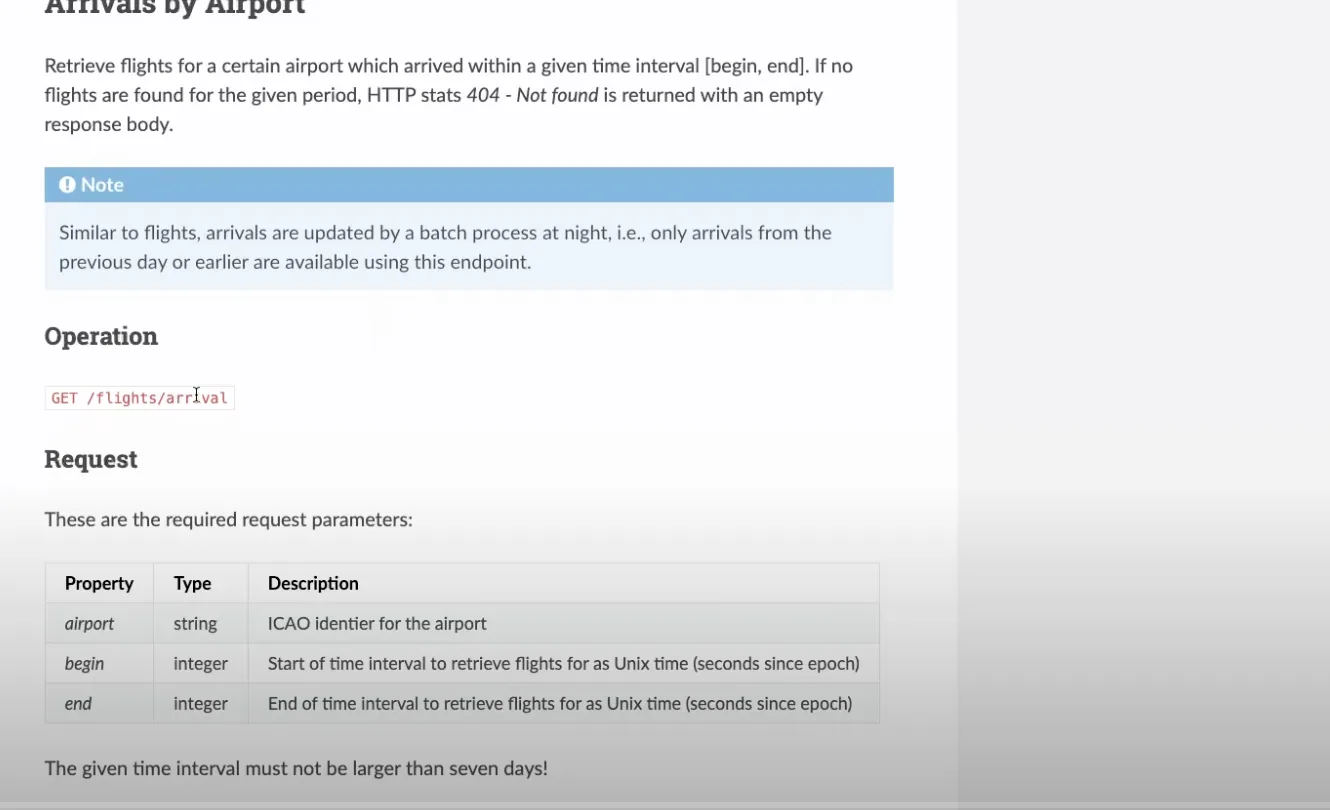
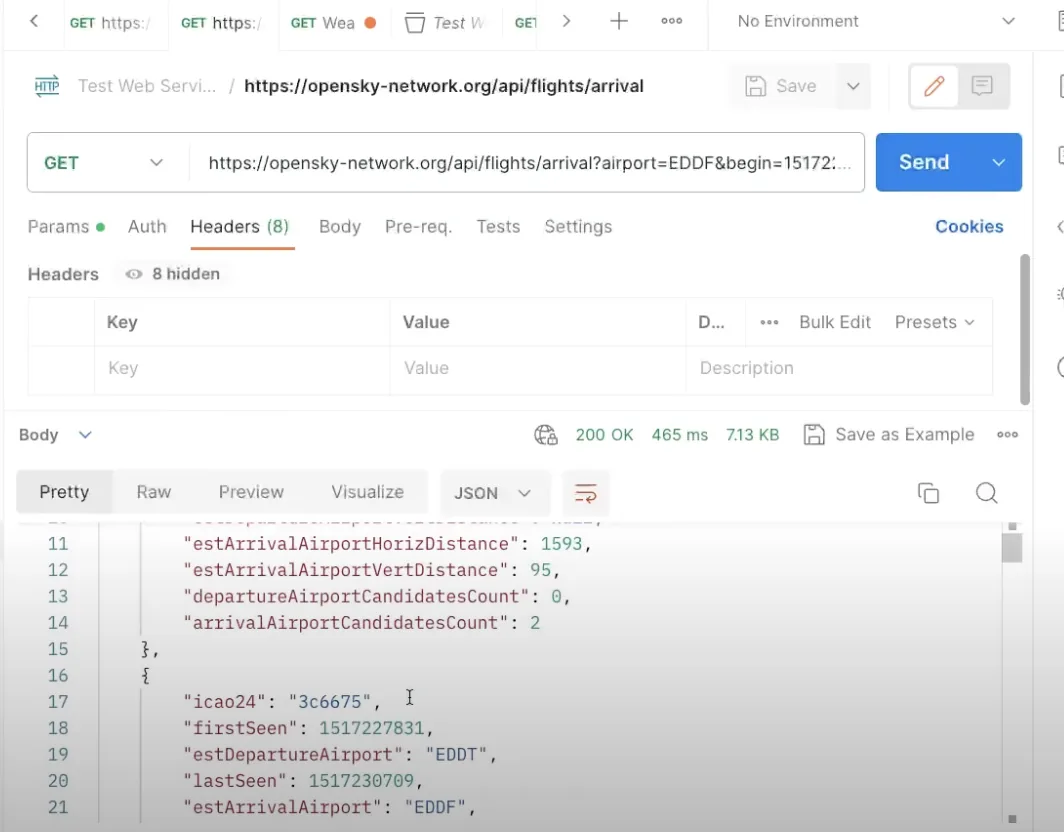
public class OS_FlightStatusModel{ public String icao24 {get;set;} public Integer firstSeen {get;set;} public String estDepartureAirport {get;set;} public Integer lastSeen {get;set;} public String estArrivalAirport {get;set;} public String callsign {get;set;} public Integer estDepartureAirportHorizDistance {get;set;} public Integer estDepartureAirportVertDistance {get;set;} public Integer estArrivalAirportHorizDistance {get;set;} public Integer estArrivalAirportVertDistance {get;set;} public Integer departureAirportCandidatesCount {get;set;} public Integer arrivalAirportCandidatesCount {get;set;} //---Use the JSON Deserialize public static List<OS_FlightStatusModel> parse(String json) { return (List<OS_FlightStatusModel>) System.JSON.deserialize(json, List<OS_FlightStatusModel>.class); }}S výše uvedenou třídou můžete JSON snadno zpracovat jediným řádkem kódu:
//---Get the Flight Request private static List<OS_FlightStatusModel> getFlightRequest(String requestURL) {//---Return structureList<OS_FlightStatusModel> retList = new List<OS_FlightStatusModel>();//---Make the requestHttpResponse resp = getRequest( requestURL);//---Check for SuccessInteger respStatusCode = resp.getStatusCode();if (respStatusCode == 200) {//---Read the PayloadString payload = resp.getBody();debug('Payload: ' + payload);//---Parse the payloadretList = OS_FlightStatusModel.parse(payload);if (retList != null) {System.debug('Found ' + retList.size() + ' records');for( OS_FlightStatusModel mRow : retList) {debug('Row: ' + mRow); } } }else {//---Handle an errordebug('Response Status Code: ' + respStatusCode); }return retList; }Část 2: dynamické zpracování JSON
U složitějších struktur JSON, jako jsou pole nebo vnořené objekty, možná budete potřebovat dynamické zpracování JSON. Tento přístup vyžaduje víc řádků kódu a pečlivý průchod tokeny JSON. I když se může zdát složitější, u pokročilých struktur JSON je dynamické zpracování nezbytné.
Příklad:
/***************************************************************************************** @Name OS_StateModelParser* @Author Steve Simpson - steve@stevetecharc.com* @Date 2023** @Description Parser for reading State Models from JSON***************************************************************************************** Version Developer Date Description*----------------------------------------------------------------------------------------* 1.0 Steve Simpson 2023 Initial Creation****************************************************************************************/public with sharing class OS_StateModelParser extends OS_BaseParser{private OS_StateResponseModel responseModel {get; set;}//--Parse the payload into the OS_StateResponseModelpublic OS_StateResponseModel parse(String json) {//---Setup the return valueresponseModel = new OS_StateResponseModel();responseModel.States = new List<OS_StateModel>();try {parseBody(json); }catch (Exception ex) {debug( 'Exception: ' + ex.getMessage() + ' ' + ex.getStackTraceString());debugJSON(json); }return responseModel; }//---Parse the body of the JSONprivate void parseBody(String json) {//---Set the default Page Sizeif (PageSize == 0) PageSize = DEFAULT_PAGE_SIZE;Boolean hasTokenTime = false;Boolean hasTokenStates = false;JSONParser parser = System.JSON.createParser(json);//---Read Token by Tokenwhile (parser.nextToken() != System.JSONToken.END_OBJECT) {//---Read the current Token, check its field nameif (parser.getCurrentToken() == System.JSONToken.FIELD_NAME) {String text = parser.getText();debug( 'Json Token: ' + text);//---If the next token has a value, then write it, this handles null valuesif (parser.nextToken() != System.JSONToken.VALUE_NULL) {//---Read the timeif (text == 'time') {responseModel.ResponseTime = parser.getIntegerValue();hasTokenTime = true; }//---Read the statesif (text == 'states') {responseModel.States = parseStateList(parser);hasTokenStates = true; } } }//---If have both tags, then break out of loopif (hasTokenStates && hasTokenTime) break; } }//---Parse the Statesprivate List<OS_StateModel> parseStateList(JSONParser parser) {CurrentRecord = 0;//---Build the return listList<OS_StateModel> retList = new List<OS_StateModel>();//---Go to the next token if neededif (parser.getCurrentToken() == null) parser.nextToken();//---Iterate over the itemswhile (parser.nextToken() != System.JSONToken.END_ARRAY) {CurrentRecord++; //---Track the current recordString logLine = 'Rec: ' + CurrentRecord + ': ';if (CurrentRecord > getMaxRecord()) {//---If past the max record, then break out of loopdebug(logLine + 'End of page');break; }else if (CurrentRecord >= getFirstRecordToProcess()) {//---Build a new State RowOS_StateModel sModel = new OS_StateModel();parseStateItem(parser, sModel);retList.add(sModel);debug(logLine + 'State: ' + sModel); }else {//---Pass in null model to trigger token advancement without reading valuesparseStateItem(parser, null);debug(logLine + 'Skipped'); } }return retList; }//---Parse the Statesprivate void parseStateItem(JSONParser parser, OS_StateModel sModel) {//---Go to the next token if neededif (parser.getCurrentToken() == null) parser.nextToken();Integer position = 0;while (parser.nextToken() != System.JSONToken.END_ARRAY) {if (sModel != null && parser.getCurrentToken() != System.JSONToken.VALUE_NULL) {if (position == 0) sModel.icao24 = parser.getText();if (position == 1) sModel.callsign = parser.getText();if (position == 2) sModel.origin_country = parser.getText();if (position == 3) sModel.time_position = parser.getIntegerValue();if (position == 4) sModel.last_contact = parser.getIntegerValue();if (position == 5) sModel.longitude = parser.getDoubleValue();if (position == 6) sModel.latitude = parser.getDoubleValue();if (position == 7) sModel.baro_altitude = parser.getDoubleValue();if (position == 8) sModel.on_ground = parser.getBooleanValue();if (position == 9) sModel.velocity = parser.getDoubleValue();if (position == 10) sModel.true_track = parser.getDoubleValue();if (position == 11) sModel.vertical_rate = parser.getDoubleValue();if (position == 12) {//---Sensors, sub Array, should be null }if (position == 13) sModel.geo_altitude = parser.getDoubleValue();if (position == 14) sModel.squawk = parser.getText();if (position == 15) sModel.spi = parser.getBooleanValue();if (position == 16) sModel.position_source = parser.getIntegerValue();if (position == 17) sModel.category = parser.getIntegerValue(); }position++;//System.debug('Position ' + position); } }}Část 3: dynamické mapování s vlastními metadaty
Pokud potřebujete ještě větší pružnost, zvažte dynamické mapování s vlastními metadaty (custom metadata). Tento přístup umožňuje dynamicky mapovat pole JSON na pole SObject bez změny kódu. S dynamickým mapováním můžete pole přidávat nebo odebírat za běhu, což v produkčních prostředích nabízí velkou pružnost.
Příklad:
Vytvořte vlastní metadata, která mapují pole JSON na názvy API polí SObject, pozice a datové typy.
Načtěte vlastní metadata a použijte je k dynamickému přiřazení hodnot polím SObject.
/***************************************************************************************** @Name OS_StateSObjectModelParser* @Author Steve Simpson - steve@stevetecharc.com* @Date 2023** @Description Parser for reading State Models from JSON***************************************************************************************** Version Developer Date Description*----------------------------------------------------------------------------------------* 1.0 Steve Simpson 2023 Initial Creation****************************************************************************************/public with sharing class OS_StateSObjectModelParser extends OS_BaseParser{private OS_StateSObjectResponseModel responseModel {get; set;}private List<OS_StateMap__mdt> mapList {get;set;}//--Parse the payload into the OS_StateResponseModelpublic OS_StateSObjectResponseModel parse(String json) {mapList = OS_StateMap__mdt.getAll().values();//---Setup the return valueresponseModel = new OS_StateSObjectResponseModel();responseModel.States = new List<OS_State__c>();try {parseBody(json); }catch (Exception ex) {debug( 'Exception: ' + ex.getMessage() + ' ' + ex.getStackTraceString());debugJSON(json); }return responseModel; }//---Parse the body of the JSONprivate void parseBody(String json) {//---Set the default Page Sizeif (PageSize == 0) PageSize = DEFAULT_PAGE_SIZE;Boolean hasTokenTime = false;Boolean hasTokenStates = false;JSONParser parser = System.JSON.createParser(json);//---Read Token by Tokenwhile (parser.nextToken() != System.JSONToken.END_OBJECT) {//---Read the current Token, check its field nameif (parser.getCurrentToken() == System.JSONToken.FIELD_NAME) {String text = parser.getText();debug( 'Json Token: ' + text);//---If the next token has a value, then write it, this handles null valuesif (parser.nextToken() != System.JSONToken.VALUE_NULL) {//---Read the timeif (text == 'time') {responseModel.ResponseTime = parser.getIntegerValue();hasTokenTime = true; }//---Read the statesif (text == 'states') {responseModel.States = parseStateList(parser);hasTokenStates = true; } } }//---If have both tags, then break out of loopif (hasTokenStates && hasTokenTime) break; } }//---Parse the Statesprivate List<OS_State__c> parseStateList(JSONParser parser) {CurrentRecord = 0;//---Build the return listList<OS_State__c> retList = new List<OS_State__c>();//---Go to the next token if neededif (parser.getCurrentToken() == null) parser.nextToken();//---Iterate over the itemswhile (parser.nextToken() != System.JSONToken.END_ARRAY) {CurrentRecord++; //---Track the current recordString logLine = 'Rec: ' + CurrentRecord + ': ';if (CurrentRecord > getMaxRecord()) {//---If past the max record, then break out of loopdebug(logLine + 'End of page');break; }else if (CurrentRecord >= getFirstRecordToProcess()) {//---Build a new State RowOS_State__c osState = new OS_State__c();parseStateItem(parser, osState);retList.add(osState);debug(logLine + 'State: ' + osState); }else {//---Pass in null model to trigger token advancement without reading valuesparseStateItem(parser, null);debug(logLine + 'Skipped'); } }return retList; }//---Parse the Statesprivate void parseStateItem(JSONParser parser, OS_State__c osState) {//---Go to the next token if neededif (parser.getCurrentToken() == null) parser.nextToken();Integer position = 0;while (parser.nextToken() != System.JSONToken.END_ARRAY) {if (osState != null && parser.getCurrentToken() != System.JSONToken.VALUE_NULL) {OS_StateMap__mdt curMap = null;for(OS_StateMap__mdt mapRow : mapList) {if (mapRow.Position__c == position) {curMap = mapRow;break; } }if (curMap != null) {String apiName = curMap.API_Name__c;if (curMap.Data_Type__c == 'Text') {osState.put(apiName, parser.getText()); }if (curMap.Data_Type__c == 'Integer') {osState.put(apiName, parser.getIntegerValue()); }if (curMap.Data_Type__c == 'Double') {osState.put(apiName, parser.getDoubleValue()); }if (curMap.Data_Type__c == 'Boolean') {osState.put(apiName, parser.getBooleanValue()); } } }position++;//System.debug('Position ' + position); } }}Závěr:
U calloutů Apex v Salesforce si můžete podle potřeby vybrat z různých technik zpracování JSON. Pro jednoduchý, statický JSON použijte pevné zpracování s deserializací na jednom řádku. Pro složitější struktury zvažte dynamické zpracování JSON. A pro maximální pružnost použijte dynamické mapování s vlastními metadaty. Každý přístup má své využití, takže zvolte ten, který nejlépe odpovídá požadavkům vašeho projektu.
Příjemné programování!
Zůstaňte naladěni
Další poznatky a tipy najdete tady na www.SteveTechArc.com a na kanálu @SteveTechArc (opens in a new tab) na YouTube. Přihlaste se k odběru a prohlubte své porozumění Salesforce a tomu, jak ho integrovat s dalšími systémy.
Pomáháme měnit svět sdílením informací o integraci s kolegy architekty a se všemi, kdo jsou na cestě k architektovi!
STA 1.6